
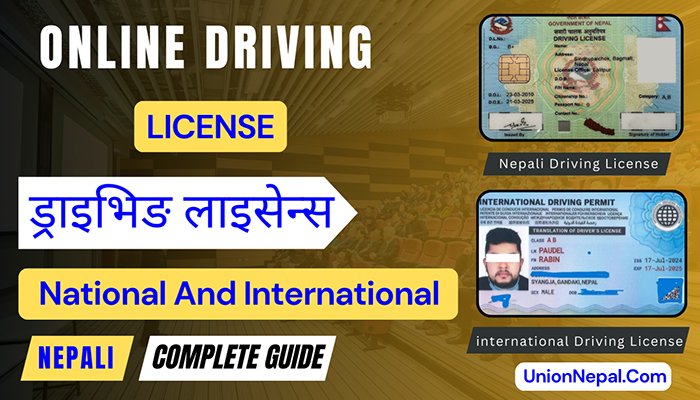
Online Driving License – Nepal 2026 – Complete Guide
Applying for a driving License in Nepal is now entirely digital. Whether you are a first-time applicant, renewing, adding a vehicle category or duplicated (after accidental lost) an existing License.
The entire process – everything from submitting the online application to tracking your smart card print status – is managed through the Department of Transport Management (DoTM) portal or Union Nepal help/support portal.
Free Online Likhit Exam Preparation – Nepal Driving License
Likhit Practice – Vision Test – Traffic Signs
Model Question Sample & Complete Guide
This comprehensive guide covers every stage of the online driving License process in Nepal – form submission, biometric day, written examination, practical trial, renewal, duplicate License, smart card print check and the International Driving Permit. All fees and procedures are updated for 2026 (Based on Official DoTM Notice – Not Based on Social Media News).
Online Driving License – Guide – Quick Summary
| Old Practice (Active And Applicable) | New Practice (Under Testing / May Failure) |
| • Fill or apply your online form at applydl.dotm.gov.np. • Pay the Government Fee (Revenue) online with your application. • Visit the Transport Office on appointment day. • Complete your Biometric and Medical Test for New and Renew Driving License. • Pass the Written Exam except for Renew, Adding a Vehicle Category, Duplicate/Copied License. • Pass the Trial Exam except for Renew, Adding a Vehicle Category, Duplicate/Copied License. • Receive your Smart Card Driving License within a Year for all New, Renew or Duplicated/Copied Driving License except for Emergency Driving License. | • Apply online via your Province’s Portal (Describe Below). • Auto-fill your form instantly using the QR Scanner in your National ID or Nagarik App. • Pay the Government Fee (Revenue) online with your application. • Visit the relevant Transport Office on your appointment day. • Complete your Biometric and Medical Test for New and Renew Driving License. • Pass the Written Exam except for Renew, Adding a Vehicle Category, Duplicate/Copied License. • Pass the Trial Exam except for Renew, Adding a Vehicle Category, Duplicate/Copied License. • Receive your Smart Card Driving License within a Week or Month or Year based on New, Renew or Duplicated/Copied Driving License and not for Emergency Driving License. |
Latest Update – Online Driving License Applications For New, Add Category Or Duplicate
As per the latest DoTM notice, new applications, renewals, adding a vehicle category or duplicated/copy (after accidental lost) along with government fee payment, are now completely online – with the National ID/Nagarik App or QR Scanner available to auto-fill your form instantly.
- Effective Date: 2083/04/01 B.S. – online applications and renewals begin.
- Government Fee (Revenue) Payment is now completed online along with the application.
- Scan the QR code in yourNational ID or the Nagarik App to auto-fill your form – no manual data entry needed.
- All other services not covered by this update continue under the previous (existing/old) procedure.
Province-Wise Contact Emails For Queries, Complaints & Suggestions
For any technical issue, complaint or suggestion, applicants can reach the department at gunaso@dotm.gov.np, or contact their respective provincial transport office directly using the details below.
| Province | Contact Number | |
| Koshi Province | mopid@koshi.gov.np | 9844018245 |
| Madhesh Province | info.molt@madhesh.gov.np | 9819772999 |
| Bagmati Province | license.hetaudayatayat@bagamati.gov.np | 057-526158 |
| Gandaki Province | tmodl.kaski@gmail.com | 9844018245 |
| Lumbini Province | tmo.lumbinilicense@gmail.com | 9857047758 |
| Karnali Province | mopidskt@gmail.com | 9843509711 |
| Sudurpashchim Province | info@mopit.gov.np | 9858480212 |
Province-Wise Online Application Portals
Each province operates its own online portal for driving license applications and renewals. Use the correct sites below based on the province where you are applying.
| Province | Official Online Portal |
| Koshi Province | edlvrs.koshi.gov.np |
| Madhesh Province | edlvrs.madhesh.gov.np |
| Bagmati Province | edlvrs.bagamati.gov.np |
| Gandaki Province | edlvrs.gandaki.gov.np |
| Lumbini Province | edlvrs.lumbini.gov.np |
| Karnali Province | edlvrs.karnali.gov.np |
| Sudurpashchim Province | edlvrs.sudurpashchim.gov.np |
Department Contact Persons
- Mr. Yukesh Chaudhary – 9848906528
- Ms. Renu Acharya – 9861549868
- Office Phone – 4574921, 4574922
What Is The Nepal Online Driving License (Savari Chalak Anumati Patra)?
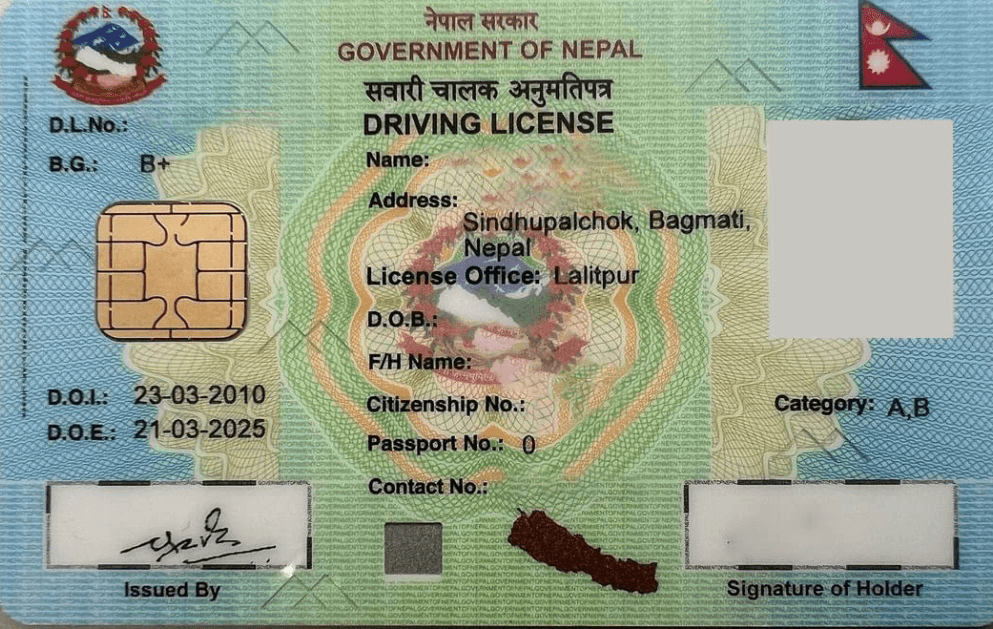
A driving License in Nepal – officially known as Savari Chalak Anumati Patra – is a government-issued document that authorizes you to legally operate a specified category of motor vehicle on public roads.
The Department of Transport Management (DoTM), operating under Nepal’s Provincial Government framework, issues all driving Licenses through its digital portal.
Nepal transitioned to smart card-based digital Licenses in 2015, replacing the older paper format. The current smart card integrates security features including, in newer versions, a multi-layer QR code.
The entire process is now conducted online – applicants can register, select an appointment date and track their smart card print status directly from a mobile phone.
Driving License Categories In Nepal
Nepal issues driving Licenses across several vehicle categories. Choosing the correct category before starting your online application is essential, as minimum age requirements and government fees differ between categories.
| Category | Vehicles Covered | Min. Age | Govt. Fee (Rajaswa) |
| A | Motorcycle, Scooter, Moped | 16 years | NRs. 500 (application) + NRs. 1,500 (after trial) |
| B | Car, Jeep, Delivery Van | 18 years | NRs. 500 (application) + NRs. 2,000 (after trial) |
| C | Tempo, Auto-Rickshaw | 18 years | NRs. 500 |
| D | Mini Truck, Medium Vehicle | 18 years | NRs. 500 |
| E (C1) | Bus, Truck, Lorry | 18 years | NRs. 500 |
| F | Power Tiller, Tractor | 18 years | NRs. 500 |
| G | Road Roller, Construction Equipment | 18 years | NRs. 500 |
| J1/J2, JCB | Excavator, Backhoe Loader, Grader | 18 years | NRs. 3,000 |
| K | Dozer, Forklift | 18 years | NRs. 500 |
Category A (motorcycle/scooter) is the most commonly applied for. Category B (car) carries a higher government fee of NRs. 2,000 after passing the trial examination.
How Much Does A Nepal Driving License Cost?
The total cost of obtaining a Nepal online driving License is spread across several stages. The table below provides a transparent breakdown so you can budget accurately before you begin.
| Stage | Approximate Cost (NPR) |
| Online form submission | Free (NRs. 0) |
| Biometric day – miscellaneous (photocopy, stamp) | NRs. 50-100 |
| Medical / eye test | NRs. 55-105 |
| Government fee – Category A application | NRs. 500 |
| Government fee – Category A after passing trial | NRs. 1,500 |
| Government fee – Category B after passing trial | NRs. 2,000 |
| Trial exam token – motorcycle (office vehicle) | NRs. 300-400 |
| Trial exam token – car (office vehicle) | NRs. 400-500 |
| New smart card (from Surakshan Mudran Kendra) | NRs. 200 |
| Duplicate/lost License fee | NRs. 500 |
| Total (Category A – approximate) | NRs. 2,400-2,700 |
You have up to 18 months to pay the government fee after biometric day if you are unable to pay on the day. Keep your biometric and medical records safe – you will need them.
Required Documents For Online Driving License
- Original citizenship certificate (Nagarikta) – front and back. Scanned or photographed – each file must be under 1 MB
- Mobile number registered in your name (this number will appear on your License).
- Email address (optional but recommended).
- Blood group information if available.
Online Driving License – Nepal – Step-By-Step
The Nepal driving License online form is available at applydl.dotm.gov.np website. A mobile phone or computer and your citizenship certificate (Nagarikta) are sufficient to make online driving License.
Step 1 – Open The DoTM Portal
- Open Google Chrome on your mobile or computer. In the address bar, type applydl.dotm.gov.np and press Enter. This takes you directly to the official DoTM applicant login interface.
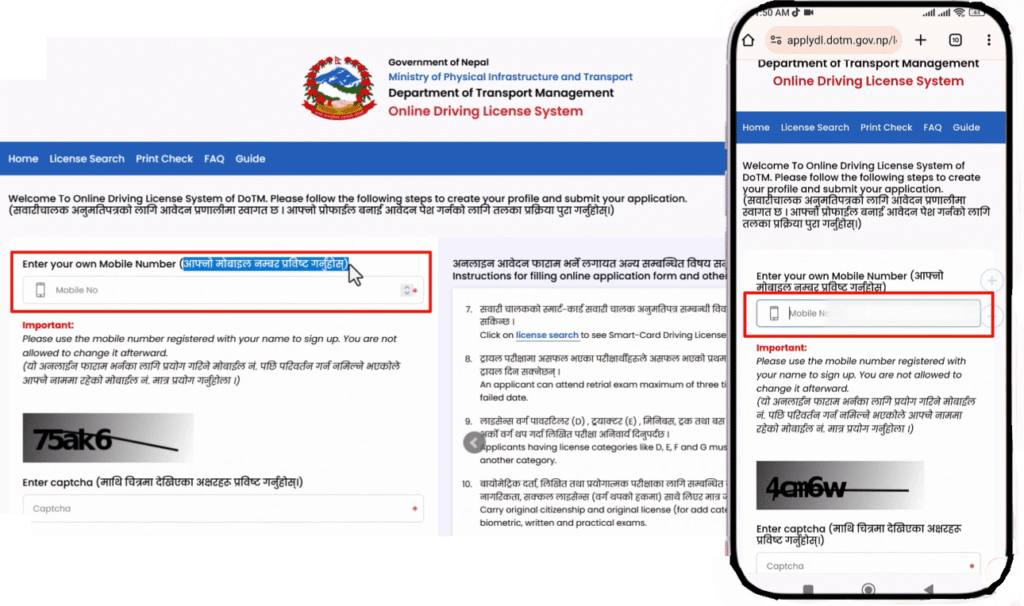
- The online form is only available Sunday through Wednesday, from 6:00 AM to 10:00 PM. Available appointment slots are limited – if no slots appear for your preferred office, check again on the next open day.
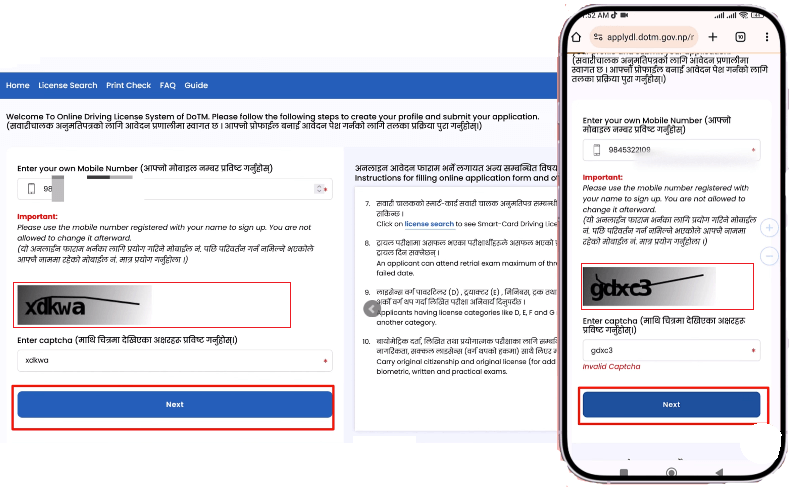
Step 2 – Enter Your Mobile Number And CAPTCHA
- Enter your mobile number in the provided field. Complete the CAPTCHA code and click Next. A 6-Digit M-PIN (OTP) will be sent to your mobile by SMS within seconds.
- Put your M-PIN and Click on “Next”.
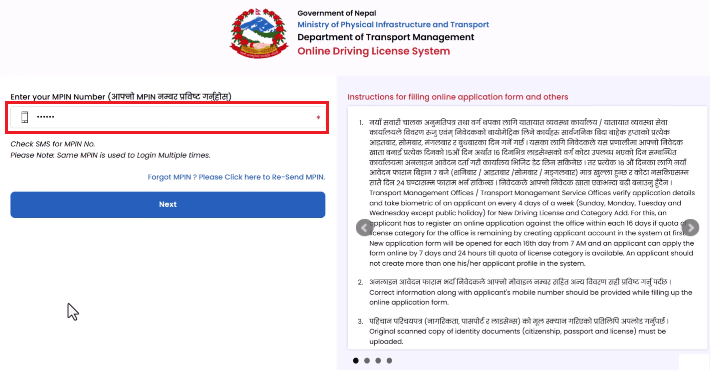
- Save your M-PIN as soon as it arrives – it is reusable for all future logins to the portal. If you lose it, use the ‘Forgot M-PIN’ option to reset.
Step 3 – Select Your License Status
You will be presented with 3 options. Select the one that matches your situation.
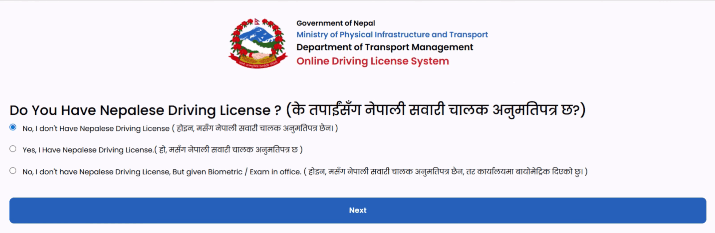
- No, I don’t have a Nepali Driving License – for first-time applicants.
- Yes, I have a Nepali Driving License – for adding a new vehicle category to an existing License.
- No License but gave biometrics before disruption – for those affected by the transport office disruption.
After that select your country as Nepal and select Next.
Step 4 – Fill Citizenship Details In English
- Enter your personal information exactly as printed on your Citizenship Certificate. All fields marked with a red asterisk (*) are mandatory. Key fields include full name in English, Date of Birth in Bikram Sambat (BS) format, Citizenship Number (include all dashes and slashes), Issue District and Issue Date.
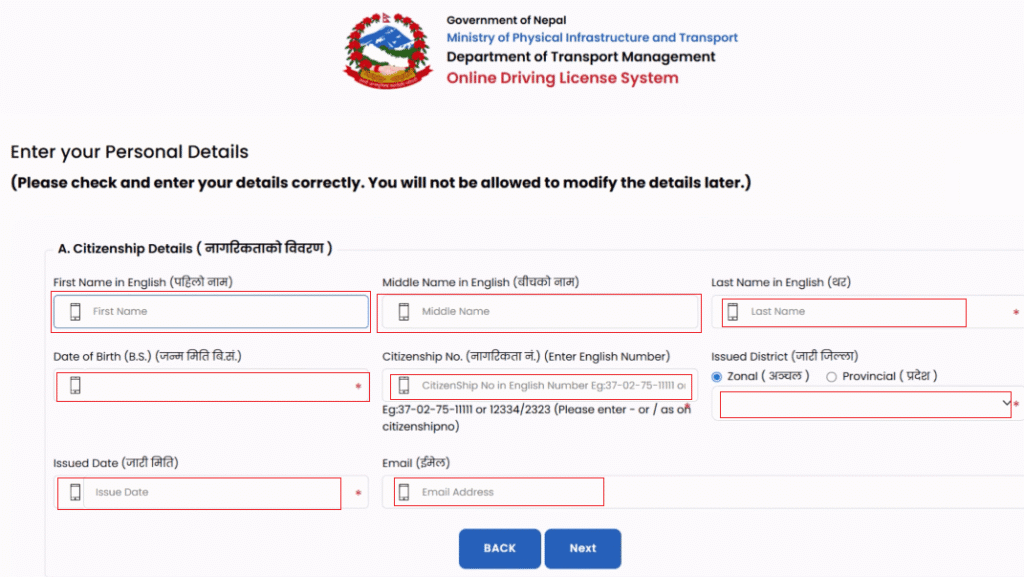
- If you see the message ‘Your details are not found from the Citizenship Information Management System’ – do not panic. This is a known government system issue. If your details are correct, simply click Next to proceed.
Step 5 – Fill Applicant Details In Devanagari
- Enter your full name in Nepali script (Devanagari). Additional mandatory fields include Gender, Blood Group, Occupation, and Education Level. The Huliya (Physical Description/Identity Mark) and Training Institute fields are optional.
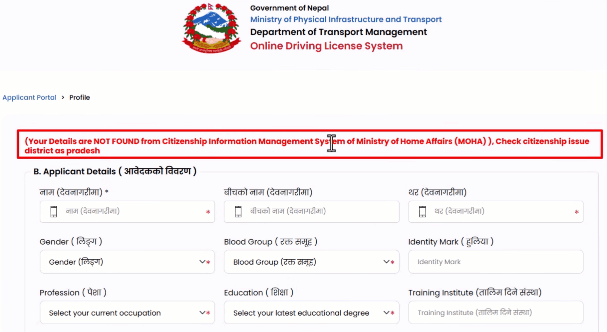
- Tip: Use Google Input Tools or your phone’s Nepali keyboard for accurate Devanagari input.
Step 6 – Guardian And Address Information
- Select your guardian relationship (Father is most common). Enter the guardian’s full name in English.
- Then enter your permanent address exactly as shown on your citizenship – Province/Zone, District, Municipality, Ward Number and Tole.
- If your current address differs from your permanent address, enter it separately in the provided fields.
Step 7 – Upload Citizenship Photos
- Upload a clear image of the front of your citizenship certificate (under 1 MB), then the back side (under 1 MB). Click Next to continue.
Step 8 – Review And Submit
- All your entries are displayed on a confirmation page. Review every field carefully – this is your last opportunity to make corrections online. Tick the declaration checkbox and click Next, then OK to confirm. Note your Reference Number and take a Screenshot.
- Once submitted online, the form is locked. If you spot an error after submission, visit the Transport Office before your appointment date. Correction costs approximately NRs. 400-500 and a new appointment date will be issued.
Step 9 – Select Category, Office And Appointment Date
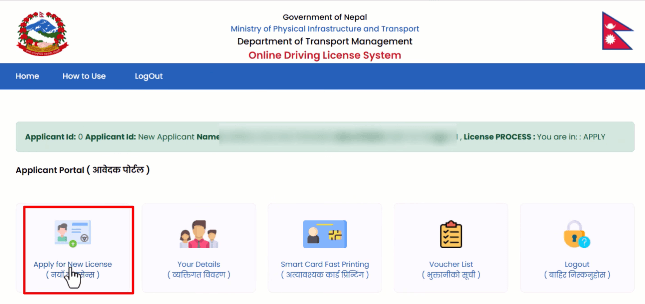
- From your dashboard, click ‘Apply for New License’.
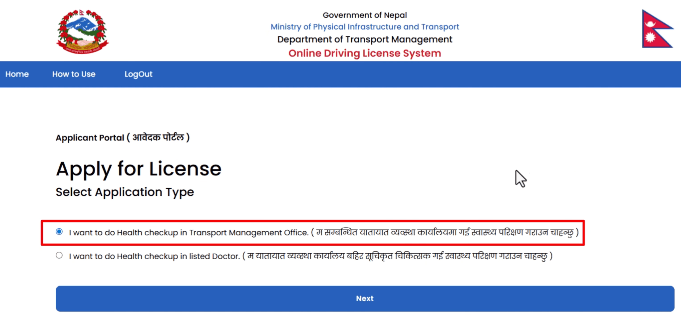
- Select as “I want to do health checkup in Transport Management Office” (at the Transport Management Office is recommended). Then click Next.
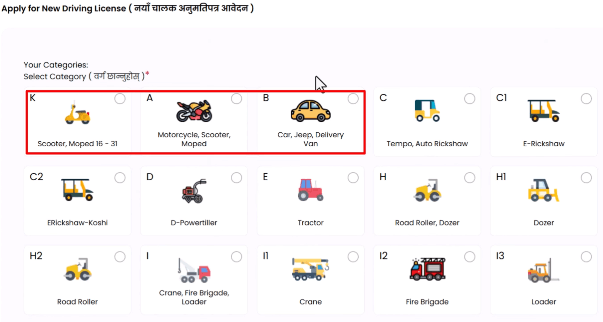
- Select your vehicle category.
- Select your nearest Transport Management Office and an available appointment date.
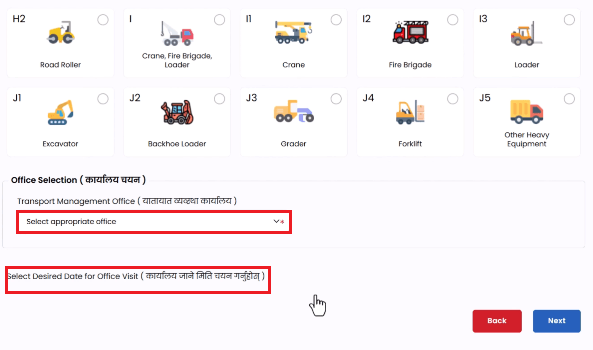
- Confirm by clicking Next and OK.
Step 10 – Download And Print Your Application
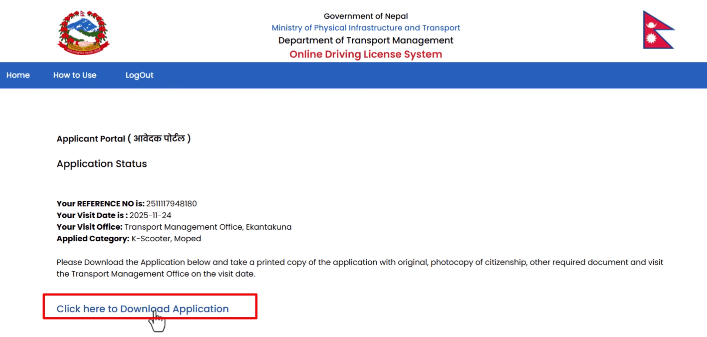
- Click ‘Download Application’ to generate a PDF of your form. Print this on A4 paper. Carry this printed form together with your original citizenship certificate to the Transport Office on your scheduled appointment date.
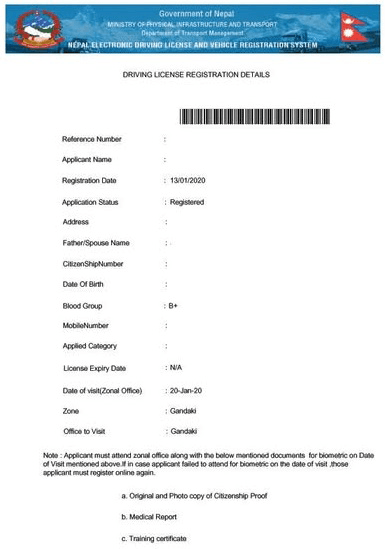
What Happens On Biometric Day At The Transport Office
Your appointment day – commonly referred to as Biometric Day – is your first in-person visit to the Transport Management Office. Arriving prepared will save significant time.
Documents To Bring On Biometric Day
- Printed online application form (A4).
- Original citizenship certificate – not a photocopy.
- Blood group card (if you do not have one, it costs NRs. 50 to create at the office).
- Spectacles or glasses if you have a vision correction requirement.
- For Add Category Applicants: original existing driving License (or police report if lost).
Before joining any queue, photocopy your application form, citizenship and blood group card. Staple them together and attach a NRs. 10 Postal Stamp. Arrive by 9:30 AM or earlier – applicants who arrive by 7-8 AM are served first.
Biometric Registration
First-time applicants have their fingerprints (both thumbs), signature and photograph captured and saved in the DoTM system.
You receive an Application ID printed on a data record slip. For re-applicants or Add Category applicants, only a system entry is made – full biometrics are not repeated if your record is already in the database.
Medical Examination
All applicants undergo two standard medical tests.
- Long Distance Vision Test – conducted at 20 metres. You cover each eye separately and indicate the direction of the letter ‘E‘ shown on a chart.
- Colour Vision Test – a book showing colour-coded numbers (e.g., 21, 23, 24) is displayed – you must identify the numbers correctly.
If you wear prescription glasses, bring them – they are accepted for the vision test. If you fail the in-office eye test, an external doctor’s certificate from a nearby eye clinic is generally accepted.
Revenue Payment (Government Fee)
After medical clearance, you proceed to pay the government fee (NRs. 500 for standard categories). You will receive a revenue receipt – keep this safe as it is required on both your written examination day and practical trial day.
New Vs Old Nepal Driving License Smart Card – Key Differences
Following the destruction of DoTM’s original printing infrastructure – a new License card format was introduced. The table below compares the two smart card versions.
| Feature | Old License Card | New License Card |
| Material | Polycarbonate | Teslin (laminated) |
| Chip | 64KB Java smart chip | No embedded chip |
| QR Technology | QR code (not implemented) | Multi-layer QR Code (4–5 layers) |
| Text Printing | Laser engraving (raised/tactile) | Security printing press |
| OVD/Hologram Position | OBI at bottom | OBI shifted to top |
| Clear Window | Yes (transparent section) | No clear window |
| DOVID Strip | Yes (shiny strip) | Replaced with security feature |
| QR on Back | No QR on back | QR code on back |
| Card Cost | NPR 300 | NPR 200 |
| Printed By | DoTM in-house (facility destroyed) | Surakshan Mudran Kendra, Panauti |
The QR code on the new card currently displays only the License number when scanned. Full integration with the police and traffic database is under active development and being piloted at Kathmandu University.
International Driving Permit (IDP) For Nepal License Holders
An International Driving Permit (IDP) is a multilingual translation document that enables you to drive in up to 190 countries using your valid Nepal driving License. You must always carry both your IDP and your original Nepal driving License simultaneously.
Key Facts About The IDP
- Valid for travel, tourism and student visa purposes – not automatically valid for employment-based driving abroad.
- Recognized in approximately 179-190 countries.
- Available in 1-year, 2-year and 3-year validity options.
- Issued as a physical card and, in some cases, a digital copy by email.
Practical Example – Nepal Driving License In Finland
Finland provides a clear example of how a Nepali License works abroad. Because Nepal is not on Finland’s direct conversion list, a Nepali License holder cannot convert their License directly to a Finnish License.
However, a valid Nepal driving License allows you to drive legally in Finland for up to one year from your arrival date. During this period you must pass the Finnish Theory and Practical examinations to obtain a local License.
| Item | Estimated Cost (EUR) |
| Theory exam | Approx. 39 EUR |
| Practical exam | Approx. 90-100 EUR |
| Rental car from driving school for test | Approx. 1,000-1,200 EUR |
| Examiner fee | Approx. 100-120 EUR |
| Total with valid Nepal license (no full course) | Approx. 230-260 EUR |
| Total learning from scratch in Finland (no Nepal license) | Approx. 2,000-2,500 EUR |
If you are planning to move to Finland or another country, obtaining your Nepal driving License beforehand can save the equivalent of NRs. 3,00,000 or more in overseas driving school costs.
How To Correct Errors In Your Online Driving License Application
Once the online application is submitted, the form is locked and cannot be edited from your mobile or computer. If you discover a mistake – wrong name spelling, incorrect citizenship number or missing punctuation – follow the process below.
Error Correction Steps
- Visit the Transport Office on or before your scheduled appointment date.
- Go to your assigned counter and inform the officer of the specific error.
- The officer will cancel your existing form entry in the system.
- A corrected form will be created and a new appointment date (usually 1–2 days later) will be issued.
- A correction fee of approximately NRs. 400-500 applies.
How To Avoid Errors In The First Place
- Keep your original citizenship certificate in front of you throughout the entire form-filling process.
- Enter your citizenship number exactly – include every dash and slash mark.
- Double-check your name in both English and Devanagari script before submission.
- Verify your date of birth is in the correct Bikram Sambat (BS) calendar format.
- Review the confirmation page thoroughly before clicking the final Submit button.
Online Driving License Nepal – Frequently Asked Questions
Disclaimer And Sources: All information compiled and verified from Nepal Department of Transport Management (DoTM) official sources and government announcements. Fees, procedures and portal availability are subject to change – always verify current requirements at dotm.gov.np before beginning your application.