
Shram Swikriti Online Nepal 2026 : Complete Labour Approval Process, Documents And Application Guide
If you are a Nepali citizen planning to work abroad, getting your Shram Swikriti (Labour Approval) is not optional – it is a legal requirement.
Without it, you cannot legally depart Nepal for foreign employment, your insurance will not be valid and you risk deportation, job loss or permanent ban from the destination country.
This comprehensive 2026 guide walks you through every step of the Shram Swikriti process, from understanding what it is to completing your online application, checking your status and renewing it – all in plain, actionable language.
Whether you are applying for the first time or renewing an existing labour approval for Qatar, UAE, Saudi Arabia, Malaysia , Japan , Korea, Australia, UK, Canada, Romania Croatia Etc. or any other destination, this guide has everything you need.
Also Useful: Complete Guide For E-Passport Nepal
What Is Shram Swikriti? Understanding Labour Approval In Nepal
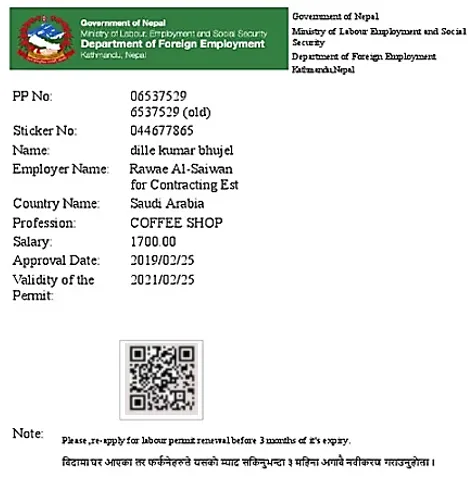
Shram Swikriti literally means “Labour Approval” in Nepali. It is the official government authorization issued by the Department of Foreign Employment (DoFE) under Nepal’s Ministry of Labour, Employment and Social Security, permitting a Nepali citizen to travel abroad for paid employment.
Think of it as Nepal’s exit clearance for workers going overseas. It protects you by.
- Officially registering your employment agreement with the government.
- Activating your mandatory foreign employment insurance (NRs. 10, 00,000 life cover).
- Creating a government record so your family can seek help if something goes wrong abroad.
- Verifying that the foreign employer and job offer are legitimate.
- Ensuring you are not being trafficked or deceived by fraudulent agents.
Documents Required For Shram Swikriti In Nepal
A. For New (Naya) Labour Approval – Individual
- Valid Nepali passport (minimum 6 months validity remaining).
- Demand letter / offer letter from the foreign employer (authenticated by Nepal Embassy in that country).
- Employment contract (signed by both worker and employer).
- Medical fitness certificate from DoFE-approved medical Centre.
- Foreign employment insurance receipt (Rastriya Beema Sansthan or approved insurer).
- Orientation training certificate from DoFE-authorised training Centre.
- Recent passport-sized photographs (4 copies).
- Citizenship certificate (Nagarikta).
- Bank voucher of Shram Swikriti fee payment.
- Self-declaration form (available on FEIMS portal).
B. For Re-Entry (Renewal) Labour Approval
- Valid passport.
- Previous Shram Swikriti approval certificate.
- ID card from destination country (e.g. Qatar ID, Emirates ID).
- Renewed employment contract from same employer.
- Medical fitness certificate (if required by destination country).
- Updated insurance receipt.
- Fee payment voucher.
C. For Institutional Labour Approval (Via Manpower Agency)
The licensed manpower agency handles most document preparation on your behalf. You must provide.
- Original passport.
- Citizenship certificate.
- Medical certificate.
- Photographs.
- Insurance receipt.
- Orientation training certificate.
The agency submits the demand letter, employment contract and PDOS certificate to DoFE through the FEIMS system.
Online Shram Swikriti (Labour Approval) Apply Process 2026
The primary portal for Shram Swikriti is the Foreign Employment Information Management System (FEIMS) at feims.dofe.gov.np.
Step 1: Visit the feims.dofe.gov.np website.
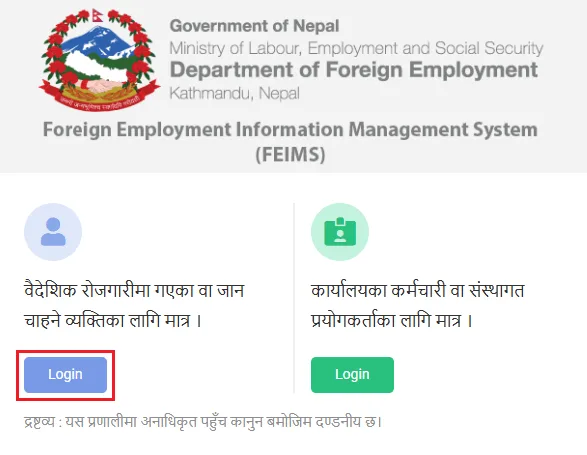
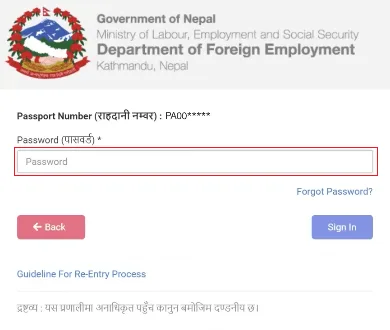
Step 2: Login To The Applicant Section
- On the homepage, click Login. There are two login sections – the first (left side) is for applicants/workers and the second (right side) is for DoFE staff/approvers. Select the applicant section.
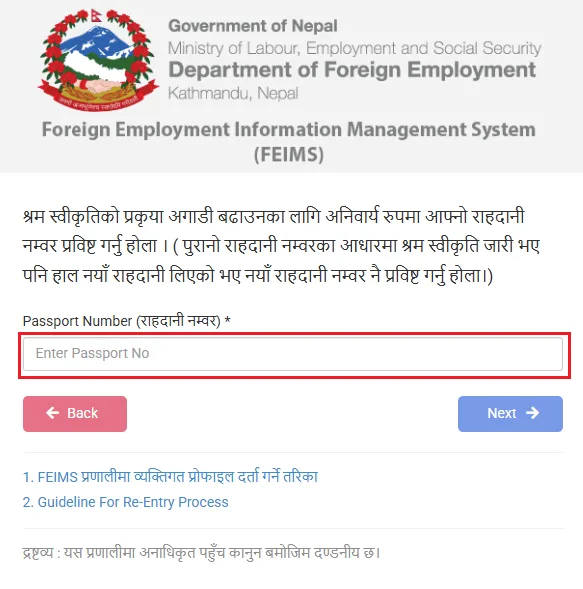
- Enter your Passport Number and Date Of Birth to proceed. If you are logging in for the first time, use the password reset option or the one-time password (OTP) sent to your registered mobile number.
Step 3: Select The Correct Application Type
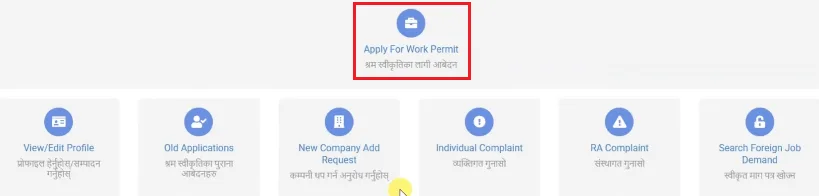
- After login, navigate to the ‘Apply For Work Permit’ section. Select the appropriate application type.
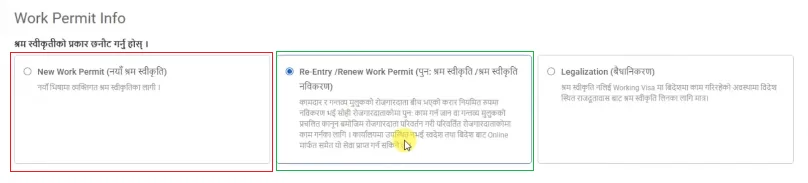
- New (Naya) Work Permit – For first-time applicants.
- Re-Entry/Renew Work Permit – For workers returning.
- Legalization.
Step 4: Fill In Your Personal Details
- Complete all required fields accurately. This includes your Individual Basic Info, Bank Information and Family Information.
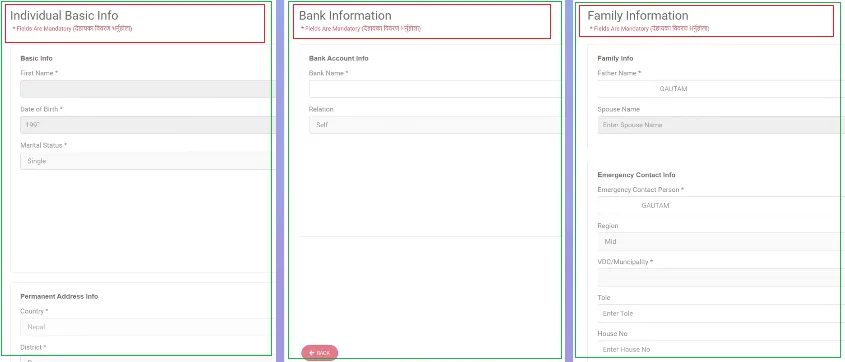
- Incomplete or incorrect information is the leading cause of application rejection.
Step 5: Fill In Employment/Destination Details
Enter details about your foreign employment.
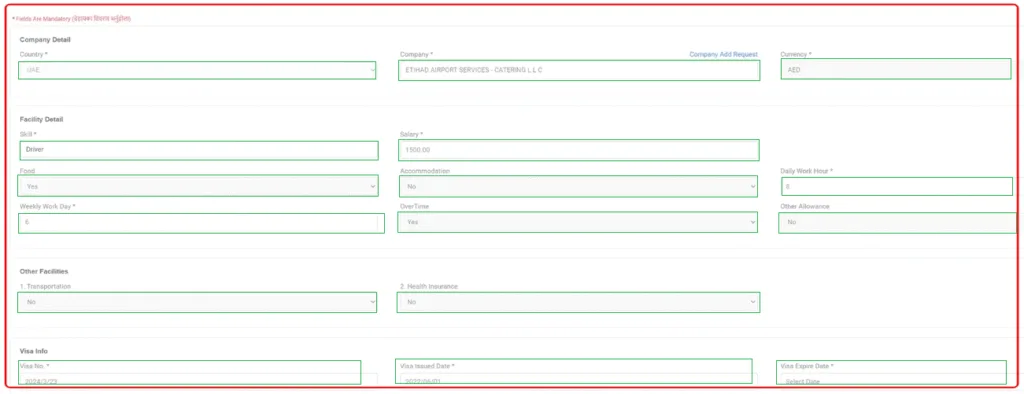
- Destination country
- Company / employer name
- Job title / skill category
- Monthly salary and currency
- Visa number and expiry date (for re-entry applicants)
- ID card number (for re-entry applicants)
Step 6: Upload Required Documents
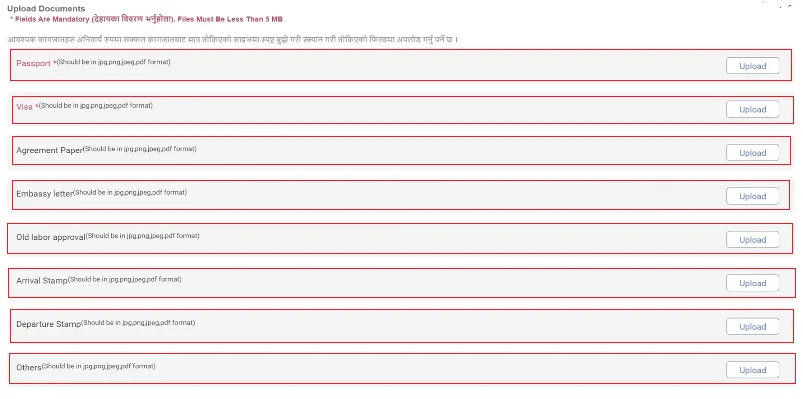
- Scan and upload all required documents as listed in Above Document Section. All files must be in JPG/PDF format and under the size limit specified by the portal.
Step 7: Pay The Application Fee
- Pay the Shram Swikriti fee via online banking, mobile banking or Khalti/eSewa through the portal’s payment gateway. The fee receipt is automatically recorded on your application. Keep a printed copy.
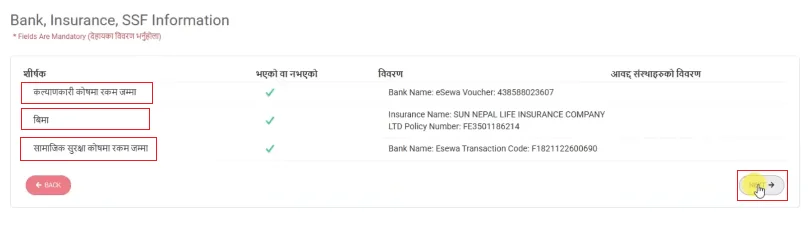
- You have to submit the online payment in 3 topics as Welfare Fund (Kalyankari Kosh), Shram Swikriti (New/Institutional) and Social Security through FEIMS portal.
Step 8: Submit The Application
- Review all details carefully, then click Submit. A Reference Number (Token No And Date) will be generated. Save this reference number – you will need it to check your application status.
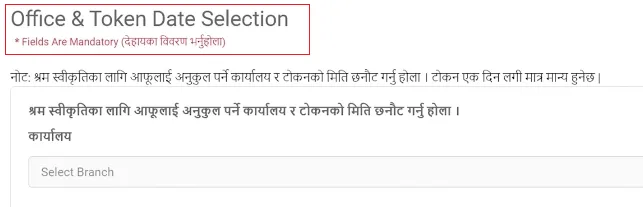
Step 9: Verification And Approval By DoFE
- DoFE staff will review your application. Processing time is typically 3-7 working days for complete applications. If additional documents are requested, respond promptly to avoid delays.
Step 10: Download Your Shram Swikriti Certificate
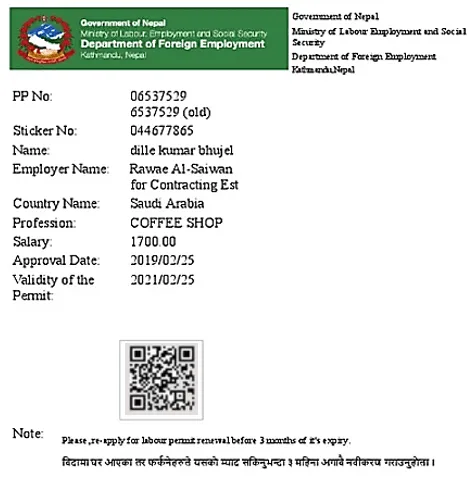
- Once approved, log back into the FEIMS portal and download your Shram Swikriti approval certificate. Print it and keep it safely. You will present this at the airport departure and at immigration in the destination country.
Who Needs Shram Swikriti In Nepal?
According to the Foreign Employment Act 2007 (2064 B.S.), any Nepali citizen departing Nepal for paid foreign employment must obtain Shram Swikriti beforehand. This applies to.
- Workers travelling to Gulf countries – Qatar, UAE, Saudi Arabia, Kuwait, Bahrain, Oman Etc.
- Workers going to Malaysia, South Korea (EPS), Japan, Israel, Jordan Etc.
- Workers in institutional approval (company-sponsored via licensed manpower agencies).
- Workers in individual (self-arranged) labour approval.
- Workers on re-entry (those who had previous approval and are returning to the same employer).
- Workers renewing an expired or expiring labour approval.
Who Is EXEMPT? Nepali professionals employed by INGOs, UN bodies, diplomatic missions or those entering on business/student visas for non-labour purposes. If you are unsure, always consult DoFE directly.
Types Of Shram Swikriti In Nepal 2026
Understanding which type applies to you saves time and prevents application errors.
| Type | Who It Is For | Applied Through | Fee (approx.) |
| Institutional | Workers via licensed manpower agency | Agency on feims.dofe.gov.np | NRs. 3,000 – 5,000 |
| Individual (Naya) | Self-arranged first-time workers | Applicant on feims.dofe.gov.np | NRs. 3,000 – 5,000 |
| Re-entry (Renewal) | Returning to the same employer/country | Applicant on feims.dofe.gov.np | NRs. 3,000 |
| Free Visa / Free Ticket | Specific demand for eligible workers | Agency (after DoFE verification) | Variable |
| Third Country | Worker already abroad, moving to new country | Respective embassy / DoFE | As per DoFE schedule |
How To Check Shram Swikriti Status Online (By Passport Number)
You can check your Shram Swikriti status at any time without logging in. Here is how.
- Go to feims.dofe.gov.np
- Click on ‘Check Status’ or ‘Shram Swikriti Check’
- Enter your Passport Number and Date of Birth (or Reference Number)
- Enter the CAPTCHA code displayed
- Click ‘Search’
- Your application status (Pending / Approved / Rejected) will appear on screen
Status Meanings: ‘Pending’ means it is still under review. ‘Approved’ means your Shram Swikriti is ready to download. ‘Rejected’ means there was an issue – check the reason shown and re-apply or contact DoFE.
Shram Swikriti Price And Fee Structure In Nepal 2026
The following fees are set by DoFE as of 2026. Individual agent or service charges are separate and should be agreed upon in writing.
| Fee Type | Amount (NRs) | Notes |
| Welfare Fund (Kalyankari Kosh) Shram Swikriti (New/Institutional) Social Security | Nrs. 1,500 NRs. 3,000 – 5,000 Nrs. 2,500 – 3,000 | Payable Via FEIMS portal (Like With Mobile Banking, eSewa, Khalti And Connect IPS Etc.) – Check On Portal |
| Re-Entry / Renewal | Nrs. 2,000 – 3,000 | Varies by country and duration |
| Foreign Employment Insurance (Annual) | Nrs. 3,757 – 4,000 | Mandatory – activates Nrs. 10 lakh cover |
| Orientation Training | Nrs. 400 – 500 | Per-day training fee |
| Medical Examination | Nrs. 2,000 – 3,500 | Depends on DoFE-approved Centre |
| Manpower Service Fee (max) | As per DoFE schedule | Varies by destination country |
| Document Attestation / Notary | Nrs. 500 – 2,000 | As applicable |
Important: Under Nepal’s Foreign Employment Act, a licensed manpower agency cannot charge more than the DoFE-set maximum service fee. If you are overcharged, file a complaint at DoFE Complaints Section or call the DoFE helpline.
Shram Swikriti Processing Time – How Long Does It Take?
Processing time depends on whether your application is complete and the current workload at DoFE.
| Application Type | Typical Processing Time | Notes |
| New Individual (Complete Documents) | 3-7 working days | Faster if documents are perfect |
| Re-entry / Renewal (Complete Documents) | 2-5 working days | Usually faster than new |
| Institutional (Via Agency) | 3-10 working days | Agency follows up with DoFE |
| Incomplete Application | Delayed indefinitely | Applicant must submit missing documents |
Shram Swikriti Renewal Online In Nepal
If your existing Shram Swikriti is expiring or you are returning to the same employer after leave, you must renew (re-entry) your approval. You do NOT need to go through the full new application process.
Step By Step Renewal Process
- Log in to feims.dofe.gov.np using your passport number and date of birth.
- Select ‘Re-entry’ option from the Apply menu.
- Enter your current/destination country ID card number.
- Enter your visa number and expiry date.
- Enter your employer/company name and current salary.
- Upload your ID card, renewed employment contract and updated insurance receipt.
- Pay the re-entry fee via the online payment gateway.
- Submit the application and save your reference number.
- Check status online after 2–5 days and download the renewed certificate.
Common Mistakes That Delay Or Reject Your Shram Swikriti
Based on worker experiences and DoFE guidance, these are the most frequent errors.
- Submitting blurry or unreadable scanned documents.
- Passport expiry date less than 6 months from travel date.
- Demand letter not attested by the Nepal Embassy in the destination country.
- Mismatch between name on passport and name on employment contract.
- Using an outdated self-declaration form from a previous year.
- Selecting the wrong application type (e.g. re-entry instead of new).
- Not completing the mandatory orientation training before applying.
- Paying the fee and not uploading the payment receipt correctly.
- Insurance not purchased from a DoFE-approved insurer.
- Leaving fields blank or entering incorrect salary/currency details.
Shram Swikriti Vs. Work Permit – What is the Difference?
| Feature | Shram Swikriti (Nepal) | Work Permit (Destination Country) |
| Issued by | Nepal’s DoFE | Foreign government (e.g. MOHRE in UAE) |
| Purpose | Exit clearance from Nepal | Right to work in destination country |
| Required for | All Nepali workers going abroad | Depends on destination country rules |
| Insurance | Activates NRS. 10 lakh cover | Not directly linked |
| Applied via | feims.dofe.gov.np | Destination country portal |
Important Contact Information
| Office / Authority | Contact / Portal | Function |
| DoFE (Department of Foreign Employment) | dofe.gov.np And 01-5970605 | Shram Swikriti, complaints, enquiries |
| FEIMS Portal (Online Application) | feims.dofe.gov.np | Apply & check status online |
| Ministry of Labour And Social Security | mol.gov.np | Policy & legal framework |
| Foreign Employment Tribunal | Kathmandu High Court complex | Legal disputes for foreign workers |
| Rastriya Beema Sansthan (Insurance) | rbb.gov.np | Foreign employment insurance |
| Ministry of Foreign Affairs Helpline | +977-1-4200000 | Embassy contacts, crisis abroad |