
TDS In Nepal – Meaning – Rates And eTDS – Complete Guide
Tax Deducted at Source (TDS) – is a mechanism under Nepal’s Income Tax Act 2058 through which a portion of income tax is collected at the very moment a payment is made, rather than later when the recipient files their annual tax return.
The Concept Is Elegantly Simple: the person making a payment deducts a prescribed percentage of tax before handing over the money. That withheld amount is then deposited directly with the government.
This system ensures a steady, real-time flow of tax revenue to the state and substantially reduces the risk of tax evasion.
To Put It In Plain Terms: if your company pays a consultant NRs. 1,00,000 and the applicable TDS rate is 15%, you pay only NRs. 85,000 to the consultant and deposit NRs. 15,000 to the Inland Revenue Department (IRD) on their behalf.
eTDS (Electronic TDS) simply refers to the online filing and submission of TDS return details through the IRD’s taxpayer portal at ird.gov.np. It is the digital extension of the TDS process and is now mandatory for all withholding agents in Nepal.
Who Is Responsible For Deducting TDS?
Under the Income Tax Act 2058, the party making a payment is called the Withholding Agent. The party receiving the payment (after TDS deduction) is called the Withholdee.
Withholding Agents Include
- Employers paying salaries to employees.
- Companies or firms making payments for services, contracts, rent, royalties, commissions or interest.
- Banks and financial institutions paying interest on deposits.
- Resident companies distributing dividends.
- Government entities making any scheduled payments.
- Any person or business making payments above the threshold on items listed under Sections 87, 88 and 88(Ka) of the Income Tax Act 2058
Key Rule: TDS is a payer’s obligation, not the recipient’s. Even if the recipient claims they will pay the tax themselves, the law holds the withholding agent responsible for deducting, depositing, and reporting TDS on time.
Rates Of TDS In Nepal For FY 2082/83 (2025-26)
The following rates are applicable under the Income Tax Act 2058 and the Finance Act 2082 for the fiscal year 2082/83 (2025-26). These apply to resident withholding agents making payments to resident withholdees unless stated otherwise.
Service Fees
| Nature Of Payment | VAT Bill Received? | TDS Rate |
| Service fee (any type) | Yes (VAT-registered party) | 1.5% on taxable amount |
| Service fee (professional/consultancy) | No (PAN bill) | 15% |
| Service fee from VAT-exempt entity (institution) | No VAT bill (but VAT-exempt category) | 1% |
Important: TDS is always calculated on the taxable/service amount only – never on the VAT portion of a bill.
Contract Payments (Section 88)
| Nature Of Payment | TDS Rate |
| Contract/subcontract payment to VAT-registered person | 1.5% |
| Contract payment – cumulative payments exceed NRs. 50,000 | 1.5% (from the point threshold is crossed) |
| Contract payment to non-resident | 5% |
Threshold Note: The 50,000 rule works cumulatively per contract. Once total payments on a single contract exceed NRs. 50,000, TDS applies on all subsequent payments and retroactively from that point.
Rent Payments (Section 88)
| Nature Of Rent | TDS Rate |
| House, land, or any property rent (to natural person) | 10% |
| Vehicle hire (road transport) – VAT bill received | 1.5% |
| Vehicle hire – no VAT bill | 10% |
| Air/water transport vehicle hire – VAT bill | 1% |
| Air/water transport vehicle hire – no VAT bill | 2.5% |
Interest Income (Section 88)
| Nature Of Interest Payment | TDS Rate |
| Interest paid by banks/financial institutions to natural persons (non-business) | 6% |
| Interest paid by companies, cooperatives, debenture issuers | 15% |
| Interest paid to non-residents | 15% |
Dividend (Section 88)
| Type | TDS Rate |
| Dividend distributed by resident company/partnership to resident person | 5% |
| Dividend distributed to non-resident | 5% |
| Return distributed by Mutual Fund to natural person | 5% |
| Return distributed by Mutual Fund to others | 15% |
Royalty, Commission And Sales Bonus
| Nature | TDS Rate |
| Royalty payments | 15% |
| Commission/Sales bonus | 15% |
Windfall Gains (Section 88Ka)
| Nature | TDS Rate |
| Lottery, prize, any windfall gain | 25% |
Salary/Employment Income (Section 87)
Salary TDS is not a flat rate. It follows progressive income tax slabs and is treated as an advance payment of annual income tax.
For Single Individual (FY – 2082/83)
| Taxable Income Slab | Tax Rate |
| First NRs. 5,00,000 | 1% (Social Security Tax) |
| Next NRs. 2,00,000 | 10% |
| Next NRs. 3,00,000 | 20% |
| Next NRs. 10,00,000 | 30% |
| Next NRs. 30,00,000 | 36% |
| Above NRs. 50,00,000 | 39% |
For Couples/Married (FY – 2082/83)
| Taxable Income Slab | Tax Rate |
| First NRs. 6,00,000 | 1% (Social Security Tax) |
| Next NRs. 2,00,000 | 10% |
| Next NRs. 3,00,000 | 20% |
| Next NRs. 9,00,000 | 30% |
| Next NRs. 30,00,000 | 36% |
| Above NRs. 50,00,000 | 39% |
Special Note: Female employees receive a 10% tax rebate on their total income tax liability from employment income.
Revenue Code For Salary TDS: Code 11211 – Social Security Tax (SST), i.e. 1% on first slab Code 11111 – Remuneration Income Tax (for income above the first slab).
How To Pay TDS Online (Payment Voucher)
Before filing the eTDS return, you must first deposit the TDS amount into the government revenue account. Here is the step-by-step process.
Step 1: Go to ird.gov.np and click on Taxpayer Portal.
Step 2: Under General, click on Tax Payer Login and sign in with your PAN number and password. (First-time users – click Create Tax Payer Login to set up your credentials).
Step 3: Navigate to Payment Voucher – New Payment.
Step 4: Select Your Bank (choose from IRD-approved commercial banks near your tax office).
Step 5: Select Tax Type – Income Tax.
Step 6: Select Revenue Code (Shirshak).
- 11211 – For Social Security Tax (1% salary slab).
- 11111 – For Remuneration Income Tax (higher salary slabs).
- 11131 – For Service Fee (contract/rent/commission/TDS types).
Step 7: Enter the Tax Amount and select the Fiscal Year.
Step 8: Under Kaifiyat (remarks), select TDS.
Step 9: Click Generate Transaction Code, verify details then click Confirm.
Step 10: Pay online via ConnectIPS, eSewa, Khalti or any Listed Bank. Alternatively, print the voucher and pay at the bank physically.
Step 11: After payment is confirmed (Status – Completed), note the Voucher Number and Date – you will need these for eTDS filing.
What Is eTDS?
eTDS (Electronic Tax Deduction At Source) is the mandatory online submission of details about every TDS deduction you made during a given period. It informs the IRD – who you paid, how much, what you deducted and when you deposited it.
Online eTDS Filing Guide
The eTDS return must be filed within 25 days from the end of each month in which TDS was deducted.
Obtaining A Submission Number
Step 1: From the taxpayer portal, click eTDS (The Plus Icon).
Step 2: Fill in the Submission Number Application Form.
- Username (PAN number)
- Password (your PAN or a custom password)
- Re-enter password
- Withholdee PAN
- Phone number
- Voucher date (optional)
- TDS Collection Interval – enter the period (e.g. Shrawan 1 to Ashadh 31). Note: the interval cannot span more than one fiscal year.
Step 3: Click Register – you will receive a Submission Number. Note it carefully – it cannot be recovered easily.
Entering Transactions
Step 4: Click Fill Transactions.
For each person/entity you deducted TDS from, enter.
- PAN Number of the withholdee (name will auto-populate).
- Payment Date (when you made the payment).
- Payment Amount (gross amount before TDS).
- TDS Amount (amount deducted).
- TDS Type/Shirshak (Revenue Code – 11211, 11111, 11131, etc.).
Click Add after each entry.
Tip For Large Entries: If you have many employees or parties, download the Sample Excel template from the portal (click Load Excel – Download Sample), fill it in the exact format and upload it in bulk. This saves significant time and reduces data entry errors.
Entering Voucher Details
Step 5: After completing all transaction entries, fill in the Voucher Form.
- Shirshak (Heading): select the revenue code.
- Voucher Number: from your bank payment receipt.
- Payment Type: Online Payment or Bank.
- Bank Name: the bank through which you deposited TDS.
- Payment Date: date of TDS deposit.
- TDS Amount: must match the transaction total.
Step 6: Click Add. The system will display Reconciled if the voucher amount matches your transaction total. If it shows Not Reconciled, check for.
- Incorrect voucher number or date.
- Wrong bank selected.
- Amount mismatch.
- You filed eTDS on the same day as payment (reconciliation requires at least one day’s processing).
Submitting The eTDS Return
Step 7: Once all vouchers show Reconciled, verify that the total TDS in transactions equals the total TDS in vouchers.
Step 8: Click Submit. Once submitted, you cannot make changes – review everything carefully before clicking.
A successful submission will display – Your eTDS Return Is Submitted along with a confirmation message.
How To Verify eTDS Returns
Filing the eTDS return is only complete after verification through the taxpayer portal. Verification confirms the return to the withholdees account, making it visible in their PAN-level tax statement.
Step 1: Open a new browser tab or window. Go to the IRD Taxpayer Portal – General Login – Tax Payer Login.
Step 2: Log in with your PAN and password.
Step 3: Navigate to Verification – TDS.
Step 4: Enter your Submission Number (from Step 3 of the filing process).
Step 5: Press Tab – the system will show a preview of your filed return.
Step 6: Review all entries carefully, then click Verify.
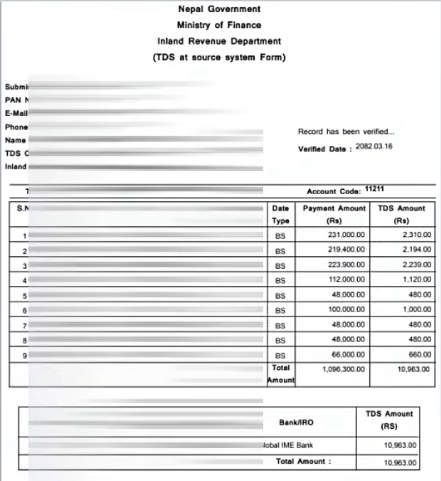
Successfully Verified – your eTDS is now complete. You can print or save the verified eTDS report (click Print Preview In English) for your records and for the withholdees reference.
If you made an error in a verified eTDS (e.g. Wrong Payment Amount), you must file a written application with your tax office to have it corrected. Once verified, it cannot be edited online.
Penalties For TDS Non-Compliance
Nepal’s Income Tax Act 2058 prescribes significant penalties for TDS lapses. These apply to withholding agents who fail to deduct, deposit or report TDS correctly and on time.
| Non-Compliance | Penalty |
| Late deposit of TDS (deposited but after the 25-day deadline) | Annual interest of 15% on the overdue amount |
| Failure to file eTDS return (after depositing TDS) | Annual interest of 2.5% in addition to the above |
| Combined penalty (late deposit + no eTDS) | 17.5% per annum on the TDS amount |
| Failure to deduct TDS altogether | The withholding agent becomes personally liable for the full TDS amount, plus 15% annual interest |
| Filing eTDS without PAN of withholdee | The expense may not be allowable as a tax deduction in your own accounts; withholdee cannot receive tax credit |
| Incorrect eTDS that needs correction | Written application to tax office required; no online rectification possible |
Critical Deadline: TDS deducted in any month must be deposited AND eTDS must be filed by the 25th day of the following month (e.g. TDS deducted in Shrawan must be deposited and eTDS filed by Bhadra 25).
TDS Certificate – What It Is And How To Get One
A TDS Certificate (or Tax Clearance Certificate / Kar Chukta Praman Patra) serves as proof that your income tax obligation for a given fiscal year has been discharged through TDS deductions made by your employer or payments made.
For Salaried Employees (Personal Tax Clearance)
Employees with annual income below NRs. 40 lakh from a single employer can obtain their personal tax clearance online.
Step 1: Log in to the IRD Taxpayer Portal with your personal PAN.
Step 2: First, check Withholdee Information to confirm your employer has filed eTDS showing your TDS in the system
Step 3: Navigate to Tax Clearance.
Step 4: Enter your fiscal year, employer’s PAN, district of employment.
Step 5: Check declaration boxes (single employment, no other income, etc.).
Step 6: Enter income details (basic salary, bonus, Dashain allowance, allowances, PF contribution) and deductions (PF, insurance premiums)
Step 7: Click Calculate Tax – the system computes your tax liability automatically.
Step 8: Click Submit – if total TDS already deposited by employer equals or exceeds your computed tax, the tax clearance certificate generates instantly.
Step 9: Print Tax Clearance – a QR-coded certificate is generated which you can download or print.
Important: If your employer has not filed eTDS showing your TDS in the system, your TDS will not appear in your tax account and you will not be able to obtain tax clearance online. In such cases, you must follow up with your employer to ensure eTDS has been filed and verified.
For Businesses / Proprietorship Firms
If your business PAN also has employment income (you are simultaneously an employee and a proprietor), you must file a D03 Income Tax Return through the taxpayer portal, attaching your salary certificate from your employer, the eTDS documents and a written application to your tax office to issue the certificate.