
Nepal Police Vacancy – Latest Recruitment Notice – Eligibility And Online Form
Nepal Police Headquarters, Human Resource Development Department, Career Development Division, Recruitment Section, Naxal – Kathmandu has published a recruitment notice for filling vacant positions in the Police Constable (Jawan) Open Competition and Technical Officers Through Open Competition following inclusive provisions.
- Eligible Nepali citizens meeting the qualifications listed below are invited to apply.
- Online applications can be submitted at Nepal Police’s official websitenepalpolice.gov.np under the Career section, or directly at careers.nepalpolice.gov.np/#/login
Required For Employment : Police Report Online – Police Clearance Certificate – Complete 2026 Guide
Nepal Police Jobs – Official Notice
Police Constable (Jawan) Open Competition
Technical Officers Group Through Open Competition
Create A Professional CV/Resume In Minutes With This Fast Easy And Free Online CV Maker
Nepal Police Application Form
Nepal Police Online/Form/Application (ORMS) Complete Guide
Nepal Police has digitized its entire recruitment process through its Online Recruitment Management System (ORMS).
This guide provides a complete, Step-By-Step walkthrough to help applicants successfully submit their application for any advertised position via the Official Nepal Police Career Portal.
Before you begin, make sure you have the following ready.
- A valid email address (for registration and receiving your password).
- Your mobile phone number.
- Scanned copies of all required documents (each under 500 KB in PDF/image format).
- Passport-size photograph (scanned, under 500 KB).
- Scanned signature.
- Citizenship certificate (front and back, scanned).
- Educational certificates (from SLC/SEE onwards, up to the minimum required qualification).
- Payment method – eSewa, Khalti, ConnectIPS or Bank Voucher.
Step 1 – Visit The Nepal Police Online Recruitment Portal
- Open any web browser (Chrome, Firefox, Edge, etc.) and go to – careers.nepalpolice.gov.np then, The Nepal Police Online Recruitment Portal (ORMS) will open.
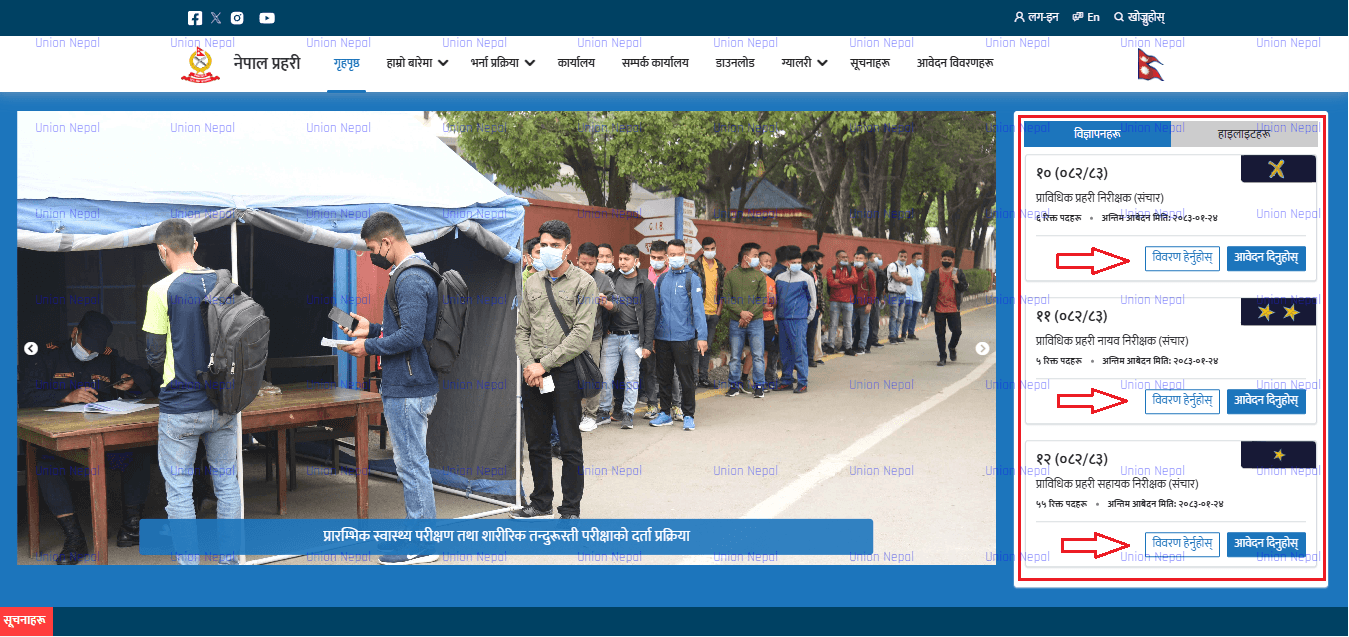
- This portal provides not only the application form but also important information related to advertised posts, quota details and eligibility criteria.
Step 2 – Browse Advertised Positions
On the portal’s home page, you will see all currently advertised positions. To view detailed information about any specific post.
- Click on the Bibaran Hernus (View Details) button next to the position you are interested in.
- A detailed page will display – available quota by category, minimum educational qualifications, age limits and other eligibility requirements.
- Review this information carefully to confirm you are eligible before proceeding to apply.
Step 3 – Create A New Account (Registration)
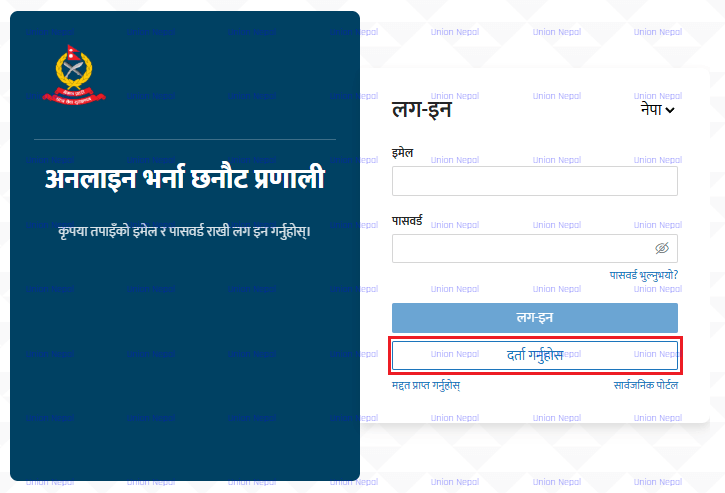
To apply for a position, you must first register on the portal. Click the Aabedan Dinuhos (Apply Now) button on the post listing. You will be directed to the Login page.
New Users – Register Here
- Click Darta Garnuhos (Register) on the Login page.
- Fill in the registration form with the following details.
- Full Name (as per official documents).
- Email Address (a valid, accessible email is required).
- Mobile Number.
- Enter the CAPTCHA characters shown on screen.
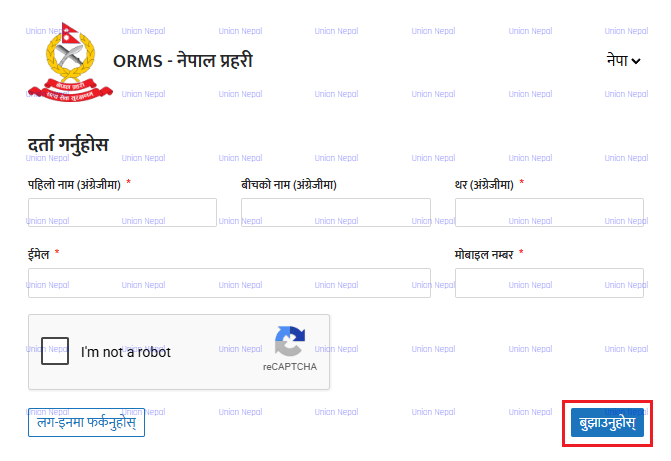
- Click Bujhaunuhos (Submit).
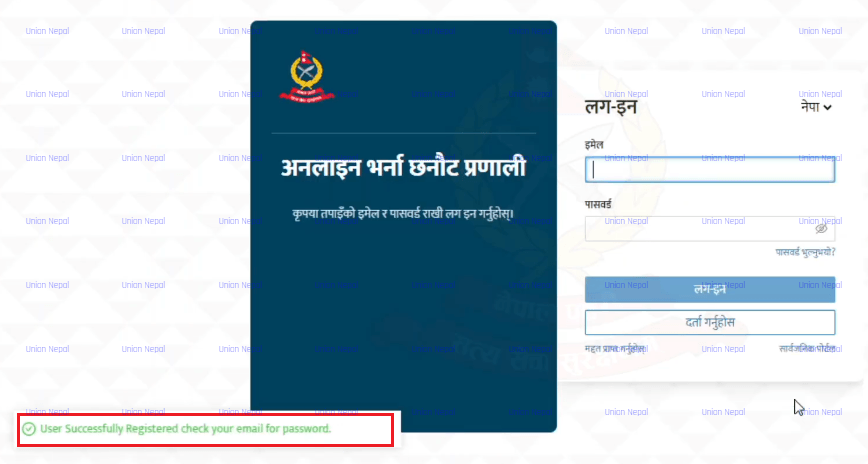
- A success message will appear – User Successfully Registered. Check your Email For Password.
- Check your email inbox – you will receive your Auto-Generated Password.
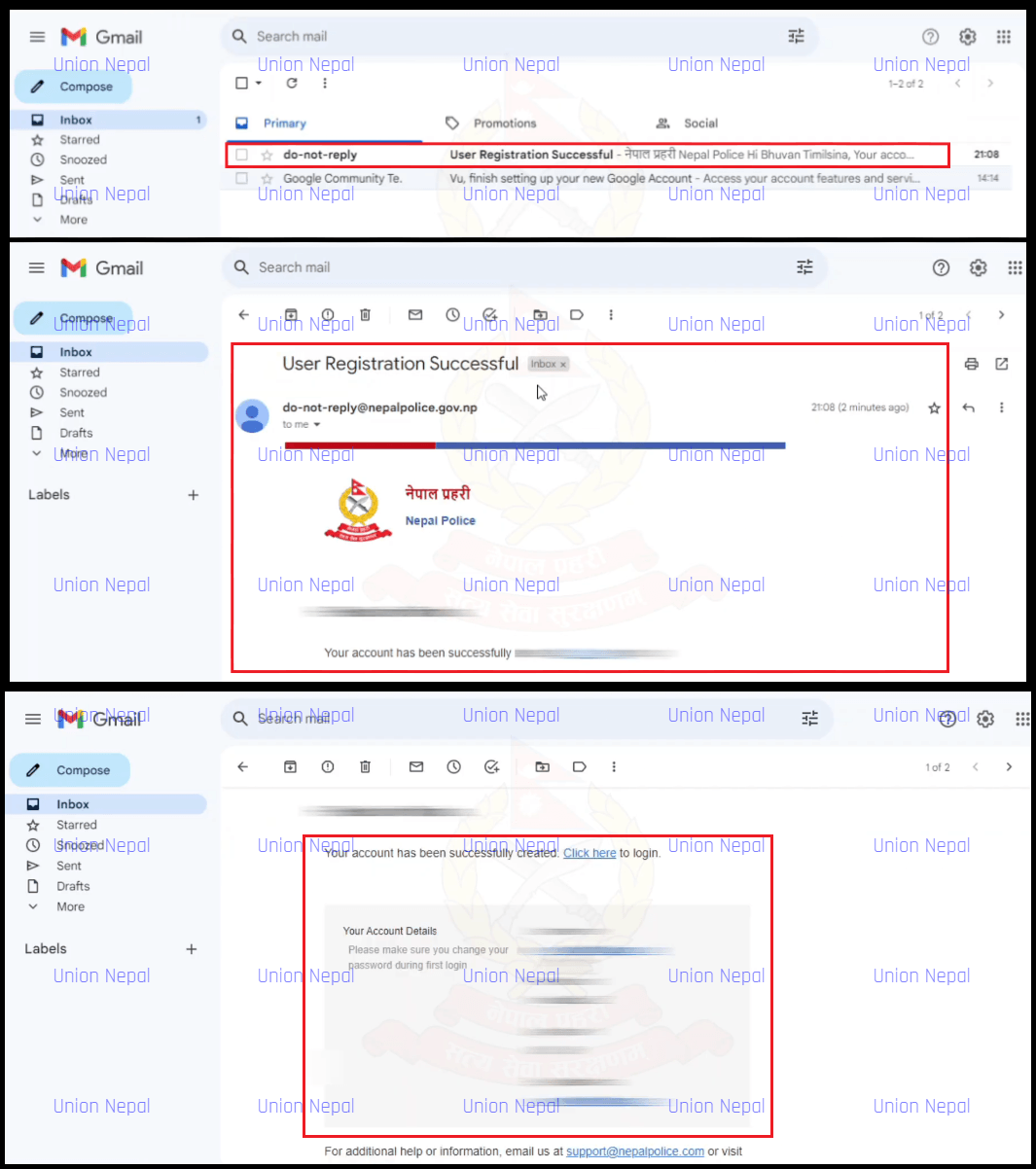
Step 4 – Log In To The Portal
Return to the login page careers.nepalpolice.gov.np/#/login and sign in using your registered email address and the password received in your email.
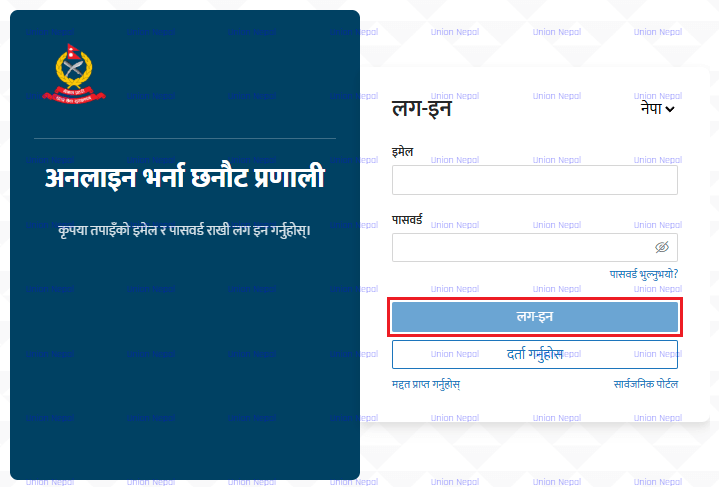
Change Your Password
- On your First Login, the system will prompt you to Change Your Password. Do not keep the auto-generated password – set a new, secure password of your choice, then click Bujhaunuhos (Submit).
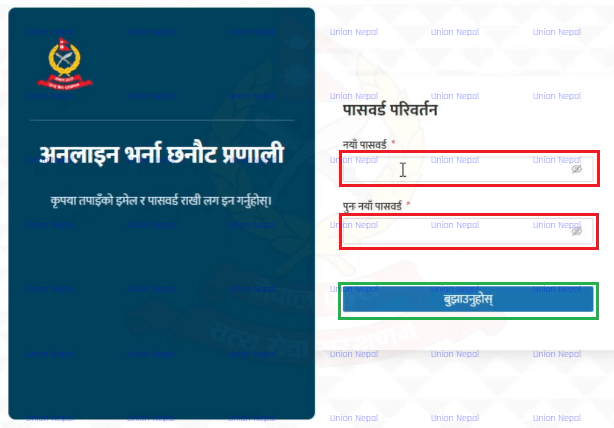
- Use this new password for all future logins.
Step 5 – Select Your Applicant Category
After logging in, you will see 2 Applicant Category Options.
- Sarbasadharan (General Public) – Select this if you are applying as an External/Open Candidate.
- Nepal Prahari Bibhagiya (Nepal Police Departmental) – Select this only if you are an existing Nepal Police Employee who has completed basic training.
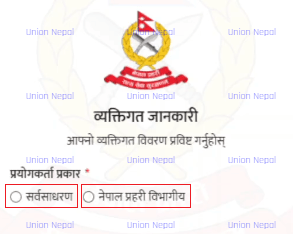
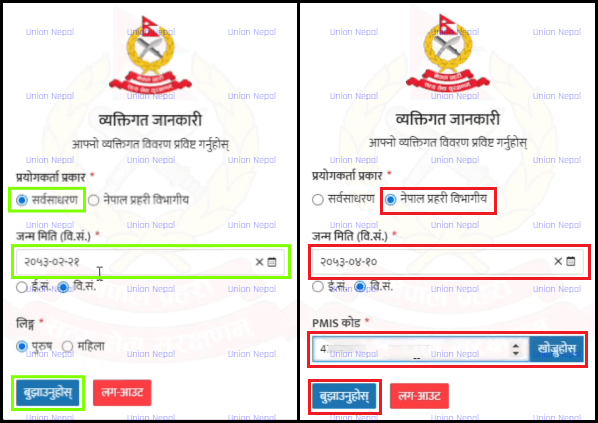
Step 6 – Enter Date Of Birth And Select Position
- Here, enter your Date of Birth by selecting the Year, Month, and Day from the calendar dropdown or by typing it in.
- Then enter the CAPTCHA/Computer Code (This Code Was Only Necessary For Departmental Applicants Only) shown on the screen and click Bujhaunuhos (Submit).
- The system will Automatically Filter and Display only the Positions for which You Are Eligible Based On Your Age. Select the desired position and click Aabedan Dinuhos (Apply).
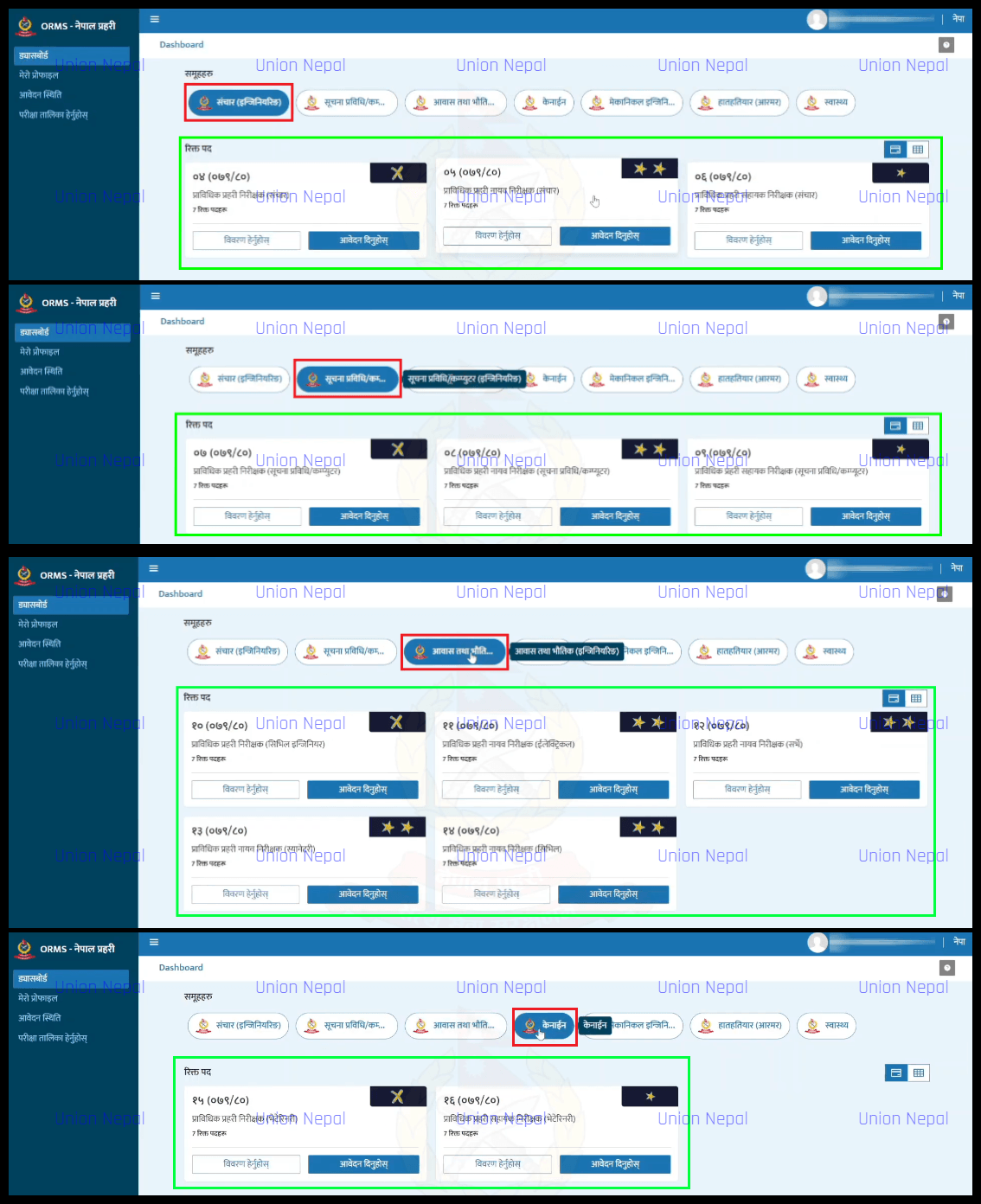
Note: Only positions matching your age eligibility will appear. If a post you want is not shown, you may not meet the age requirement for that position.
Step 7 – Upload Departmental Documents (Departmental Applicants Only)
If you are a Departmental (Existing Nepal Police) Applicant, you must upload the following two documents before proceeding.
- Niyukti Patra (Appointment Letter) – Upload the appointment letter including the appointment date.
- Aadharbhut Talim Praman Patra (Basic Training Certificate) – Include the training institution name, training name, type of training and training duration.
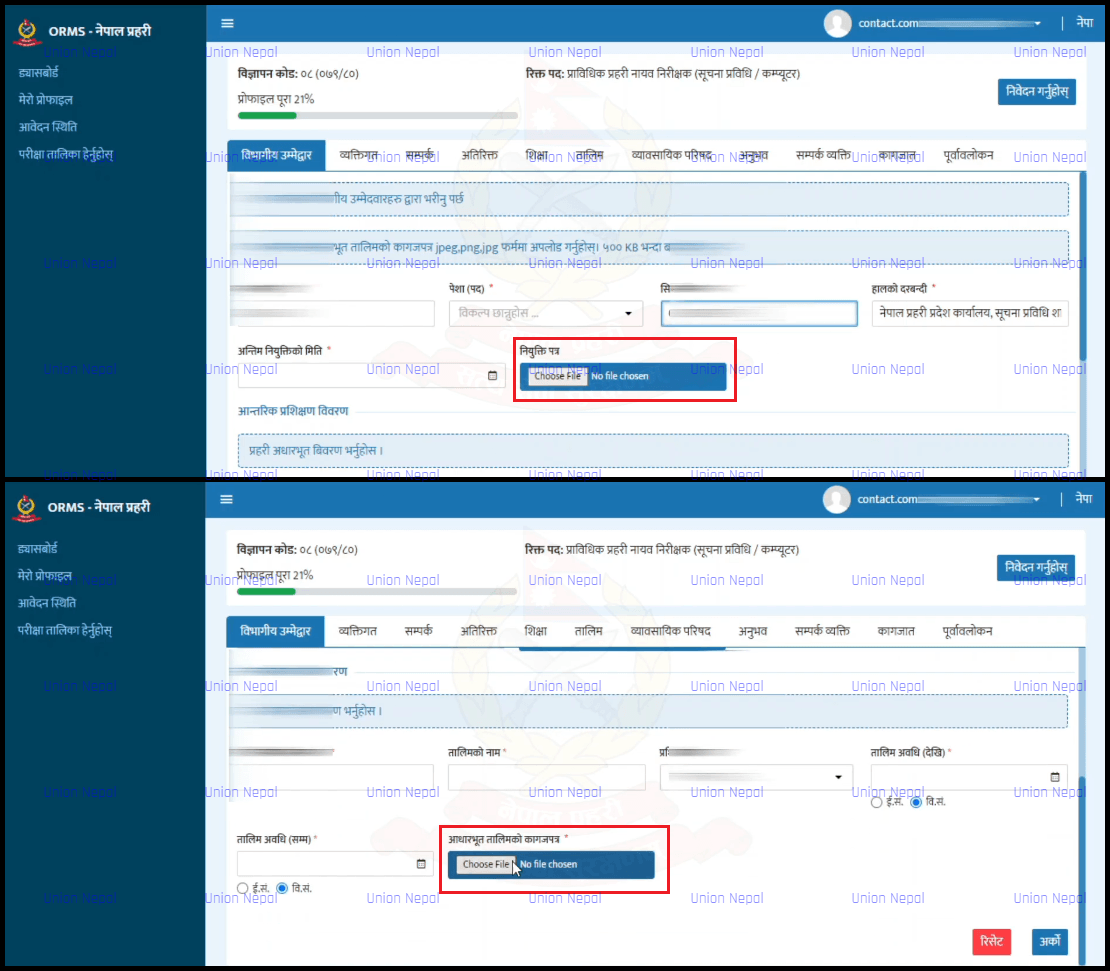
Note: General Public applicants skip this step and proceed directly to Step 8.
Step 8 – Fill In Personal Information
The application form opens. Your name and date of birth will be auto-filled from your login details.
Complete all remaining fields carefully. Fields marked with a red Asterisk (*) Are Mandatory.
Personal Details To Fill
- Full Name in Nepali
- Place of Birth
- Father’s First Name (In Nepali)
- Father’s Surname (In Nepali)
- Mother’s Name (In Nepali)
- Phone Number (Optional)
- Grandfather’s Name (In Nepali)
- Grandfather’s Surname (In Nepali)
- Spouse’s Name (Optional)
- Citizenship Number
- Citizenship Issued District
- Citizenship Issue Date (Select From Calendar Or Type In Nepali Format – English Date Auto-Populates)
- Issuing Office Name
- Type Of Citizenship

Once all personal details are filled, click Arko (Next).
Step 9 – Fill In Contact / Address Information
On the Contact tab, fill in both your permanent and temporary addresses.
Permanent Address
- Select Province.
- Select District.
- Select Local Body / Municipality.
- Enter Ward Number.
- Enter Road/Street Name (Optional).
- Enter Tole (Locality Name).
- Mobile Number (Auto-Filled From Registration).
- House Number (Optional).
- Phone Number (Optional).
Temporary Address
- If your temporary address is the same as your permanent address, check the box Same As Permanent Address and the fields will be auto-filled.
Citizenship Address (Pre-Province Restructuring)
- If your citizenship was issued before the provincial restructuring of Nepal, enter your old address in this section by selecting your Zone, District and Municipality/VDC, Ward Number.
- After completing all address fields, click Arko (Next).
Step 10 – Fill In Other Personal Details
On this tab, fill in Additional Personal Information.
- Caste / Ethnicity (Jata) – Select from the list – if not listed, select Other and type it Manually.
- Religion (Dharma) – Select from the list – if not listed, select Other and type it Manually.
- Marital Status (Baiwahik Sthiti).
- Current Occupation (Pesha) – Select in Nepali.
- Geographical Area (Bhaugolik Kshetra) – Select the region where you reside.
Father’s Education And Occupation
- Father’s Literacy: Select Literate (Lekhpadh Garn Sakne) or Illiterate (Nasakne).
- If literate, select Father’s Education Level.
- Father’s Occupation.
Mother’s Education And Occupation
- Mother’s Literacy: Select Literate or Illiterate.
- Mother’s Occupation.
Inclusive / Quota Category (If Applicable)
- If you are applying under an inclusive quota category, scroll down and select the Appropriate Category – Indigenous/Janajati, Dalit, Backward Region, Martyr/Disabled Police Family (Aamar/Ashakt Prahari Parivar).
- After selecting your Category, upload the Required Recommendation Letter (Recommendation Letter) by clicking Browse and selecting the file. For Martyr/Disabled Police Family, also upload the Certificate and Relationship Proof (Nata Pramanit).
- Note: All uploaded files must be in PDF format and must not exceed 500 KB in size.
- Click Arko (Next) to continue.
Step 11 – Enter Educational Qualifications
- On the Education tab, click Add New (Naya Thap) to add each academic qualification. You must enter certificates starting from SLC/SEE up to the minimum required qualification for the post you are applying for.
- For each qualification, fill in the required details such as the level of education, institution name, board/university, year of passing, and upload the certificate in PDF format.
Note: Each educational certificate PDF must be under 500 KB. Documents larger than 500 KB will not be accepted by the system.
Step 12 – Upload Other Required Certificates (If Applicable)
- If the position you are applying for Requires Additional Certificates (e.g. A License, Professional Certificate Or Similar), upload them on this tab.
- If the post you are applying for Does Not Require Any Additional Certificates, you may proceed directly to the next step.
Step 13 – Enter Work Experience (If Applicable)
If the post requires work experience or if you wish to declare experience, go to the Experience tab and click Naya Thap (Add New). Fill in the following details for each employment.
- Organization/Institution Name.
- Office Address.
- Position/Designation held.
- Type Of Office: Government or Non-Government.
- Reason for leaving (If Applicable).
- Employment Duration: Start date to End date.
- Current Status: Working / Transferred / Retired.
- Employment Type: Permanent / Temporary / Contract.
- Upload the Experience Certificate provided by that organization.
- Click Submit.
If no experience is required or you have none to declare, skip this tab and proceed to the next step.
Step 14 – Add Contact Persons (References)
You are required to provide details of 2 Contact Persons who can be reached for reference. Fill in the following for each contact person.
- Full Name.
- Address.
- Occupation and Designation.
- Mobile Number.
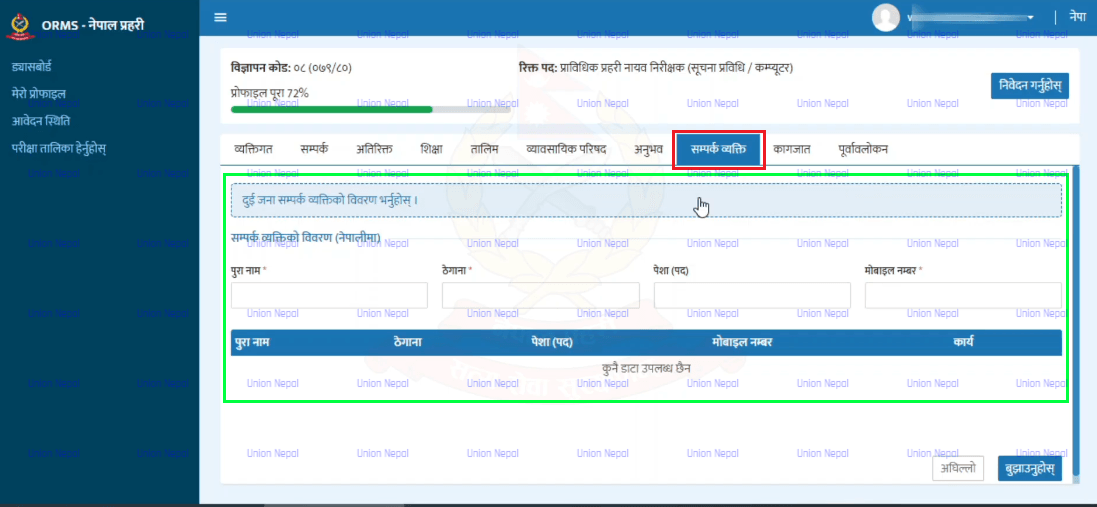
Click Submit after filling each contact person’s details. Repeat the process to add the second contact person. Both contacts must be submitted before moving to the next step.
Step 15 – Upload Documents And Photograph
On the Documents tab, upload the following.
Passport-Size Photograph
- Click the photo upload option and select your scanned Passport-Size Photo.
- Use the Zoom In / Zoom Out controls to adjust the photo to fit the Frame Correctly.
- Click Save to confirm the photo.
Signature
- Upload a scanned image of your Signature.
Citizenship Certificate
- Upload Front Side of Citizenship Certificate.
- Upload Back Side of Citizenship Certificate.
Fingerprints
- Upload Right Thumb Print.
- Upload Left Thumb Print.
Additional Documents (If Required)
Click Add New if you need to upload any of the following additional documents.
- Migration Certificate.
- Age Difference Certificate.
- Caste or Surname Difference Certificate.
- For Each Additional Document: Enter the document name, select the document type and upload the file.
Note: All uploaded photos and files must be under 500 KB. The system will reject files that exceed this size.
Step 16 – Review Your Application
- On the Punarawalokan (Review) tab, carefully check all the information you have entered across every section. This is your last opportunity to verify everything before Final Submission.
- If you notice any errors, go back to the relevant tab and correct the information. Once you are satisfied that all details are accurate, click Thap Hos (Add) to proceed.
Note: Once you click Ho Nischit (Confirm) in the next step, you will NOT be able to edit your application. Use this review step to double-check everything.
Step 17 – Select Post Category – Province And Examination Center
After reviewing, you will see the posts you are eligible to apply for. The Khula (Open) category will be Auto-Selected. Additional Inclusive Categories you chose earlier (if any) will also appear.
Fill in the following.
- Select Province – Choose the province in which you want to apply.
- Select Application Center – Choose the examination/application center in your selected province.
- Check the terms and conditions box (ORMS Sart Ra Niyam Sweekar) to confirm you agree.
- Click Nibedan Gardai Chu (Submit Application).
Step 18 – Read And Accept The Declaration
A Declaration section will appear with important statements. Read all declarations carefully.
If none of the disqualifying conditions apply to you, click Sabai Chayan Garnuhos (Select All) to accept all declarations, then click Arko (Next).
Step 19 – Final Confirmation And Application ID
A summary of your application will be displayed, showing.
- Master ID.
- Advertisement Code.
- Level / Grade.
- Email Address.
- Total Fee Amount payable.
Important Note: Once you click Ho Nischit (Confirm), you will not be able to make any changes to your application. If you find any errors, click Radda Garnuhos (Cancel) first to go back and correct them.
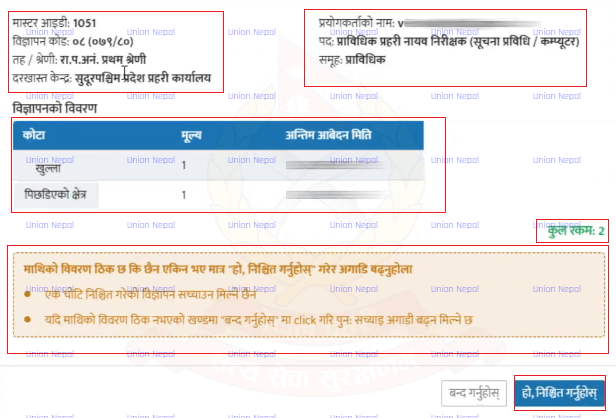
When you are ready, click Ho Nischit (Confirm). A success notification will appear showing your Application ID. Note down your Application ID Carefully.
Step 20 – Pay The Application Fee
After submission, you will be taken to your Dashboard. Go to Aawedan Sthiti (Application Status) and click the Bhuktani Baki (Payment Pending) tab. Your applied position will appear there.
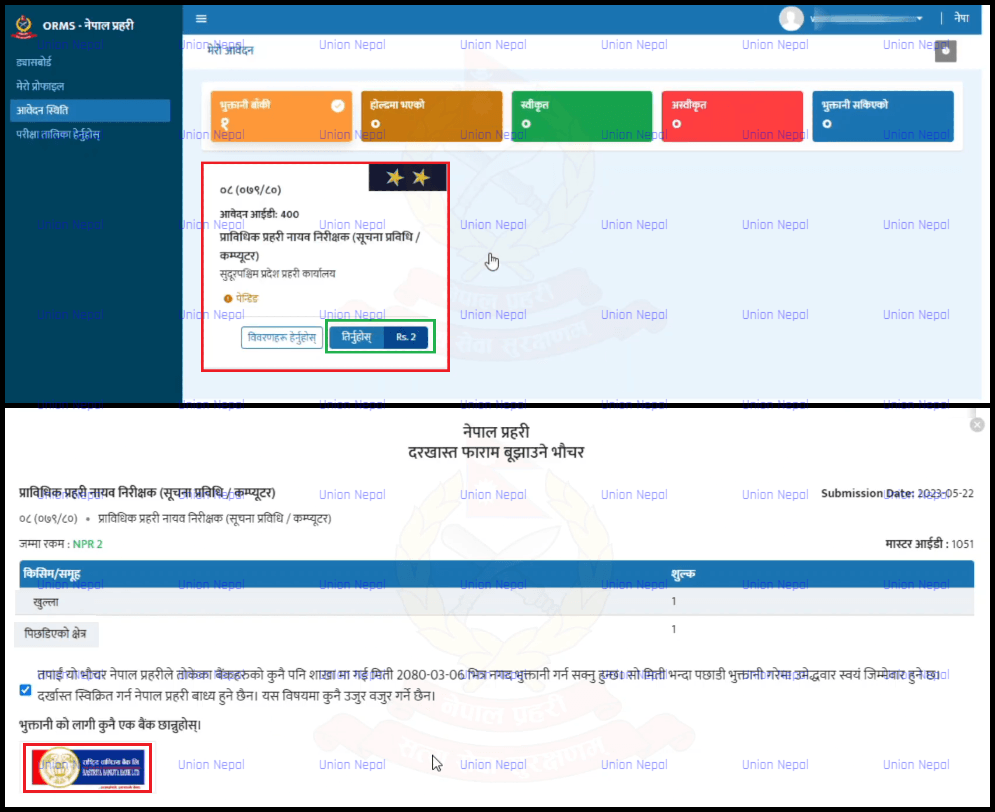
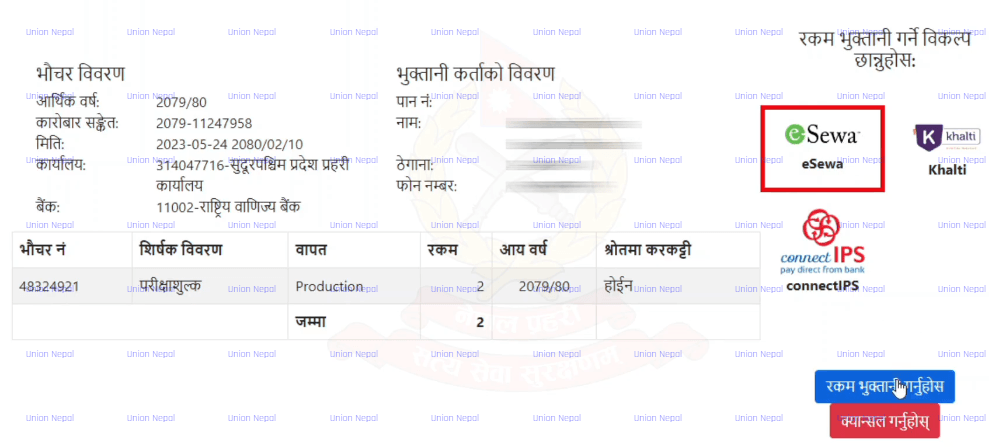
Click Tirnuhos (Pay) next to the post. Tick the terms checkbox, then select from the available Banks/Payment Providers.
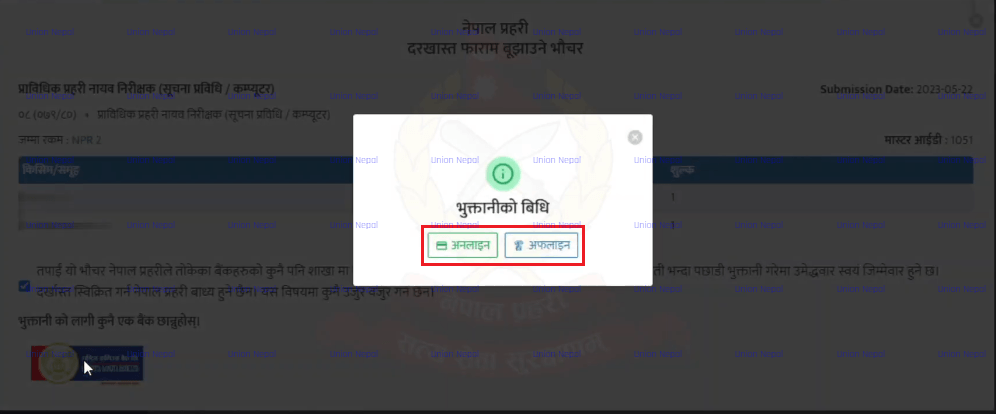
Option A – Online Payment
- Select the Online option and choose your preferred payment provider.
- eSewa
- Khalti
- ConnectIPS
- For eSewa: Enter your eSewa ID and password, then enter the token sent to your mobile and click Continue Payment – Confirm.
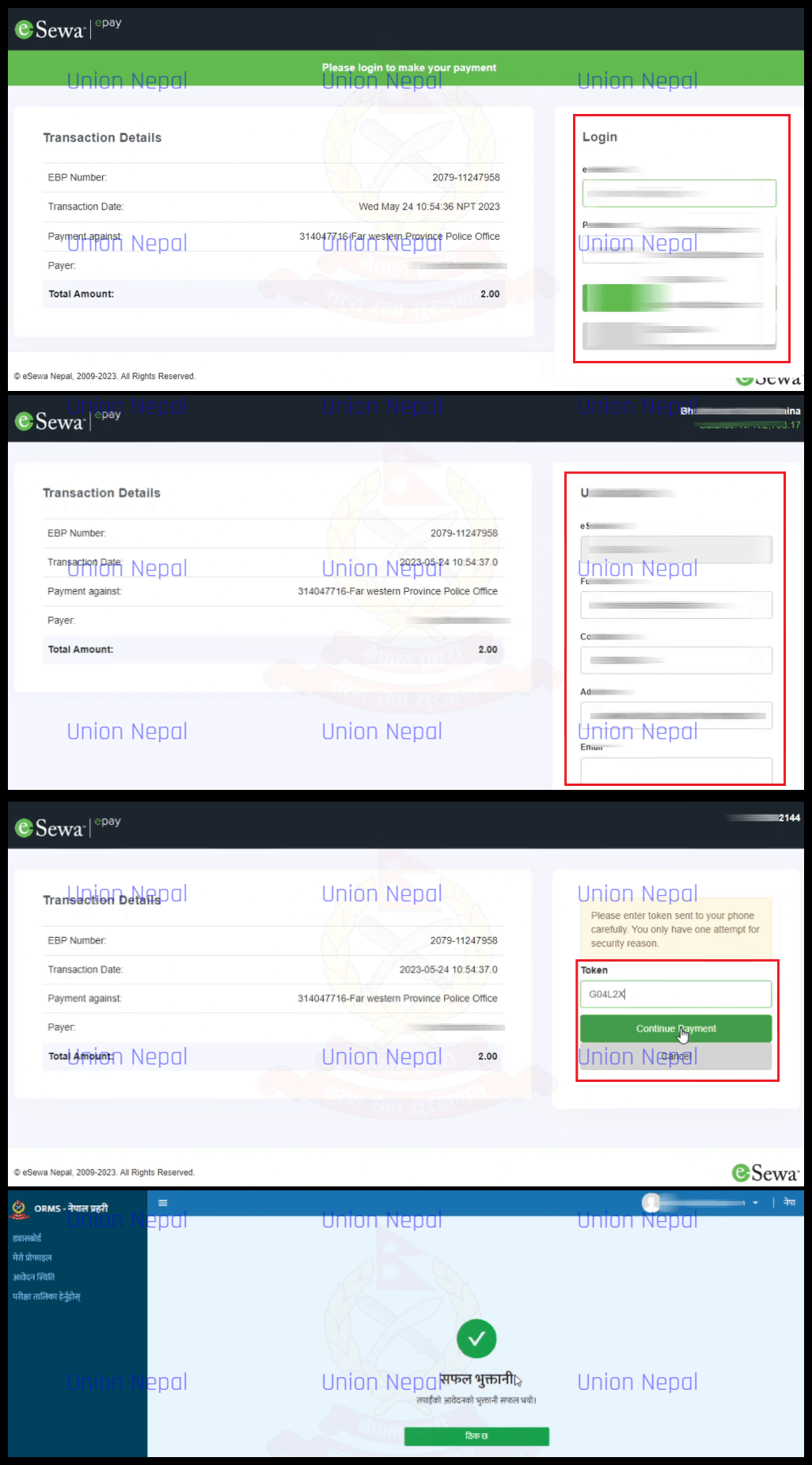
- A payment success notification will appear. Click OK.
Option B – Offline Payment (Bank)
- Select the Offline Option to generate a Bank Voucher with an EBP Code.
- Print The Voucher and take it to the Designated Bank to make the payment.
- Once payment is made at the bank, Your Application Process Is Complete. You do not need to visit the application office separately.
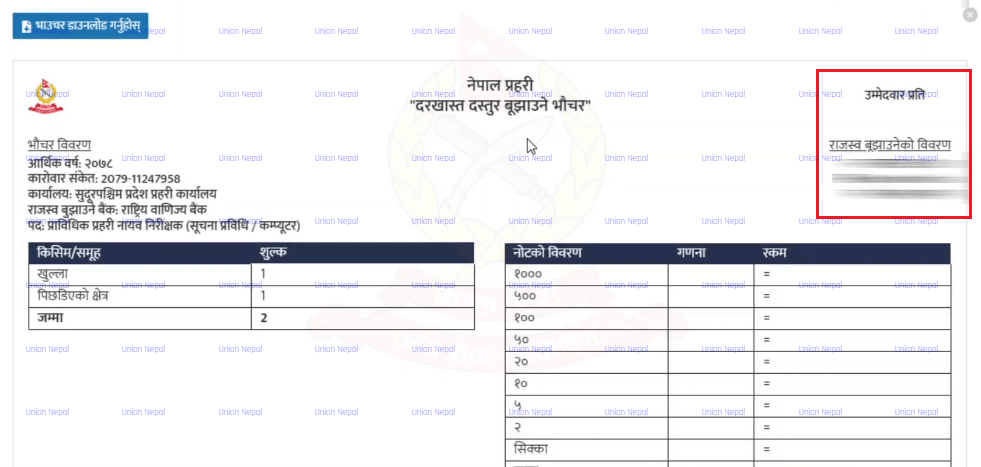
Note: If payment appears to fail or is delayed in updating, wait a few minutes and refresh your dashboard. It may take a short time to reflect as completed.
Step 21 – After Payment – Check Status & Download Documents
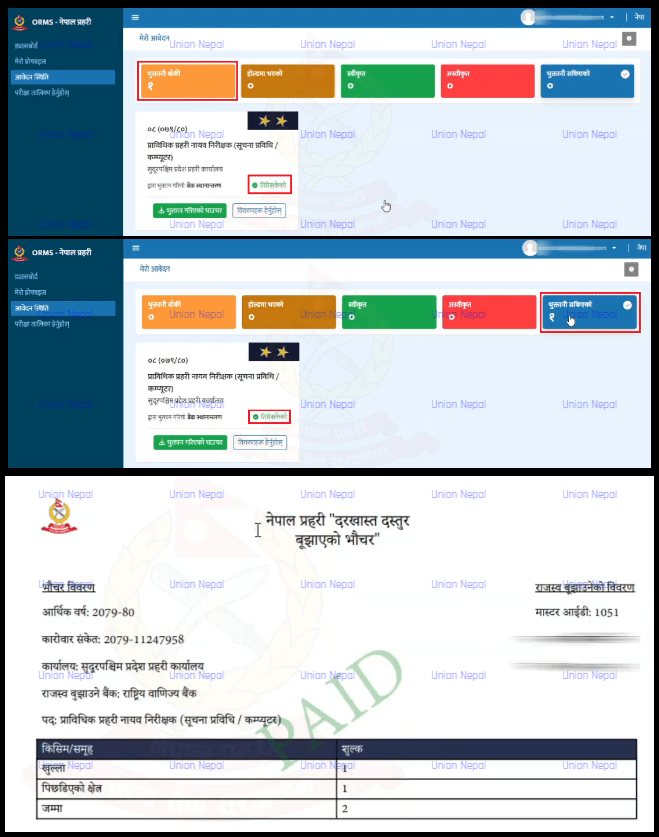
After successful payment, go back to your Dashboard. Your application will now appear under the Payment Complete tab instead of Payment Pending.
Application Approval
- Your application will show a Pending Status until the concerned application office reviews and approves your form. Once approved, it will move to the Approved Section.
- You can also download a Copy Of Your Payment Voucher from the dashboard for your records.
Step 22 – Download Your Documents
- Darkhast Form (Application Form) – Click to view and download the complete application form generated from your submitted details. Save it securely.
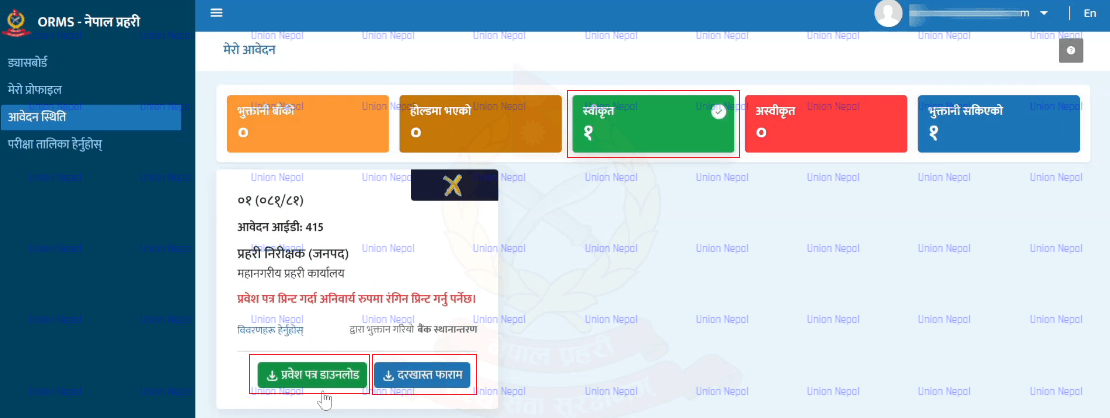
- Admit Card / Entrance Ticket (Prabesh Patra) – After approval, download your Admit Card from the dashboard.
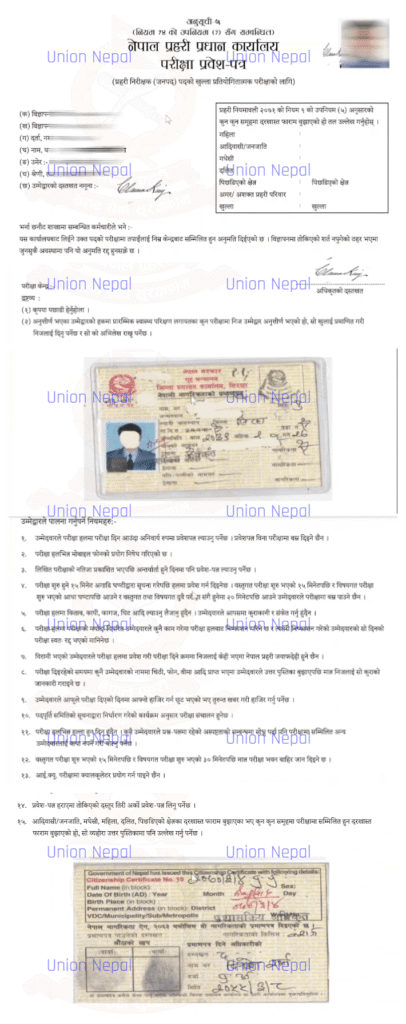
Important Note: The Admit Card Must be printed in COLOR. You will not be allowed to sit the examination without a color-printed admit card.
Additional Vacancy Notice – Police Constable (Jawan) Open Competition
In addition to the technical recruitment, Nepal Police also announced an addition of vacancies for the Police Constable (Jawan) post under the District Police Group through open competition. This notice supplements the advertisement published on 2082/06/10.
| Category | Open | Martyr/ Disabled | Women | Adivasi/ Janajati | Madhesi | Dalit | Pi. Che. | Total |
| Originally advertised (2082/06/10) | 837 | 31 | 137 | 219 | 191 | 103 | 35 | 1,553 |
| Additional vacancies (post-advertisement) | 741 | 27 | 122 | 194 | 170 | 91 | 30 | 1,375 |
| Grand Total (Jawan – All Combined) | 1,578 | 58 | 259 | 413 | 361 | 194 | 65 | 2,928 |
Position Details – Technical Officers (Online Application)
The following positions are available in the Technical Police Group (Prabidhik Prahari Samuha) across various directorates and sub-groups.
| S.N. | Ad. No. | Post / Sub-Group | Open | Martyr/Disabled Police Family | Women | Adivasi/Janajati | Madhesi | Dalit | Remote Area | Total |
| Information Technology Directorate – Engineering Sub-Group | ||||||||||
| 1 | 07 (082/83) | Tech. Police Inspector (IT/Computer) | 2 | – | – | 1 | 1 | – | – | 4 |
| 2 | 08 (082/83) | Tech. Police Dy. Inspector (IT/Computer) | 4 | – | 1 | 1 | – | 1 | – | 7 |
| 3 | 09 (082/83) | Tech. Police Asst. Inspector (IT/Computer) | 3 | – | – | 2 | 1 | 1 | – | 7 |
| Communication Directorate – Engineering Sub-Group | ||||||||||
| 4 | 10 (082/83) | Tech. Police Inspector (Communication) | 3 | 1 | – | – | – | 1 | 1 | 6 |
| 5 | 11 (082/83) | Tech. Police Dy. Inspector (Communication) | 2 | – | – | 1 | 1 | 1 | – | 5 |
| 6 | 12 (082/83) | Tech. Police Asst. Inspector (Communication) | 30 | 1 | 5 | 7 | 6 | 4 | 2 | 55 |
| Physical Infrastructure Directorate – Engineering Sub-Group | ||||||||||
| 7 | 13 (082/83) | Tech. Police Inspector (Civil Engineer) | 1 | – | – | – | – | – | – | 1 |
| 8 | 14 (082/83) | Tech. Police Inspector (Electrical Engineer) | 1 | – | – | – | – | – | – | 1 |
| 9 | 15 (082/83) | Tech. Police Inspector (Building & Architect) | 1 | – | – | – | – | – | – | 1 |
| 10 | 16 (082/83) | Tech. Police Dy. Inspector (Architect) | 1 | – | – | – | – | – | – | 1 |
| 11 | 17 (082/83) | Tech. Police Dy. Inspector (Civil) | 1 | – | 1 | – | – | – | – | 2 |
| Transport Division – Engineering Sub-Group | ||||||||||
| 12 | 18 (082/83) | Tech. Police Inspector (Automobile Engineer) | – | – | – | – | 1 | – | – | 1 |
| 13 | 19 (082/83) | Tech. Police Asst. Inspector (Automobile) | 2 | – | 1 | – | – | – | – | 3 |
| Weapons Maintenance Section – Engineering (Weapons) Sub-Group | ||||||||||
| 14 | 20 (082/83) | Tech. Police Asst. Inspector (Weapons) | 1 | – | 1 | – | 1 | – | – | 3 |
| Central Forensic Laboratory – Forensic Science Sub-Group | ||||||||||
| 15 | 21 (082/83) | Tech. Police Inspector (Biology) | – | – | – | 1 | – | – | – | 1 |
| 16 | 22 (082/83) | Tech. Police Inspector (Chemistry) | 1 | – | – | – | – | – | – | 1 |
| 17 | 23 (082/83) | Tech. Police Dy. Inspector (Biology) | 1 | – | – | – | – | 1 | – | 2 |
| 18 | 24 (082/83) | Tech. Police Dy. Inspector (Chemistry) | 1 | – | – | – | – | – | – | 1 |
| Nepal Police Hospital – Health Sub-Group | ||||||||||
| 19 | 25 (082/83) | Tech. Police Dy. Superintendent (MD Ophthalmologist) | – | – | – | 1 | – | – | – | 1 |
| 20 | 26 (082/83) | Tech. Police Inspector (Medical Officer – MBBS) | 4 | – | – | 1 | – | 1 | 1 | 7 |
| 21 | 27 (082/83) | Tech. Police Inspector (Dental Officer) | 1 | – | – | – | – | – | – | 1 |
| 22 | 28 (082/83) | Tech. Police Inspector (Physiotherapy Technologist) | – | – | – | 1 | – | – | – | 1 |
| 23 | 29 (082/83) | Tech. Police Inspector (Dietetics) | 1 | – | – | – | – | – | – | 1 |
| 24 | 30 (082/83) | Tech. Police Dy. Inspector (Staff Nurse) | 4 | – | 1 | 1 | – | – | – | 6 |
| 25 | 31 (082/83) | Tech. Police Dy. Inspector (Pharmacy Assistant) | 1 | – | 1 | – | – | – | – | 2 |
| 26 | 32 (082/83) | Tech. Police Asst. Inspector (Physiotherapy Assistant) | 1 | – | – | 1 | – | – | – | 2 |
| 27 | 33 (082/83) | Tech. Police Asst. Inspector (CMA) | 3 | 1 | – | – | – | 1 | 1 | 6 |
Position Details – Technical Police Constable / Jawan (In-Person Application)
| S.N. | Ad. No. | Office / Sub-Group | Open | Martyr/Disabled | Women | Adivasi/Janajati | Madhesi | Dalit | Remote | Total |
| 1 | 34 (082/83) | IT Directorate – Engineering, IT/Computer | 7 | 1 | 1 | 2 | 2 | 1 | 1 | 15 |
| 2 | 35 (082/83) | Physical Infrastructure Directorate – Housing & Infrastructure Engineering | 14 | 1 | 2 | 4 | 3 | 2 | 1 | 27 |
| 3 | 36 (082/83) | Transport Division – Mechanical Engineering & Vehicles | 21 | 1 | 4 | 5 | 4 | 3 | 1 | 39 |
| 4 | 37 (082/83) | Canine Unit – Dog Handler | 15 | 1 | 3 | 4 | 4 | 2 | – | 29 |
| 5 | 38 (082/83) | Weapons Maintenance Section – Engineering, Weapons | 1 | – | – | – | 1 | – | – | 2 |
| 6 | 39 (082/83) | Nepal Police Hospital – Health | 12 | 1 | 1 | 3 | 3 | 2 | 1 | 23 |
| 7 | 40 (082/83) | Nepal Police Music School – Music | 34 | 1 | 6 | 9 | 8 | 4 | 1 | 63 |
| 8 | 41 (082/83) | Communication Directorate – Engineering | 151 | 5 | 26 | 40 | 34 | 18 | 6 | 280 |
Application Submission Period
| Position | Application Period |
| Technical Officers (DSP, Inspector, Dy. Inspector, Asst. Inspector) | 2082/12/25 To 2083/01/24 (via ORMS Online) |
| Technical Police Constable / Jawan | 2082/12/26 To 2083/01/31, 10:00 AM to office hours (excluding public holidays) |
Application / Examination Fee
| Position | Application Fee |
| Technical Police Deputy Superintendent | NRs. 2,000/- |
| Technical Police Inspector | NRs. 1,200/- |
| Technical Police Deputy Inspector | NRs. 700/- |
| Technical Police Assistant Inspector | NRs. 500/- |
| Technical Police Constable (Jawan) | NRs. 300/- |
Note: If applying for more than one sub-group simultaneously, an additional 20% fee per extra group applies.
Nepal Police Vacancy – Age Limit
| Position | Age Requirement |
| Technical Police Deputy Superintendent | 23 years (min) to 35 years (max) |
| Technical Police Inspector | 20 years (min) to 32 years (max) |
| Technical Police Deputy Inspector | 18 years (min) to 30 years (max) |
| Technical Police Assistant Inspector | 18 years (min) to 28 years (max) |
| Technical Police Constable (Jawan) | 18 years (min) to 23 years (max) |
Note: For currently serving non-gazetted police officers applying for open competitive posts of Inspector, Dy. Inspector, and Asst. Inspector, the upper age limit is 35 years, and candidates must have completed foundational training.
Minimum Educational Qualifications
General Physical Requirements (All Technical Officer Posts)
- Not convicted in any criminal case involving moral turpitude.
- Not convicted for violation of human rights or humanitarian law.
- Not a member of any political party or terrorist organization.
- Male: Height minimum 5’2″, Chest 31-33″, Weight minimum 50 kg.
- Female: Height minimum 5’0″, Weight minimum 42 kg.
- Eyesight: Not weaker than -2 or +2.
- Must obtain medical fitness certificate from a doctor approved by Nepal Police Headquarters.
- Must be a Nepali citizen.
Information Technology Directorate
- Technical Police Inspector (IT/Computer): Bachelor’s in Computer/Software/IT Engineering registered with the relevant Engineering Council, OR Bachelor’s (BSc CSIT, BIT, BCA or equivalent) with 6 months certified training from a recognized institution.
- Technical Police Deputy Inspector (IT/Computer): Diploma in Engineering in the relevant field from a recognized institution.
- Technical Police Assistant Inspector (IT/Computer): SLC/SEE or equivalent and 3 months training in the relevant subject from a recognized institution.
- Technical Police Constable (IT/Computer): SLC/SEE or equivalent plus at least 1 month IT training certificate from a recognized training institution.
Communication Directorate
- Technical Police Inspector (Communication): Bachelor’s in Electronics & Communication / Telecommunication / Radio Communication / Electrical & Electronics Engineering or equivalent, registered with Engineering Council.
- Technical Police Deputy Inspector (Communication): Diploma/Proficiency Certificate in the above-mentioned engineering fields.
- Technical Police Assistant Inspector (Communication): SLC/SEE plus 18 months course in relevant field, OR Proficiency Certificate with 3 months training in Electronics/Mobile/Communication equipment maintenance.
- Technical Police Constable (Communication): SLC/SEE or equivalent from a recognized institution.
Physical Infrastructure Directorate
- Inspector (Civil Engineer): Bachelor in Civil Engineering, registered with Engineering Council.
- Inspector (Electrical Engineer): Bachelor in Electrical Engineering, registered with Engineering Council.
- Inspector (Building & Architecture): Bachelor in Architecture, registered with Engineering Council.
- Dy. Inspector (Architect): 3-year Diploma in Architecture or Proficiency Certificate in Architecture.
- Dy. Inspector (Civil): 3-year Diploma in Civil Engineering or Proficiency Certificate in Civil Engineering.
- Constable (Jawan): Minimum 8th grade, with CTEVT or equivalent skill certificate in Masonry, Carpentry, or Painting.
Transport Division
- Inspector (Automobile Engineer): Bachelor’s in Mechanical/Automobile Engineering, registered with Engineering Council.
- Asst. Inspector (Automobile): Proficiency Certificate in Mechanical/Automobile, OR SLC/SEE with 3-year training from CTEVT-recognized institution.
- Constable (Jawan): SLC/SEE or equivalent.
Weapons Maintenance Section
- Asst. Inspector (Weapons): SLC/SEE plus 18 months General Mechanics course, OR Diploma in Mechanical Engineering.
- Constable (Jawan): SLC/SEE or equivalent.
Central Forensic Laboratory
- Inspector (Biology): Bachelor’s with Biology, Molecular Biology, Genetics, Biochemistry, Biotechnology, Microbiology, or Forensic Science as major subject.
- Inspector (Chemistry): Bachelor’s with Chemistry or Forensic Science as major subject.
- Dy. Inspector (Biology): Proficiency Certificate with Life Sciences as major.
- Dy. Inspector (Chemistry): Proficiency Certificate with Life Sciences or Physical Sciences as major.
Nepal Police Hospital
- Dy. Superintendent (MD Ophthalmologist): MBBS or equivalent, Postgraduate in Ophthalmology, registered as specialist with Nepal Medical Council.
- Inspector (Medical Officer – MBBS): MBBS or equivalent, registered as specialist with Nepal Medical Council.
- Inspector (Dental Officer): BDS or equivalent, registered with Nepal Medical Council.
- Inspector (Physiotherapy Technologist): Bachelor’s in Physiotherapy, registered with relevant council.
- Inspector (Dietetics): Bachelor’s in Food & Technology or equivalent.
- Dy. Inspector (Staff Nurse): Minimum Proficiency Certificate in Nursing, registered with Nepal Nursing Council.
- Dy. Inspector (Pharmacy Assistant): Proficiency Certificate in Pharmacy, registered with relevant council.
- Asst. Inspector (Physiotherapy Assistant): SLC/SEE then 15 months CMA/ANM and 3 months physiotherapy training, registered with relevant council.
- Asst. Inspector (CMA): SLC/SEE then 15 months CMA from recognized institution, registered with relevant council.
- Constable (Jawan): SLC/SEE or equivalent plus at least 3 months health-related training.
Canine Unit & Music School
- Constable – Canine (Dog Handler): SLC/SEE or equivalent.
- Constable – Music (Nepal Police Music School): Minimum 8th grade from a recognized institution.
Application Submission Locations
Online Application Posts (Technical Officers)
- IT Directorate posts: IT Directorate, Nepal Police HQ, Naxal, Kathmandu – Tel: 01-5719900 Ext. 347
- Communication posts: Communication Directorate, Nepal Police HQ, Naxal -Tel: 01-5719899, 9851280000
- Physical Infrastructure posts: Physical Infrastructure Directorate, Nepal Police HQ – Tel: 01-5719900 Ext. 219, 01-5719846
- Transport posts: Transport Division, Nepal Police HQ – Tel: 01-5719914, 9851283387
- Weapons Maintenance posts: Weapons Section, Nepal Police HQ – Tel: 01-5719900 Ext. 457
- Forensic Lab posts: Central Forensic Laboratory, Samakhusi, Kathmandu – Tel: 01-4980310
- Hospital posts: Nepal Police Hospital, Maharajganj, Kathmandu – Tel: 01-4002601, 4512530, 5971940
Jawan In-Person Application Centers
- Koshi Province: Koshi Province Police Training Center, Biratnagar – 9852090180
- Madhesh Province: Madhesh Province Police Training Center, Janakpur (Contact: Rajbiraj, Saptari) – 9854090600
- Bagmati Province: Bagmati Province Police Training Center, Dudhauli, Sindhuli – 9854041733
- Gandaki Province: Gandaki Province Police Training Center, Pokhara, Kaski – 9856068121
- Lumbini Province: Lumbini Province Police Training Center, Butwal, Rupandehi – 9857090444
- Karnali Province: Karnali Province Police Training Center, Surkhet (currently Nepalgunj, Banke) – 9858090115
- Sudurpashchim Province: Sudurpashchim Province Police Training Center, Dipayal, Doti – 9858490084
- Kathmandu Valley: Bhrikuti Police Campus, Kathmandu – 9851283012
- Lalitpur: Bhrikuti Police Campus, Lalitpur – 9851294555
- Bhaktapur: Bhrikuti Police Campus, Bhaktapur – 9851290976
- All other District Police Offices: Respective District Police Offices.
Examination Process
For Technical Officers (DSP, Inspector, Dy. Inspector, Asst. Inspector)
Stage 1: Preliminary and Detailed Health Examination.
Stage 2: Written Examination (conducted by the Public Service Commission at designated centers).
Stage 3: Special Health Examination.
Stage 4: Practical Examination (only for posts specified in curriculum).
Stage 5: Interview.
Note: Wrong answers in Multiple Choice Questions will incur a 20% negative marking. Only answers written as A, B, C, D in English capital letters will be accepted.
For Technical Police Constable (Jawan)
Stage 1: Preliminary Health Examination and Physical Fitness Test.
Stage 2: Detailed Health Examination.
Stage 3: Written Examination (conducted by Public Service Commission).
Stage 4: Practical Examination (for curriculum-specified posts).
Stage 5: Interview.
Examination Centers – Technical Police Constable (Jawan)
| Coverage Area / Candidates From | Exam Center |
| Koshi Province districts (Biratnagar, Morang, Jhapa, Sunsari, Dhankuta, etc.) | Koshi Province Police Training Center, Biratnagar, Morang |
| Madhesh Province districts (Saptari, Siraha, Dhanusha, Mahottari, Sarlahi, Rautahat, Bara, Parsa) | Madhesh Province Police Training Center, Janakpur (Contact: Rajbiraj, Saptari) |
| Bagmati Province (Dolakha, Ramechhap, Sindhuli, Chitwan, Makwanpur) | Bagmati Province Police Training Center, Dudhauli, Sindhuli |
| Gandaki Province (Gorkha, Lamjung, Tanahu, Kaski, Manang, Mustang, Parbat, Syangja, Myagdi, Baglung) | Gandaki Province Police Training Center, Pokhara, Kaski |
| Lumbini Province (Nawalparasi East/West, Rupandehi, Kapilvastu, Palpa, Arghakhanchi, Gulmi, Rolpa, Pyuthan, Dang) | Lumbini Province Police Training Center, Butwal, Rupandehi |
| Karnali Province (Rukum East/West, Banke, Bardiya, Surkhet, Dolpa, Jumla, Mugu, Humla, Kalikot, Jajarkot, Dailekh) | Karnali Province Police Office, Birendranagar, Surkhet |
| Sudurpashchim Province (Bajura, Bajhang, Doti, Achham, Darchula, Baitadi, Dadeldhura, Kanchanpur, Kailali) | Sudurpashchim Province Police Training Center, Dipayal, Doti |
| Kathmandu Valley + nearby districts (Kavrepalanchok, Sindhupalchok, Rasuwa, Nuwakot, Dhading) | Kathmandu Valley Police School, Maharajganj, Kathmandu |
Health examination and physical fitness schedule for Jawan will be published at respective police offices by 2083/02/11 and on Nepal Police’s website www.nepalpolice.gov.np
Health Examination Schedule – Technical Officers
The schedule for Preliminary and Detailed Health Examination for Technical Officers (DSP, Inspector, Dy. Inspector, Asst. Inspector) will be published on Nepal Police’s website nepalpolice.gov.np by 2083/02/13. Examination centers.
Nepal Police Hospital, Maharajganj, Kathmandu (health exams) – Nepal Police Headquarters, Naxal (practical and interview).
Required Documents
For Online Application Posts (Technical Officers)
- Nepali Citizenship Certificate (original scan).
- Academic qualification certificates of each level (Transcript, Provisional/Permanent Certificate and Marksheet).
- For studies abroad – Equivalency Certificate from Higher Secondary Education Board / TU.
- Martyr/disabled police family documentation and kinship proof (if applicable).
- Adivasi/Janajati identity certificate from relevant local authority or National Foundation for Development of Indigenous Nationalities.
- Madhesi identity certificate as specified by Government of Nepal Gazette notification.
- Dalit identity certificate from the National Dalit Commission or relevant local authority.
- Permanent resident certificate from concerned district for Remote Area quota (Achham, Kalikot, Jajarkot, Jumla, Dolpa, Bajhang, Bajura, Mugu, Humla).
- Recent passport-size photo (full face, both ears visible, male candidates must have trimmed beard and hair) – uploaded in JPG format.
- Signature, fingerprint (right/left), and both sides of Citizenship in JPG format.
For Jawan In-Person Applications
- All original documents listed above in original plus self-certified copies.
- 5 passport-size photos (full face, both ears visible).
- Candidates must appear in person with all original documents.
- Fill this application form as above and submit with necessary documents.
Important Notes & Special Provisions
- This notice is published pursuant to the Supreme Court’s Mandamus Order dated 2079/10/24 (Writ No. 078-WO-0662) directing that inclusive quota positions lost in FY 2079/80 due to pending legal arrangements be compensated. The current vacancies include those compensatory positions.
- Application fees are non-refundable if the application is rejected for not meeting requirements.
- Results will be published after each stage – only passing candidates advance to the next stage.
- If new vacancies arise before written exam results are published, they may be added to the same advertisement with a public notice.
- Curriculum and exam-related notices will also be published at www.nepalpolice.gov.np.
- Open and inclusive group candidates appear for the same exam – inclusive quota candidates compete separately within their respective groups based on marks obtained.
- Disqualified applications may be cancelled at any stage if conditions are found unmet.
- Candidates must bring their Admit Card and original Citizenship Certificate to each examination stage.
- For double registration detected in Jawan applications, the application will be cancelled.
Contact Information
Nepal Police Headquarters – Recruitment Section
Address: Naxal, Kathmandu
Phone: 01-5719927
Email: ormscareer@nepalpolice.gov.np
Website: nepalpolice.gov.np
Online Application Portal: careers.nepalpolice.gov.np/#/login
First Publication Date: 2082/12/20