
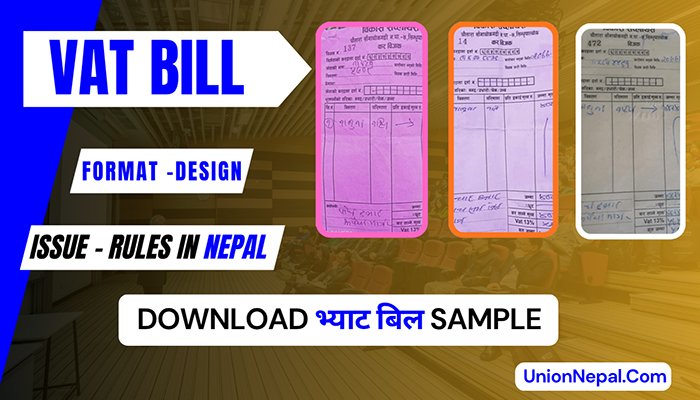
VAT Bill In Nepal – Complete Guide To Format – Rules – How To Issue
If your business is VAT-registered in Nepal, every single sale you make requires a VAT bill. Some mistakes – wrong format, missing fields, wrong number of copies or not issuing one at all. Then, the Inland Revenue Department (IRD) can fine you NRs. 10,000 per missing invoice.
Also Useful : PAN Bill In Nepal – Format – Limit – Rules
This guide covers everything you actually need to know about the VAT bill in Nepal – what it is, exactly what must be on it, how to write one by hand or through software, how many copies you must keep, VAT rates, non-VAT items, the mismatch problem, fake bills and the questions business owners ask most often.
What Is A VAT Bill In Nepal?
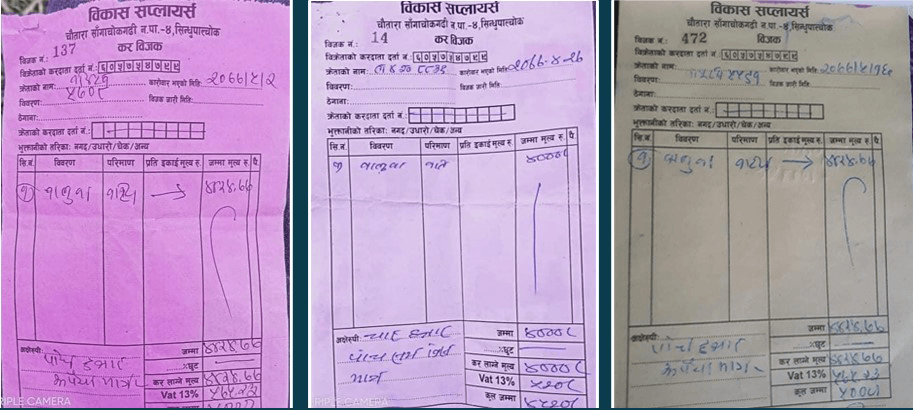
A VAT bill – formally called a tax invoice, which is a legal document issued by a VAT-registered business every time it sells goods or provides services. It records the transaction and shows the 13% Value Added Tax that the buyer pays on top of the sale price.
Under Nepal’s Value Added Tax Act 2052 (and its amendments), every VAT-registered taxpayer must issue a VAT bill for every taxable transaction. The bill serves 3 purposes at once.
- It is legal proof of the sale for the seller.
- It is the buyer’s record for claiming VAT credit (if they are also VAT-registered).
- It is the document the IRD uses to verify your monthly VAT return.
Key Point: A VAT bill is NOT optional. Selling without issuing one is a punishable offence under Nepali tax law, regardless of how small the transaction is.
Who Must Issue A VAT Bill In Nepal?
Any individual or business that is registered under VAT with the Inland Revenue Department must issue a VAT bill for every sale. VAT registration becomes compulsory when.
| Business Type | Annual Turnover Threshold | Action Required |
| Goods / Trading | Above NRs. 50 lakh | Must register for VAT and issue VAT bills |
| Services | Above NRs. 30 lakh | Must register for VAT and issue VAT bills |
| Mixed (Goods + Services) | Taxable goods portion crosses threshold | Assessed separately – consult IRD |
Once you are registered, you must issue a VAT bill for every transaction – there is no minimum transaction amount below which you can skip issuing a bill.
Mandatory VAT Bill Format – Required Fields
Nepal’s IRD does not prescribe a single fixed visual template, but every VAT bill must contain these mandatory fields. A bill missing even one of these fields is invalid and cannot be used for VAT credit claims or audits.
| Field | What To Write / Example |
| Seller’s Business Name | Your registered trade or company name (e.g. Sharma Electronics) |
| Seller’s PAN / VAT Number | Your 9-digit PAN number issued by IRD |
| Seller’s Address | Registered business address |
| Bill Number (Bijak Number) | Sequential invoice number – must not repeat (e.g. 001, 002, 003…) |
| Bill Date | Date of transaction in BS (Bikram Sambat) format (e.g. 2081/12/15) |
| Buyer’s Name | Name of the customer or business purchasing |
| Buyer’s PAN Number | Required if the buyer is a registered firm – not required for individual buyers under NRs. 1 lakh |
| Buyer’s Address | Customer’s address |
| Description of Goods / Services | Clear name of each item sold (e.g. Sunflower Oil 500ml, 10 cartons) |
| Quantity and Unit | Number of units and unit type (pcs, kg, carton, litre, etc.) |
| Rate per Unit | Sale price per unit including your 3% margin if applicable |
| Taxable Amount (Kar Laagne Mulya) | Total before VAT – sum of all line items |
| 13% VAT Amount | 13% of the taxable amount |
| Total Amount (Kul Jamma) | Taxable amount + VAT amount |
| Seller’s Signature | Authorized signature of the seller or representative |
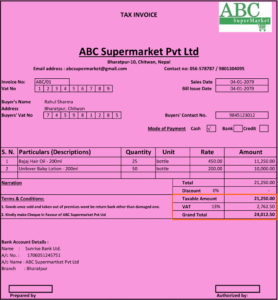
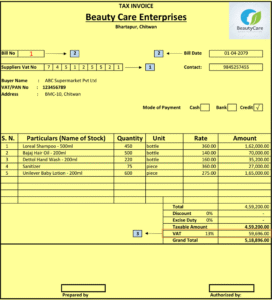
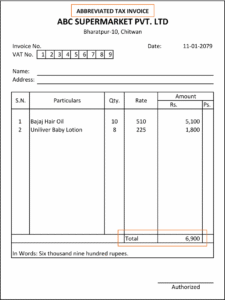
Important: VAT bills must be serially numbered without gaps. Skipping, repeating or cancelling numbers without proper documentation is a compliance violation.
How To Issue A VAT Bill Step By Step
You can issue a VAT bill in 2 ways in Nepal – byhand using a Printed Bill Pad (Bill Pad Method) or through Accounting Software such as Busy, Tally or the IRD’s online e-billing system. Both are legally valid.
Method A – Handwritten Bill Pad
- Place two carbon papers behind the first page of your bill pad so all 3 copies are written at once.
- Write today’s date in BS format at the top (e.g. 2082/02/07).
- Enter the buyer’s name. If the buyer is a registered firm, write the firm name and their PAN number in the ‘Kretako Kardaata Darta Number’ field. If the buyer is an individual purchasing less than Nrs. 1 lakh worth of goods, you may write just their name and leave the PAN field blank.
- List each item sold – item name, quantity, rate per unit and line total.
- Add all line totals to get the taxable amount (Kar Laagne Mulya).
- Calculate 13% VAT – multiply the taxable amount by 0.13.
- Add the taxable amount and VAT amount to get the grand total (Kul Jamma).
- Sign the bill in the ‘Bikretagko Hastakshar’ field.
- Tear off the original (red copy) and hand it to the customer. Keep the two carbon copies.
Method B – Software (Busy / Tally / e-Bill)
- Go to Transactions – Sales in your software.
- Press Enter twice to open a new sales entry.
- Select the date (auto-filled or enter manually).
- Search and select the buyer’s name. Use F3 to create a new party if needed – save them under Sundry Debtors.
- Enter item names one by one (search with the first few letters), quantities and confirm rates. The software calculates totals automatically.
- Press F4 to finalize and save. The bill number is assigned automatically in sequence.
- Print and hand the original to the customer. The software retains digital copies.
Pricing Tip: If you want to sell at a 3% markup above your purchase price, Calculate: Purchase Price × 1.03 = Selling Rate. This 3% covers your margin before the 13% VAT is added on top.
How Many Copies Of A VAT Bill Must You Keep?
A minimum of 3 copies of every VAT bill must exist. There is no maximum – you can make as many copies as your business needs. Here is what each copy is used for:
| Copy | Name | Purpose |
| 1st (Original) | Original / Red Copy | Given to the customer at the time of sale |
| 2nd (Carbon Copy) | Office Copy / OC | Kept by the seller as business transaction proof and for audit purposes |
| 3rd (Carbon Copy) | Auditor Copy | Provided to the auditor during statutory or tax audits |
The two carbon copies (copies 2 and 3) are sometimes referred to together as ‘Original Copy’ or ‘OC’. Your office copy is also your primary proof of business transactions and must be kept organized by date and bill number.
VAT Rate In Nepal – 13% And Non-VAT Items
Nepal’s standard VAT rate is 13%, applied on the taxable value of goods and services. However, certain essential goods are VAT-exempt (non-VAT items), meaning 13% is not added when you sell them. If you sell non-VAT items, the VAT line on the bill is crossed out or left blank and the total equals the taxable amount only.
Common Non-VAT (VAT-Exempt) Items In Nepal
These items do not attract 13% VAT. When selling them on a VAT bill, enter the amount under the ‘Sthaniya Kar Chutko Bikri’ (locally tax-exempt sales) line.
- Rice (Chamal) and rice bran (Kanika).
- Lentils and pulses – Masur daal, Maas daal, Chana, Kerau, Bodi.
- Flattened rice (Chiura) and puffed rice (Bhuja).
- Salt (Nun).
- Potatoes (Aalu) – added to the non-VAT list recently.
- Flour and whole wheat.
- Fresh vegetables and unprocessed agricultural produce.
All other goods – oils, biscuits, noodles, beverages, electronics, clothing and processed foods – are taxable at 13% VAT. When a single bill includes both VAT and non-VAT items, the bill shows two separate totals: the exempt amount on one line and the taxable amount with 13% VAT on another.
Rule To Remember: Do NOT write 13% on non-VAT items. Cross out or draw a line through the VAT section and write the total directly in Kul Jamma.
What To Enter In The VAT Register For Each Bill
| Column | What To Enter |
| Miti (Date) | Date of the VAT bill in BS format |
| Bijak Number | Bill number (sequential) |
| Kretako Naam (Buyer Name) | Customer or firm name |
| Kretako PAN Number | Buyer’s PAN/VAT number (if a firm; leave blank for individuals) |
| Kar Laagne Mulya (Taxable Amount) | Total before VAT (for VAT items) |
| 13% Bhyaat (VAT Amount) | 13% of the taxable amount |
| Sthaniya Kar Chutko Bikri | Total of non-VAT / exempt items (if any) |
- For Bills With Only VAT Items: fill in the taxable amount and VAT columns.
- For Bills With Only Non-VAT Items: fill in only the Sthaniya Kar Chutko Bikri column.
- For Mixed Bills: fill in both columns.
At the end of each month, total all columns. These totals feed directly into your D3 VAT return, which must be filed with the IRD every month.
VAT Mismatch – What It Is And How To Avoid It
A VAT mismatch (mismatch problem) happens when two businesses involved in the same transaction report different amounts to the IRD. Here is how.
- Business A buys goods worth NRs. 1, 00,000 from Business B. In A’s VAT return, A reports a purchase of NRs. 1, 00,000. But B only reports a sale of NRs 50,000 in their return. The IRD’s system flags this discrepancy – a mismatch.
- This matters because Nepal’s D3 VAT return (Schedule 13 / Anusuchi 13) requires businesses to list every transaction above NRs. 1 lakh by name and PAN number – for both buyers (debtor list) and sellers (creditor list). This cross-referencing means the IRD automatically detects when Party A’s purchase doesn’t match Party B’s sale.
| Mismatch Scenario | Risk |
| You reported NRs. 1 lakh in purchases – your supplier reported only NRs. 50,000 in sales | IRD flags your purchase – you may be denied VAT credit |
| You reported NRs. 80,000 in sales – your customer reported NRs. 1 lakh in purchases from you | IRD notices you under-reported sales – penalty and audit risk |
| Supplier issued a VAT bill but did not file it in their return | Your VAT credit claim is at risk even though you have the bill |
How To Avoid Mismatch
- Always ask your supplier for a VAT bill and ensure they file it in their return.
- Check that the amounts on your purchase bills match what your suppliers have declared.
- File your monthly D3 return accurately and on time.
- Keep all VAT bills organized by month and bill number.
Fake VAT Bills – Why They Are Illegal And How The IRD Tracks Them
A fake VAT bill (Nakkali Bhyaat Bill) is a bill issued for a transaction that did not actually happen. In Nepal, some businesses buy fake VAT bills to inflate their purchase figures and claim VAT credit they have not legitimately earned – reducing the tax they owe.
This is illegal and carries serious penalties. Under the VAT Act, issuing or using a fake VAT bill is a criminal offence. Every actual transaction must have a corresponding VAT bill – no more, no less. Fabricating purchases to reduce VAT payable is considered tax evasion.
The IRD detects fake bills through the mismatch system described above – if a supplier has no record of a sale but a buyer is claiming a purchase from them, the mismatch is automatically flagged. With Nepal moving toward faceless audits and electronic billing, the detection rate is increasing every year.
Penalties For Not Issuing A VAT Bill In Nepal
Failing to issue a VAT bill or issuing an incorrect one carries significant financial penalties under the VAT Act 2052.
| Violation | Penalty |
| Not issuing a VAT bill when required | NRs. 10,000 per missing invoice |
| Issuing an invalid / incomplete VAT bill | NRS. 10,000 per invoice |
| Using or issuing a fake VAT bill | Criminal prosecution + fine + potential business closure |
| Mismatch in VAT return (where under-reporting proven) | Additional tax assessment + interest + penalty |
| Not filing VAT return on time | NRs. 1,000 per month delay + interest on unpaid tax |
The IRD also has the authority to conduct a Full Audit (going back up to 4 years) if irregularities are detected. Keeping clean, accurate, and serially numbered VAT bills is your best protection.
Note: For the most current IRD rules and any updates to the VAT thresholds, always verify at the official IRD Nepal.