
Nepal Police Report Online – Police Clearance Certificate – 2026 Complete Guide
Planning to go abroad for work, a visa, study or immigration? One essential document you will almost certainly need before your embassy appointment is a Nepal Police Report officially called the Police Clearance Certificate (PCC).
Whether your employer, embassy or university calls it a Police Report or Police Clearance Certificate, they are asking for the exact same government-issued document.
This complete guide covers every step of the process – from applying Free Online at Nepal Police’s OPCR portal, using the Nagarik App or Ncell App, paying the NRs. 500/- Consular Stamp Fee, Downloading Your Certificate, Resolving The ‘On Hold’ Issue and Applying From Abroad.
Note: The Nepal Police Report can be applied for entirely free at opcr.nepalpolice.gov.np – available 24/7 from anywhere in the world. The only fee is NRs. 500/- for the consular attestation stamp, required for international use.
What Is Nepal Police Report? (Police Clearance Certificate)
The Nepal Police Report – officially called the Police Clearance Certificate (PCC) – is a government-issued document confirming whether an individual has any criminal record registered in Nepal Police’s Central Crime Database, maintained at Police Headquarters in Naxal, Kathmandu.
The certificate carries a digital signature from Nepal Police and is internationally recognized once stamped by Nepal’s Department of Consular Services.
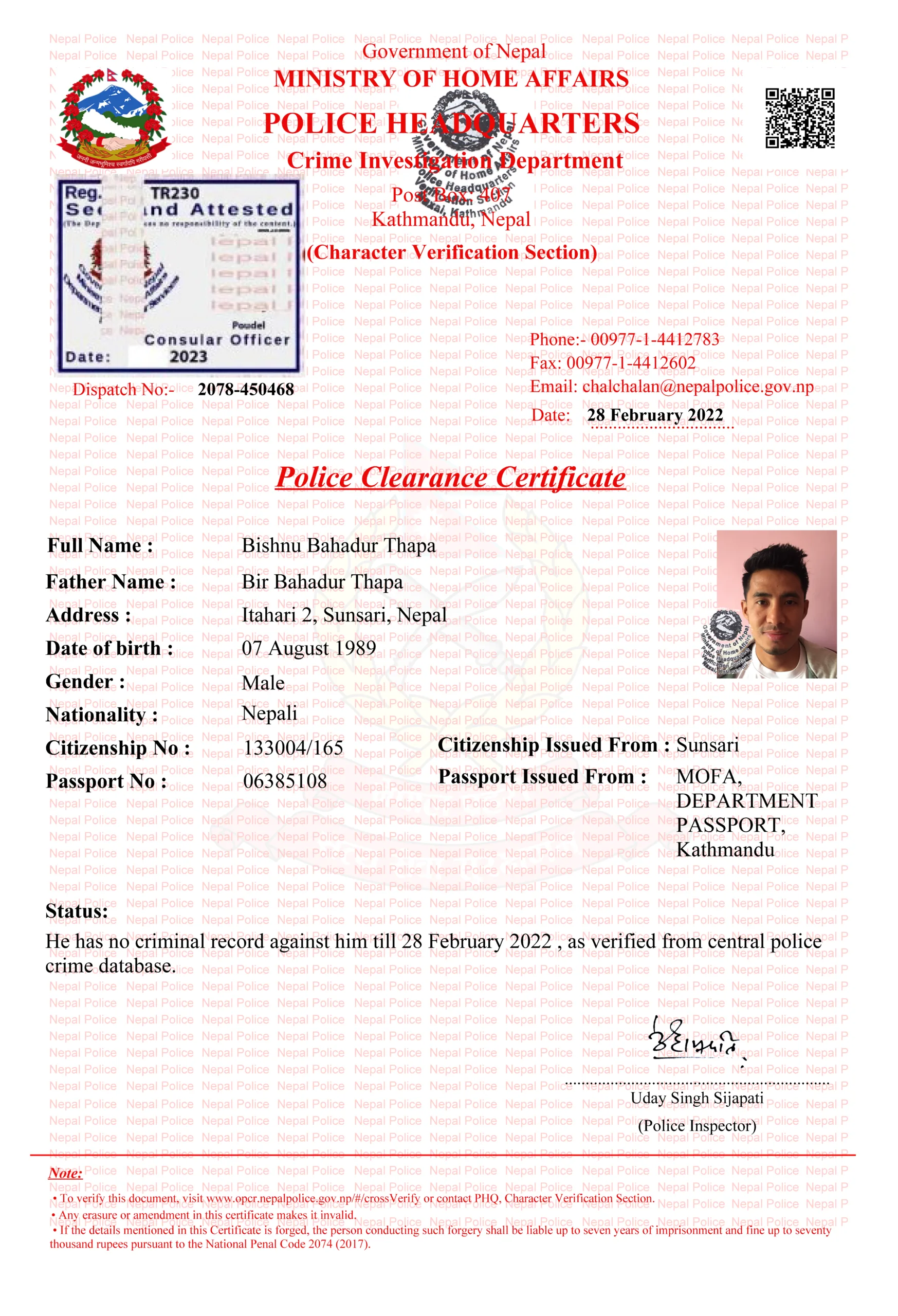
Police Report Vs. Police Clearance Certificate – Same Document
Police Report is the everyday Nepali term. Police Clearance Certificate (PCC) is the official government name. Both refer to the identical document. Throughout this guide, both terms are used interchangeably – exactly as Nepali citizens do.
Who Issues The Nepal Police Report?
Nepal Police issues the PCC through the Online Police Clearance Registration (OPCR) system. Verification is handled by the Criminal Records Section at Nepal Police Headquarters, Naxal, Kathmandu.
For international use, the certificate is additionally stamped (Attested) by the Department of Consular Services under Nepal’s Ministry of Foreign Affairs (MOFA).
Who Needs A Nepal Police Report?
| Purpose | Details |
| Visa Application | Required by almost every country for work, tourist, settlement, dependent and immigration visas |
| Foreign Employment | Mandatory for countries like Qatar, UAE, Australia, UK, Japan, South Korea – especially for security-sensitive roles |
| Study Abroad | Universities and scholarship programs in the US, UK, Canada and Australia require PCC as part of admissions |
| Job Application (Nepal & Abroad) | Required in banking, healthcare, education, security and government roles |
| Immigration / PR / DV Lottery | Mandatory for US Green Card, Australian PR, Canadian immigration and other residency programs |
| Legal Proceedings Abroad | Required for officially attested submissions to foreign courts |
| Foreigners & Refugees in Nepal | Foreign nationals and refugees who resided in Nepal may also need a PCC for the period of their stay – apply at the OPCR portal |
Eligibility Criteria For Nepal Police Report
Before applying, confirm you meet the following eligibility requirements:
Citizenship Requirements
- You must be a Nepali citizen, a legal resident of Nepal or a foreign national/refugee who resided in Nepal.
- You must hold a valid Nepali citizenship certificate (for Nepali citizens) or a valid visa/residence permit (for foreign nationals).
Legal Status
- Applicants should have no unresolved criminal cases in Nepal.
- No outstanding legal obligations under Nepali law.
Age Requirements
- Applicants must be at least 16 years old.
- For individuals under 16, a parent or guardian must apply on their behalf.
Required Documents For Nepal Police Report
A. For Online Application (OPCR Portal)
Scan and prepare the following before starting. Files must be in JPEG, PNG (images) or PDF (multi-page). Safe File Size – up to 150 KB per file (300 KB maximum).
| Document | Requirement / Notes |
| Citizenship Certificate – Front & Back | Mandatory for all Nepali citizens. Scan both sides clearly. |
| Valid Passport – Pages 2, 3, and 31 | Required for visa, immigration and employment applications. Old-format passports: merge pages 30 & 31 into one scan. |
| Passport-Size Photo | 3.5 cm × 4.5 cm (35mm × 45mm). Plain white background. Both ears fully visible. Face covering at least 50% of image. Recent photo only. |
| Marriage Certificate | Required if married – allows spouse name to appear on the report. |
| Migration Certificate | Required only if you have permanently relocated to a new address since your citizenship was issued. |
| Purpose Letter / Supporting Document | Explains the reason – visa application letter, job offer letter, university admission letter etc. |
| Proof of Address | Required document – recent utility bill (electricity, water, gas or internet), voter ID card or lease/rental agreement. Must be dated within the last 3–6 months. |
B. For Foreign Nationals Residing In Nepal
- Scanned copy of passport (all relevant pages).
- Valid visa or residence permits from your time in Nepal.
- Work permit or educational certificate (if applicable).
- Any document verifying your stay in Nepal.
C. For Offline (In-Person) Application
- Original citizenship certificate + one photocopy.
- Original valid passport + one photocopy.
- 2 to 4 recent passport-size photographs.
- Proof of current residence (utility bill or rental agreement – dated within 3-6 months).
- Completed PCC application form (collected at the police station).
- Processing Fee In Cash – NRs. 500/- To NRs. 1,000/- (varies by district).
Fees And Processing Time
| Service | Fee (NPR) | Notes |
| Online Application (OPCR Portal) | Free | Apply at opcr.nepalpolice.gov.np – no charge |
| Offline at District Police Station | NRs. (500 – 1,000)/- | Varies by district |
| Express / Urgent Processing at Police HQ | NRs. (1,500 – 2,000)/- | Visit Nepal Police HQ, Naxal in person |
| Consular Attestation (Stamp) | NRs. 500/- | Paid at att.nepalconsular.gov.np |
| Connect IPS Transaction Fee | NRs. 2/- extra | Small gateway charge on top of NRs. 500/- |
| Door-to-Door Stamp Delivery (MOFA) | NRs. (1,000 – 1,200)/- | Additional fee for pickup/delivery service |
| Application Type | Estimated Time |
| Online (OPCR Portal) – standard | 2-3 working days |
| Online (Nagarik App) | 3-7 working days (may take longer than OPCR portal) |
| Online – name matches suspect (On Hold) | 1-2 weeks – requires visit to Police HQ, Naxal |
| Offline / In-Person at Police Station | 1-3 working days |
| Consular Stamp after downloading report | 5-6 hours to 1-2 working days |
| Full process (report + stamp) | 3-5 working days total |
| Urgent processing (visit Naxal HQ in person) | Same day to 1-2 days |
Note: Processing can slow significantly during public holidays and festival seasons. Always apply at least 2-3 weeks before your visa interview, embassy appointment or submission deadline.
How To Apply For Nepal Police Report Online – Step By Step (OPCR Portal)
The official online application portal is available 24/7 opcr.nepalpolice.gov.np
Step 1 – Create Your Account
- Open your browser and go to opcr.nepalpolice.gov.np
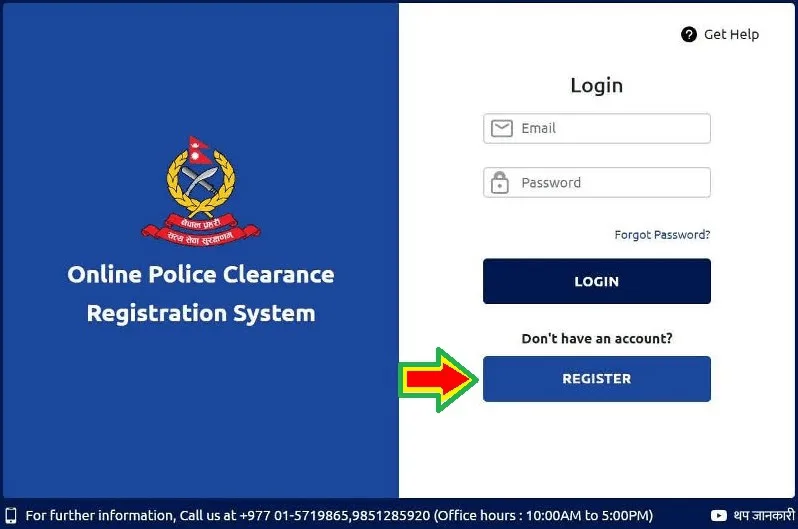
- Click Register on the homepage.
- Select your category: ‘I Am Nepali’, ‘I Am Foreigner’ Or ‘I Am Refugee’. Click Next.
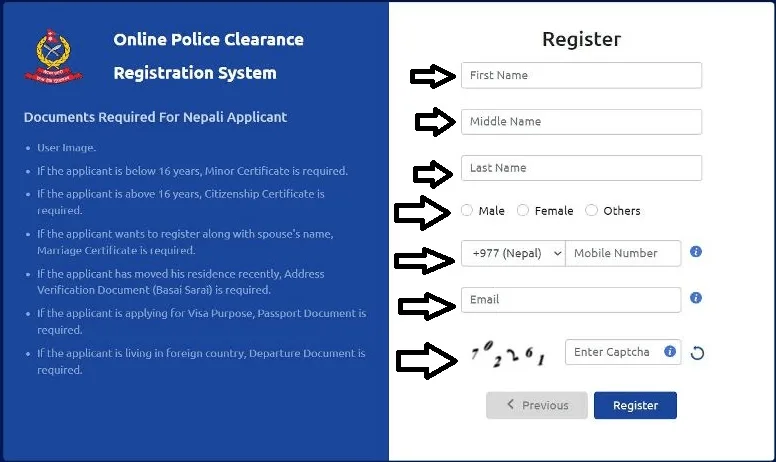
- Enter your full name, gender, mobile number and email address. Complete the CAPTCHA and click Register.
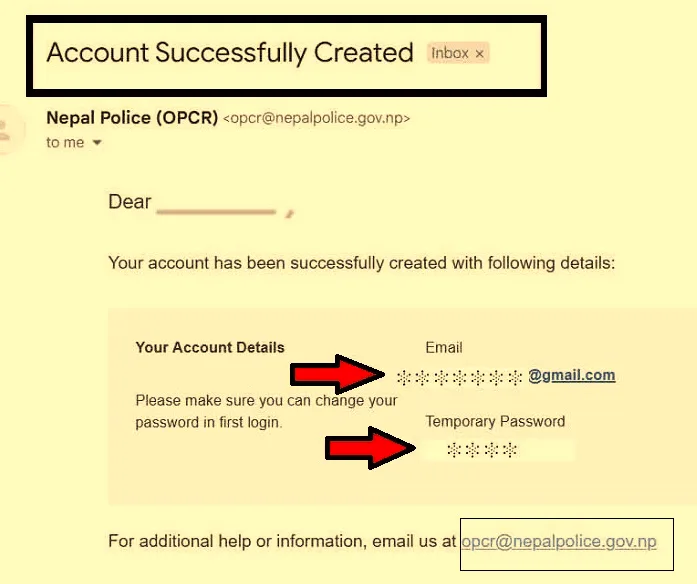
- Check your email – you will receive your username and a temporary password or verify your account through email.
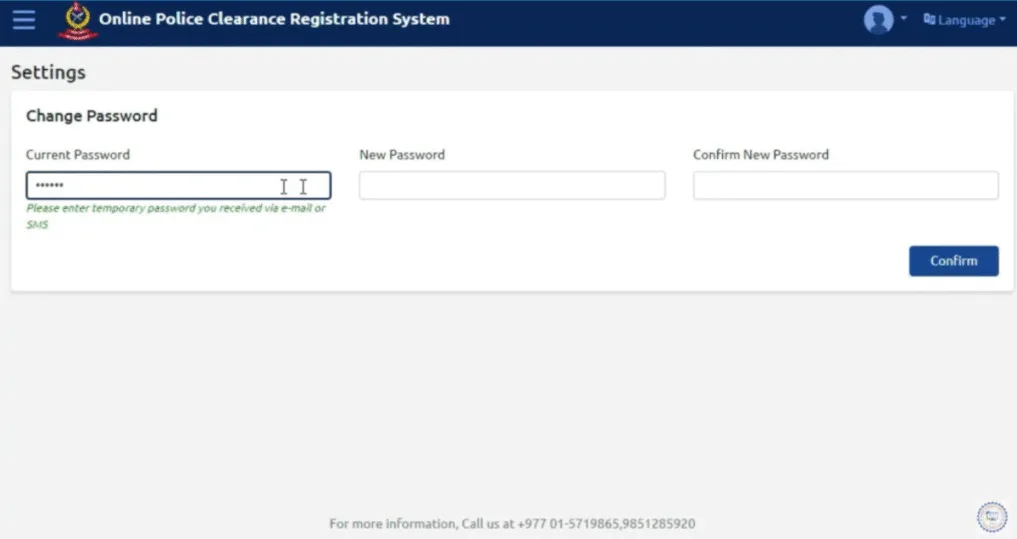
- Return to the login page. Enter your email and temporary password.
- You will be prompted to set a new secure password immediately and change to new password with the help of email and OTP (One Time Password) send On Your mobile or email.
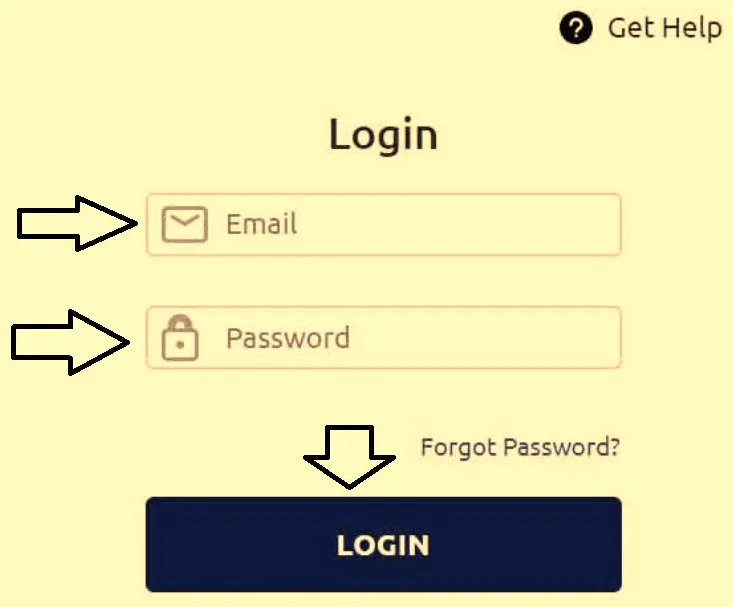
- Log back in using your email and new password.
Note: Use a personal email address you check regularly – all status notifications and temporary passwords are sent here.
Step 2 – Fill The Online Application Form
After logging in, click Online Application for Police Clearance Certificate. The form has 5 Stages.
Stage 1 – Personal Information
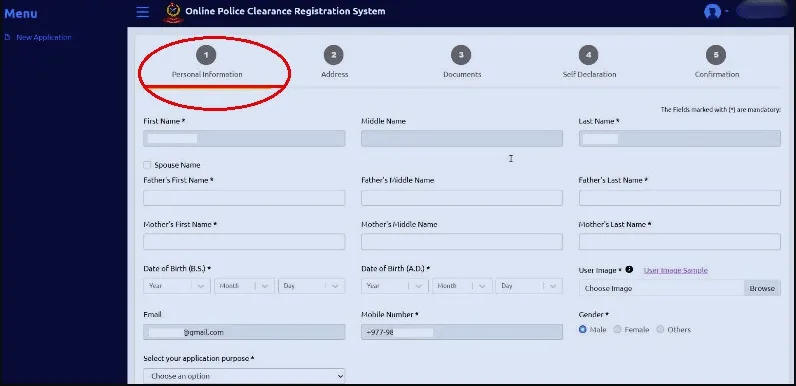
- Enter your first, middle and last name exactly as on your citizenship certificate.
- Add your parents’ names, date of birth in both B.S. and A.D. formats, gender, mobile, email, and spouse’s name (if married).
- Upload your passport-size photo.
- Select your application purpose.
- Also enter the country you are visiting and the specific purpose of your travel (visa, employment, study, immigration, personal record).
- If applying for a visa, select Apply With Citizenship And Passport.
Stage 2 – Address
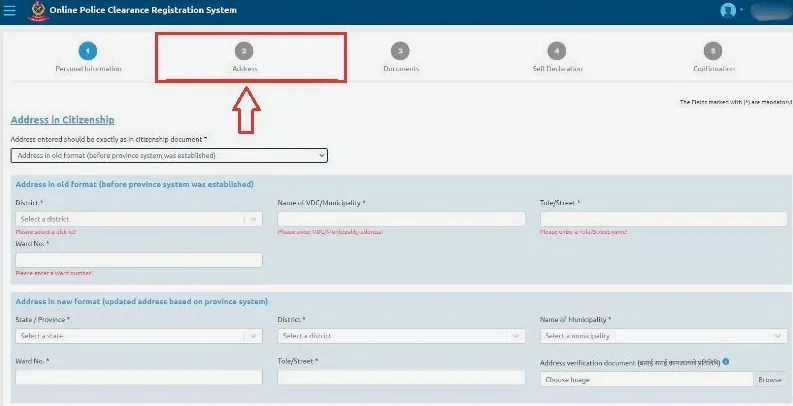
- Identify whether your citizenship is old format (pre-federalism) or new format (post-federalism).
- Enter your permanent address exactly as it appears on your citizenship – even if your current address is different.
- Advice: Address mismatch is the single most common cause of rejection. Copy your address character-by-character from your citizenship, including old district names on older-format certificates.
Stage 3 – Documents
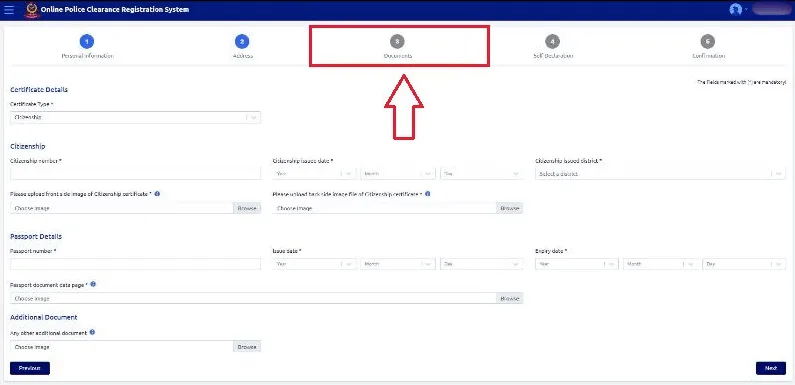
- Enter your citizenship number, issue date and issue district.
- Upload front and back of citizenship certificate.
- Upload marriage certificate (if married).
- Upload passport pages 2, 3, and 31. Old-format passports – merge pages 30 and 31 into a single scan.
- Add any additional supporting documents.
Stage 4 – Self-Declaration
- Question: ‘Do you have a criminal history?’ Answer: Select ‘No’ if none.
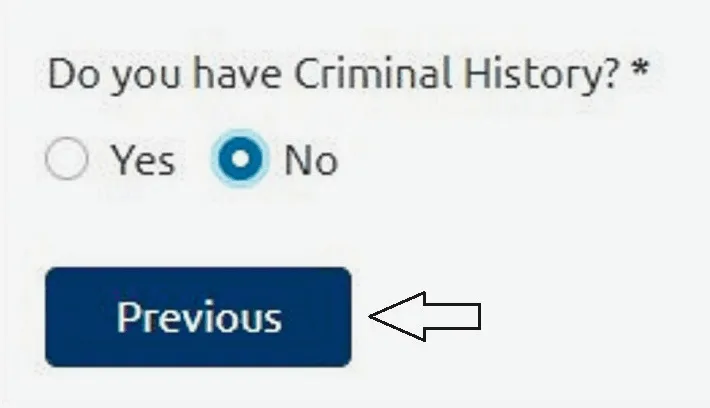
- If you have any prior case (resolved or unresolved), select ‘Yes’ and provide accurate details. Dishonest declarations can result in permanent rejection.
Stage 5 – Confirmation
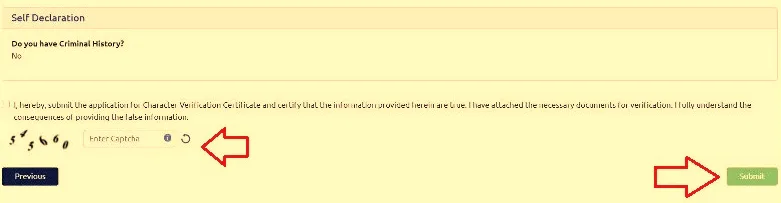
- Review all details carefully. Complete the CAPTCHA. Click Submit.
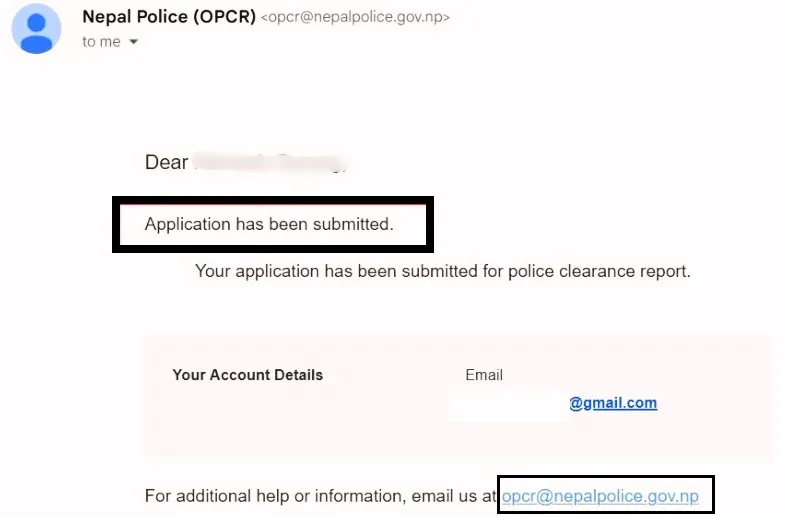
- You will receive a confirmation email that your application was submitted successfully. Note your reference number for tracking.
Offline (In-Person) Application Process
- Visit your nearest District Police Office (DPO) or Metropolitan Police Office.
- Request and collect the PCC application form at the counter.
- Fill in accurate personal information – full name, current address, date of birth, citizenship number, and purpose.
- Submit required documents – original citizenship certificate, valid passport, photographs and proof of residence.
- Pay the processing fee in cash (NRs. 500/- to NRs. 1,000/- depending on district). Collect your payment receipt.
- Police conduct background verification across relevant districts.
- Return with your original receipt and valid ID to collect your Police Clearance Certificate – usually within 1-3 working days.
How To Download Your Nepal Police Report
- Visit opcr.nepalpolice.gov.np and log in.
- Click ‘View Application Status’.
- When status shows ‘Completed’ or ‘Approved’, click ‘Download Certificate’
- The certificate opens as a PDF in a new browser tab.
- Click the download icon (top-right) to save.
Specific Note
• Note the Dispatch Number printed in the top-left corner of your downloaded certificate immediately. You will need this exact number to apply for the consular stamp. Do not lose it.
• Save both a colour PDF and a black-and-white printed copy. For US DV Lottery / Green Card, a colour printout is generally accepted – always verify with the US Embassy or your immigration attorney.
• The certificate is issued in both English and Nepali. If a foreign authority specifically requires a certified English-only translation, this can be obtained through authorized Nepali translation services.
• If the certificate has a QR code, no further manual verification is required – the QR code confirms authenticity automatically.
How To Check – Track Your Nepal Police Report Status
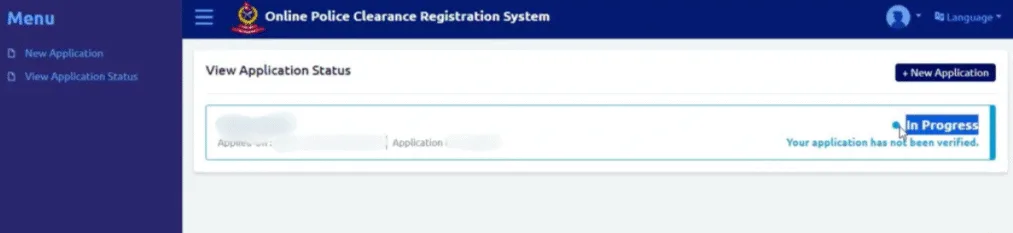
- Visit opcr.nepalpolice.gov.np and log in.
- Click ‘View Application Status’
- Your application will display one of the following statuses.
| Status | Meaning | What to Do |
| In Progress / Under Review | Application is being verified by police | Wait – check again after 1-2 working days |
| Pending Additional Information | More documents or corrections needed | Log in and upload the missing/corrected documents immediately |
| Approved / Completed | Police Report is ready to download | Click ‘Download Certificate’ immediately |
| Rejected | Application has issues – missing data, incorrect documents etc. | Review the rejection reason, fix the issue and re-apply from the same account |
| On Hold | Your details match a suspect or require further clarification | See Section 11 – On Hold Resolution |
How To Get The Consular Stamp On Your Police Report
What Is the Police Report Stamp?
The consular stamp – officially called consular attestation – is an authentication seal applied by Nepal’s Department of Consular Services, MOFA.
It confirms the certificate is genuine and authenticated by the Nepalese government for international use. Required for embassy submissions, foreign employment and immigration processes.
| Feature | Stamped Police Report | Unstamped Police Report |
| Official Verification | MOFA consular seal applied | Not officially attested |
| Accepted Abroad | Yes – embassies, immigration, foreign employers | Not accepted for foreign legal/visa use |
| Primary Use | International visa, immigration, employment | Domestic use and personal reference |
| Cost | NRs. 500/- (government fee) | Free |
| QR Code Verification | If QR code present – no further verification needed | Manual verification Via Nepal Consular |
Online Stamp Process – Step By Step
Step 1: Visit att.nepalconsular.gov.np
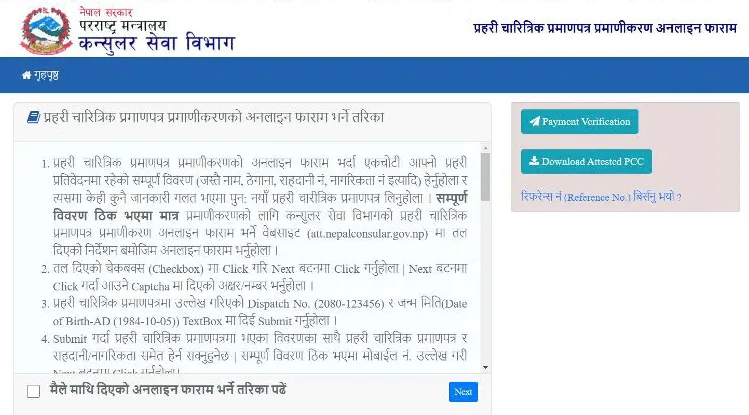
Step 2: Read the instructions, tick the declaration checkbox, and click Next.
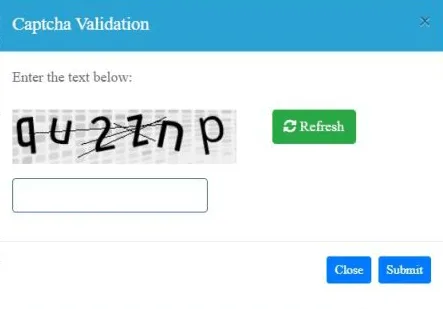
Step 3: Complete the CAPTCHA and click Submit.
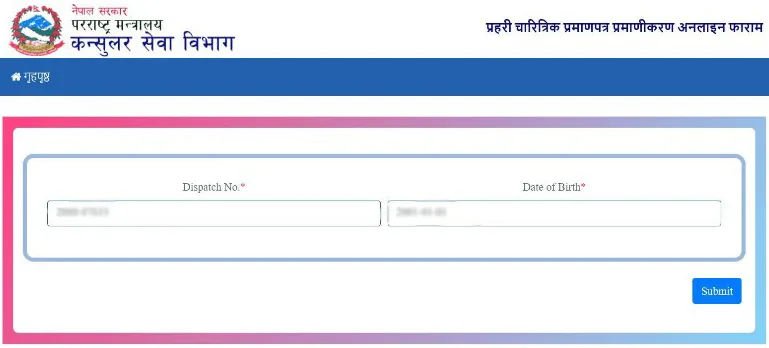
Step 4: Enter your Dispatch Number (from top-left of downloaded Police Report) and Date of Birth in A.D. format. Click Submit.
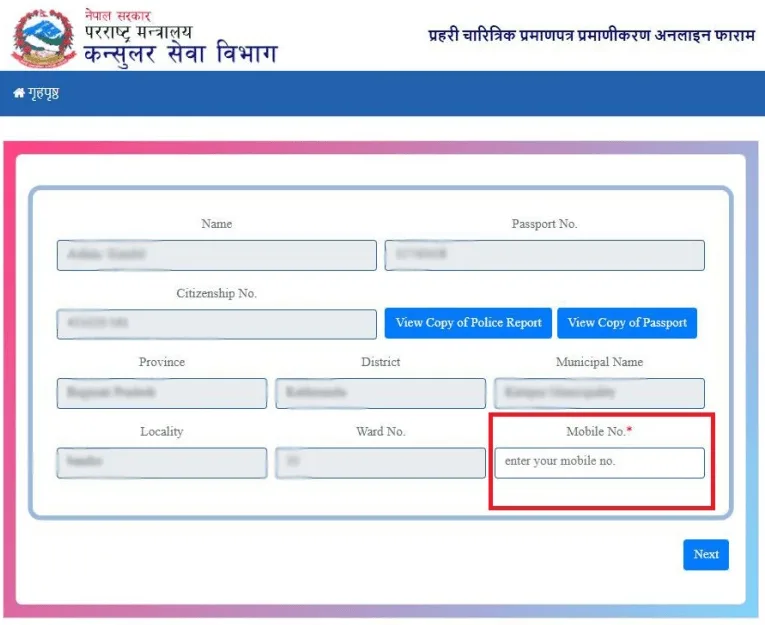
Step 5: Verify displayed details are correct. Enter your mobile number and click Next.
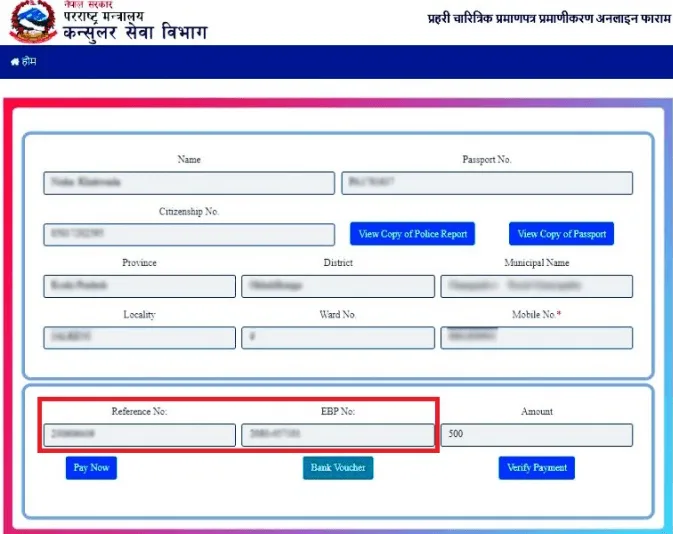
Step 6: Your Reference Number and EBP Number will appear. Copy and save both – these are critical for completing payment and downloading your stamped certificate.
Step 7: Click ‘Pay Now’ Choose your payment method.
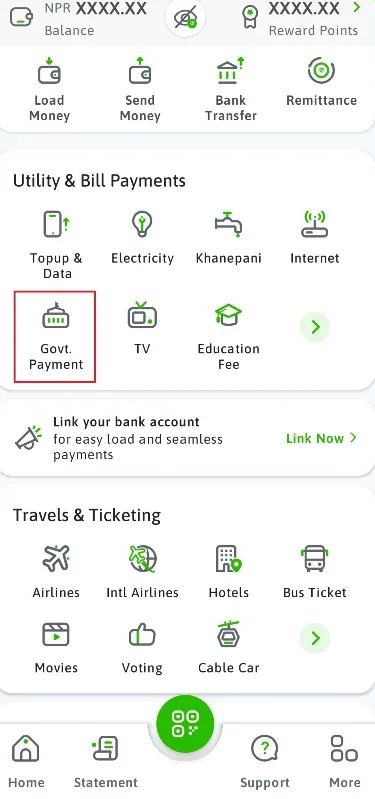
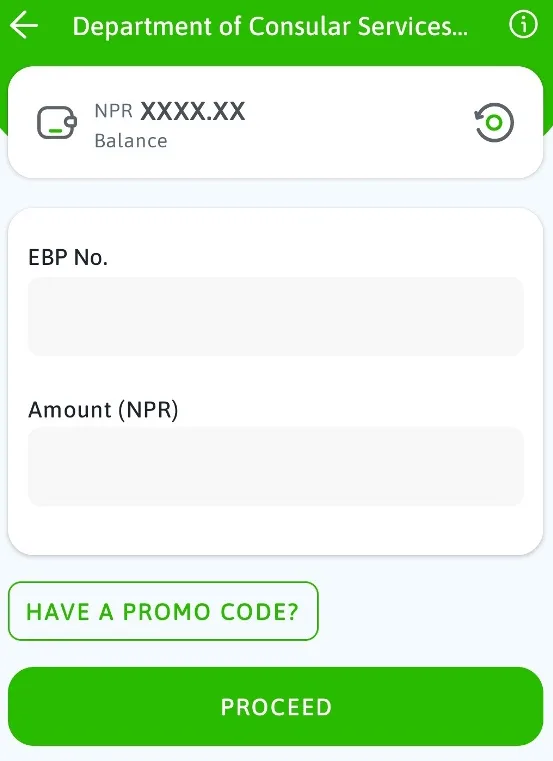
- eSewa: Open the eSewa app – tap ‘Govt. Payment’ – enter your EBP Number – enter Amount NRs. 500/ confirm payment with OTP.
- Khalti: Enter Khalti credentials and confirm payment.
- Connect IPS: Enter username, CAPTCHA and password – note NRs. 2/- extra transaction fee applies.
- IME Pay: Enter IME Pay credentials.
- Bank Voucher: Click ‘Create Bank Voucher’ print it and pay at any Global IME Bank branch.
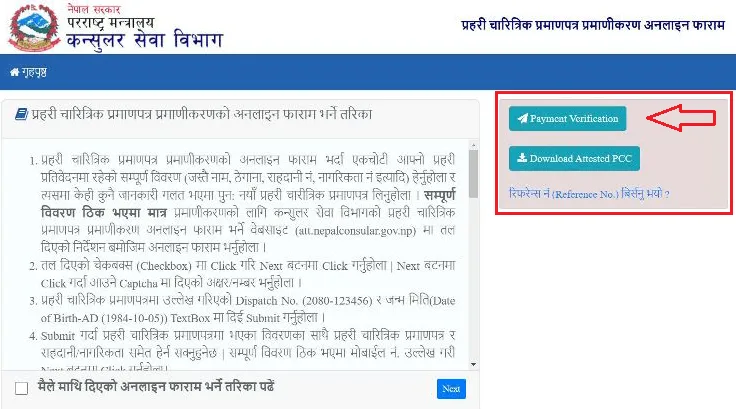
Step 8: After payment, click ‘Verify Payment‘. You will see: ‘Payment is Verified and Your Application is Submitted Successfully.’
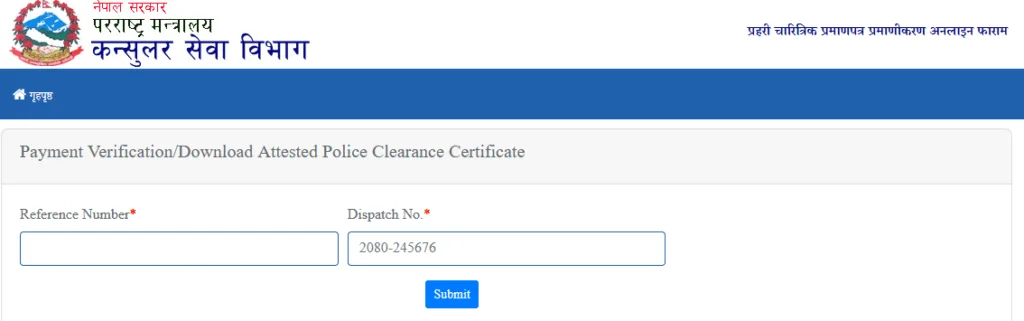
Note: If the website redirects unexpectedly after payment, do not panic. Return to att.nepalconsular.gov.np, go to ‘Payment Verification’ and enter your Reference Number and Dispatch Number to confirm your payment was received.
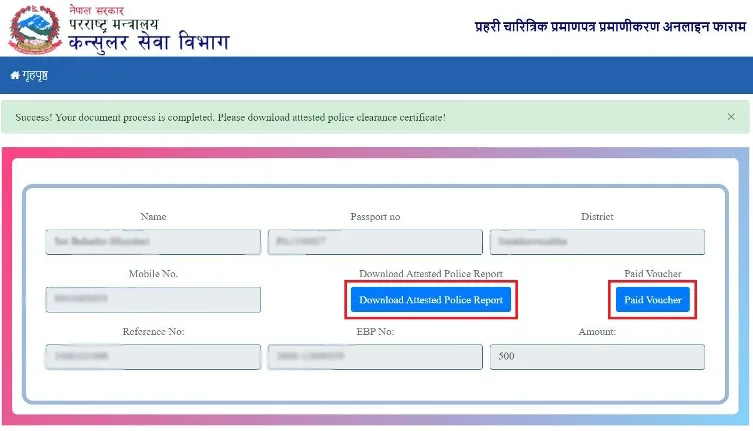
Step 9: Download your Paid Voucher using the Download PDF option (do not use Print).
How To Download The Stamped Police Report
- Wait approximately 1 working day after payment for attestation processing.
- Return to att.nepalconsular.gov.np
- Click ‘Download Attested PCC‘ (Top-Right Of Homepage).
- Enter your Reference Number and Dispatch Number. Click Submit.
- You will see: ‘Success! Your document process is completed’ Click ‘Download Attested Police Report’ The stamped certificate downloads as a PDF.
- Open the file and confirm the consular stamp is clearly visible and all details are correct.
Note: Forgot your Reference Number? Click ‘Forgot Reference Number’ on the consular site. Enter your Dispatch Number and Date of Birth to retrieve it.
Stamp Office Location – Tripureshwor
- Department of Consular Services, Ministry of Foreign Affairs (MOFA), Tripureshwor, Kathmandu
- The only office that provides internationally valid consular stamps for embassy and immigration use.
- Working Hours: Sunday to Friday, 10:00 AM – 5:00 PM.
- A door-to-door document pickup and delivery service is available through the MOFA portal at an additional fee of approximately NRs. 1,000/- to NRs. 1,200/- depending on location.
What To Do If Your Application Is On Hold
This does NOT mean you are guilty of any crime. Thousands of innocent Nepali citizens face this situation every year and resolve it successfully.
Why Applications Go On Hold
- Your name, date of birth or address closely resembles another person with a criminal record in Nepal Police’s database.
- Someone has misused your citizenship documents, linking your details to a case.
- Old, unresolved cases in the police database have not been updated after closure.
- Multiple people with identical names and similar personal details exist in the police record system.
Step-By-Step Resolution
- Do not reapply or panic. Note your Application ID from the OPCR portal.
- Call Nepal Police HQ: 01-5719865 or 9851285920. Explain your situation with your Application ID – many cases are resolved by phone.
- If not resolved by phone, take your original citizenship certificate (and a copy) to Nepal Police Headquarters, Naxal, Kathmandu.
- Go to the Chal Chalan Shakha (Conduct Section). They will identify which case your details are linked to and which station/court holds the record.
- Receive official paperwork directing you to the relevant District Administration Office (DAO) or District Police Office.
- At the DAO, submit your citizenship and three-generation genealogy details (Teen Pusta Bibaran) to clear your name.
- The DAO sends an official email to Nepal Police HQ confirming your identity clearance.
- Once cleared, your Police Report is automatically approved online.
Note: This process typically takes 1-2 weeks. If you have a visa appointment approaching, begin immediately. Apply for your Police Report as early as possible.
Nepal Police Report – Nagarik App – Complete Guide
The official Nagarik App is a government-launched mobile platform providing Nepali citizens with centralized access to government services including the Police Clearance Certificate.
Download – Nagarik App
- Android Users: Search ‘Nagarik App’ on Google Play Store.
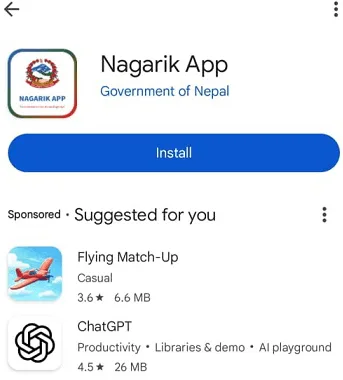
- Iphone/iOS Users: Search ‘Nagarik App’ on the Apple App Store.
Safe Note: Your SIM card must be registered in your own name (Nepal Telecom, Ncell, or Smart Telecom). The Nagarik App will not function correctly if the SIM is not verified under your personal identity. This is required to prevent identity theft.
Step 1: Register and Log In
- Open the Nagarik App and select your preferred language.
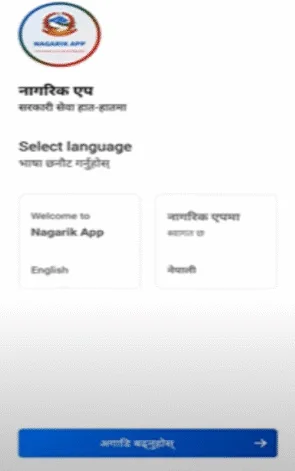
- Enter your registered mobile number and tap Enter.
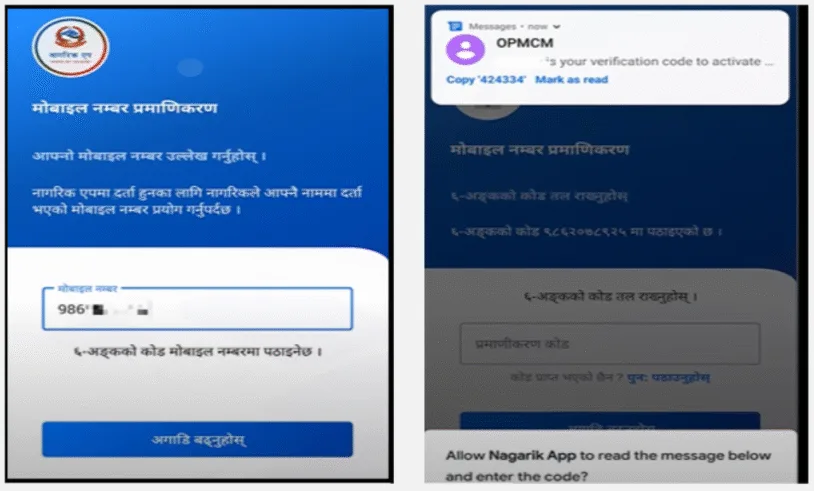
- You will receive an OTP via SMS – enter it or let the app auto-detect it (Only if you use same entered number in used mobile during login).
- You are now logged in. You will be asked to verify and link your documents.
Step 2: Link Required Documents To Your Profile
Before applying for a Police Report, you must link the following documents to your Nagarik App profile.
- Citizenship Certificate – mandatory for all PCC applications.
- E-Passport – required if applying for visa, travel or immigration purposes.
- Voter ID and Driving License – link these if available.
Step 3: Apply For Police Clearance Certificate
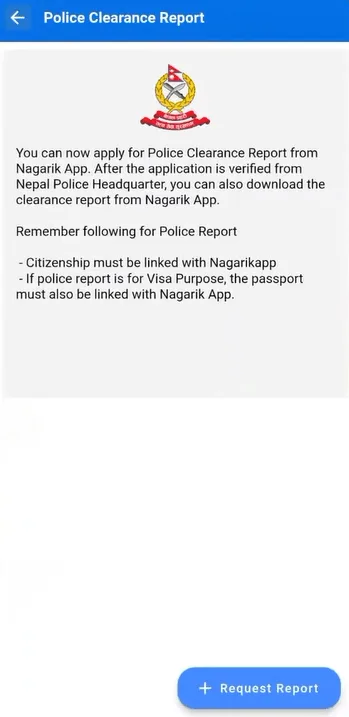
- In the app dashboard, tap ‘Police Clearance Certificate’
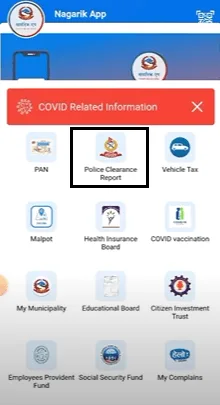
- Tap ‘Request Report’
- Fill in your personal details: full name, address, contact information.
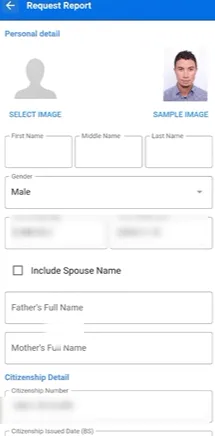
- Upload a recent passport-size photograph meeting these exact specifications.
- Size: 35mm × 45mm (same as 3.5 cm × 4.5 cm)
- Background: Plain white, borderless.
- Face Coverage: 70-80% of total image area.
- Body Coverage: 20-30% of image.
- Resolution: 600 to 1200 DPI
- File Size: 1 MB to 2.5 MB
- Type: Color photo only – no black & white, no filters
- Recent Photo – No Old Photos: both ears fully visible – no glasses or hats.
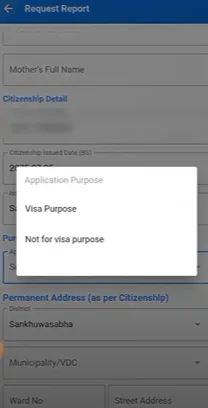
- Select your application purpose (foreign employment, visa, study, immigration, personal record) and tap Proceed.
- Submit your application. It is forwarded to Nepal Police Headquarters for verification.
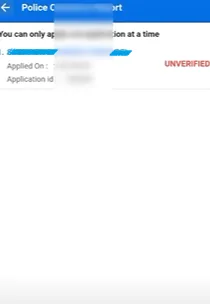
- Once approved, go to the Police Clearance Certificate section in the app and download your certificate as a PDF.
Time And Important Note
• Processing Time Via Nagarik App: generally 3-7 working days – which can be longer than the OPCR portal’s standard 2–3 days. If speed is important, apply directly at opcr.nepalpolice.gov.np
• The Nagarik App is for individual use only – you cannot apply on behalf of another person through this app.
Nepal Police Report Via Ncell App
Ncell has integrated Nepal Police’s PCC service (Online Police Clearance Registration System) into its customer app as part of the Digital Nepal Framework. This makes the Police Report/ Police Clearance Certificate even more accessible – especially for Ncell subscribers.
Key Features Of The Ncell App PCC Service
- PCC application directly via the Ncell App – no physical visits required.
- Zero Data Charge: Browsing the full Nepal Police website (nepalpolice.gov.np) – including PCC applications and crime reports – is completely free for Ncell users.
- OTP-based authentication ensures secure identity verification.
- Data is encrypted for security during transmission.
How To Apply PCC Via Ncell App
- Download or update the Ncell App from Google Play Store or Apple App Store.
- Open the app and log in using your Ncell mobile number.
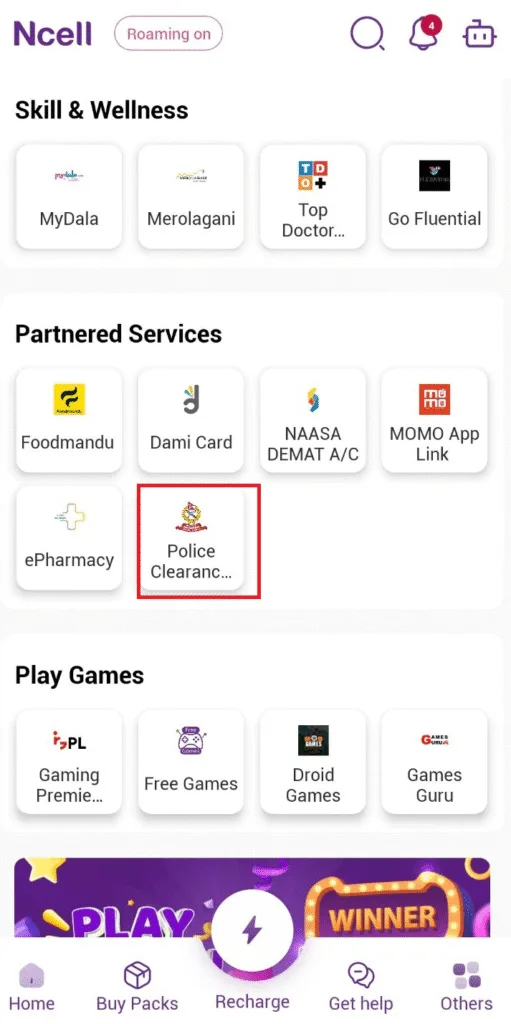
- Tap ‘Police Clearance Certificate’ or ‘PCC’ on the homepage.
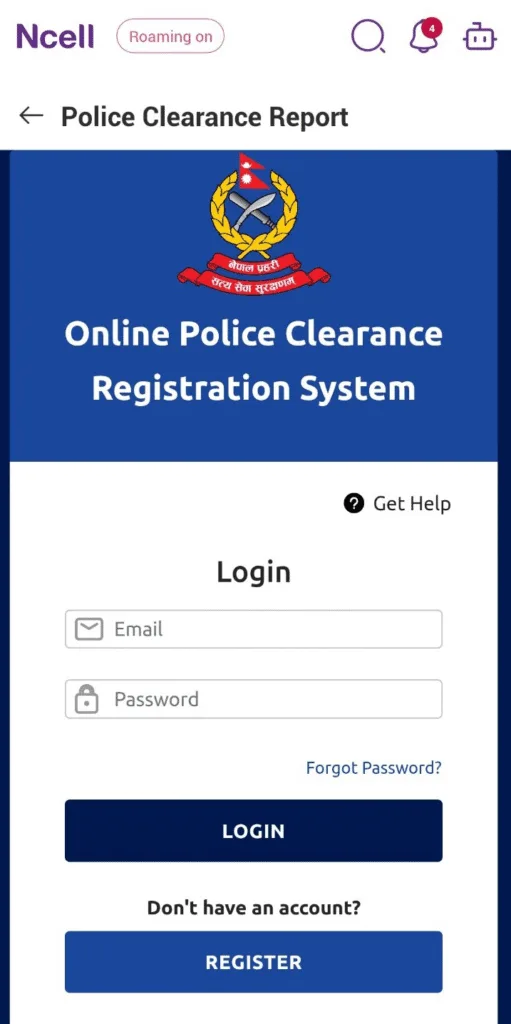
- Fill In All Required Fields: full legal name as per citizenship or passport, date of birth, citizenship or passport number, permanent and temporary addresses, purpose for applying.
- Upload required documents or scanned ID proof if prompted.
- Submit the application and wait for confirmation.
- Track your status or download the Police Clearance Certificate once issued.
Helpful For You: Ncell has zero-rated the Nepal Police website – meaning the entire opcr.nepalpolice.gov.np portal can be accessed without using any mobile data if you are on the Ncell network.
Nepal Police Report From Abroad
You do not need to be physically present in Nepal to apply. The entire OPCR process is online and accessible globally.
- Apply online at opcr.nepalpolice.gov.np using your Nepali citizenship certificate and passport documents.
- Once approved (2-3 working days), download the certificate as a PDF from the portal.
- For consular attestation, complete the stamp process at att.nepalconsular.gov.np and pay NRs. 500/- using eSewa, Khalti, Connect IPS or another supported method.
- Download the final stamped certificate – no physical visit to Nepal is required for the digital version.
Note: Some Nepali citizens living abroad face issues receiving the OTP on their foreign mobile number during registration. If this occurs, use a trusted contact in Nepal who can receive the OTP and relay it to you – or use a Nepali mobile number forwarded to your device.
Power Of Attorney (POA) – Applying Through A Representative
If you are overseas or otherwise unable to apply yourself, you can authorize a trusted person in Nepal to submit a Police Report application on your behalf.
- Provide a signed authorization letter or Power of Attorney (POA) document.
- Supply copies of your citizenship certificate, passport and a recent photograph.
- Your authorized representative submits the application online using your details via the Nepal Police OPCR portal or Nagarik App.
- Once issued, the PCC can be downloaded, collected, or sent to you digitally.
Before applying via POA, verify with the specific embassy or organization where you plan to use the PCC whether applications made through an authorized representative are accepted.
Embassy – Consulate Verification for Nepalis Abroad
- Nepal Embassy London: Submit a colour copy of your Police Report and a completed verification form. Fee: £75 (Visa/Mastercard/Maestro). Same-day processing in most cases. Email: consular@nepembassy.org.uk Tel: 02072291594.
- For postal applications to the Nepal Embassy London, a virtual payment link is sent to your email.
- For Hong Kong ID Card Holders: A recommendation letter from the Nepal Embassy is available – same-day processing, £75 fee.
For US Green Card (DV Lottery) applications, the Nepal Police Report typically does not need a consular stamp – a colour digital printout is generally accepted. Always verify directly with the US Embassy Kathmandu or your immigration attorney.
Office Locations And Working Hours
| Office | Working Days | Hours |
| OPCR Online Portal (opcr.nepalpolice.gov.np) | 24/7 – always available | Apply anytime |
| Nepal Police HQ – Naxal (Urgent/On-Hold Cases) | Sunday to Friday | 10:00 AM – 5:00 PM |
| OPCR Helpline / Contact | Sunday to Friday | 10:00 AM – 4:00 PM |
| Dept. of Consular Services – Tripureshwor | Sunday to Friday | 10:00 AM – 5:00 PM |
| MOFA Attestation Correction Window | Saturdays only | 10:00 AM – 5:00 PM |
Contact Information
| Contact | Details |
| OPCR Portal | opcr.nepalpolice.gov.np |
| Nepal Police Website | nepalpolice.gov.np |
| Consular Attestation Portal | att.nepalconsular.gov.np |
| Phone – Nepal Police HQ (OPCR) | +977-01-5719865 |
| Phone – OPCR Mobile | +977-9851285920 |
| Email – OPCR | opcr@nepalpolice.gov.np |
| General Nepal Police Email | info@nepalpolice.gov.np |
| Office Hours (Police HQ / Consular) | 10:00 AM – 4:00 PM – Sunday to Friday |
| Nepal Embassy London (PCC Verification) | £75 – consular@nepembassy.org.uk – 02072291594 |
| Nepal Police Tel (General) | +977-1-5719900 |