
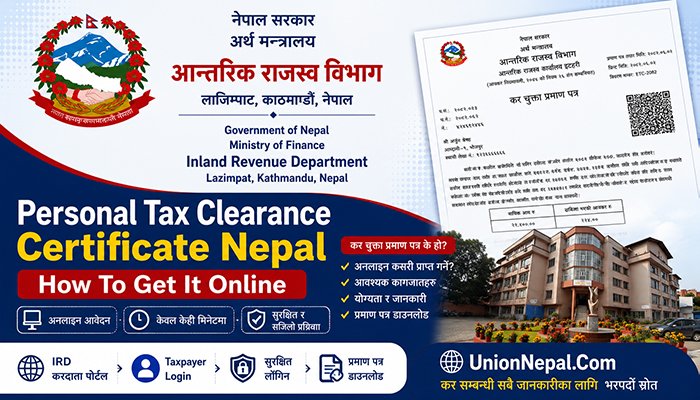
Personal Tax Clearance Certificate – Nepal – Complete Online Guide 2026
A Personal Tax Clearance Certificate, known in Nepali as Kar Chukta Pramanpatra, confirms that an individual taxpayer has paid income tax and filed the required returns for a fiscal year, with no outstanding liability against their PAN.
Individuals request it for visas, bank loans and embassy income proof or simply to keep their financial records straight.
The Inland Revenue Department (IRD) has made the process almost entirely digital for salaried individuals with a straightforward tax situation.
This guide walks you through the complete process, from checking eligibility to downloading your certificate, based on the current Taxpayer Portal workflow.
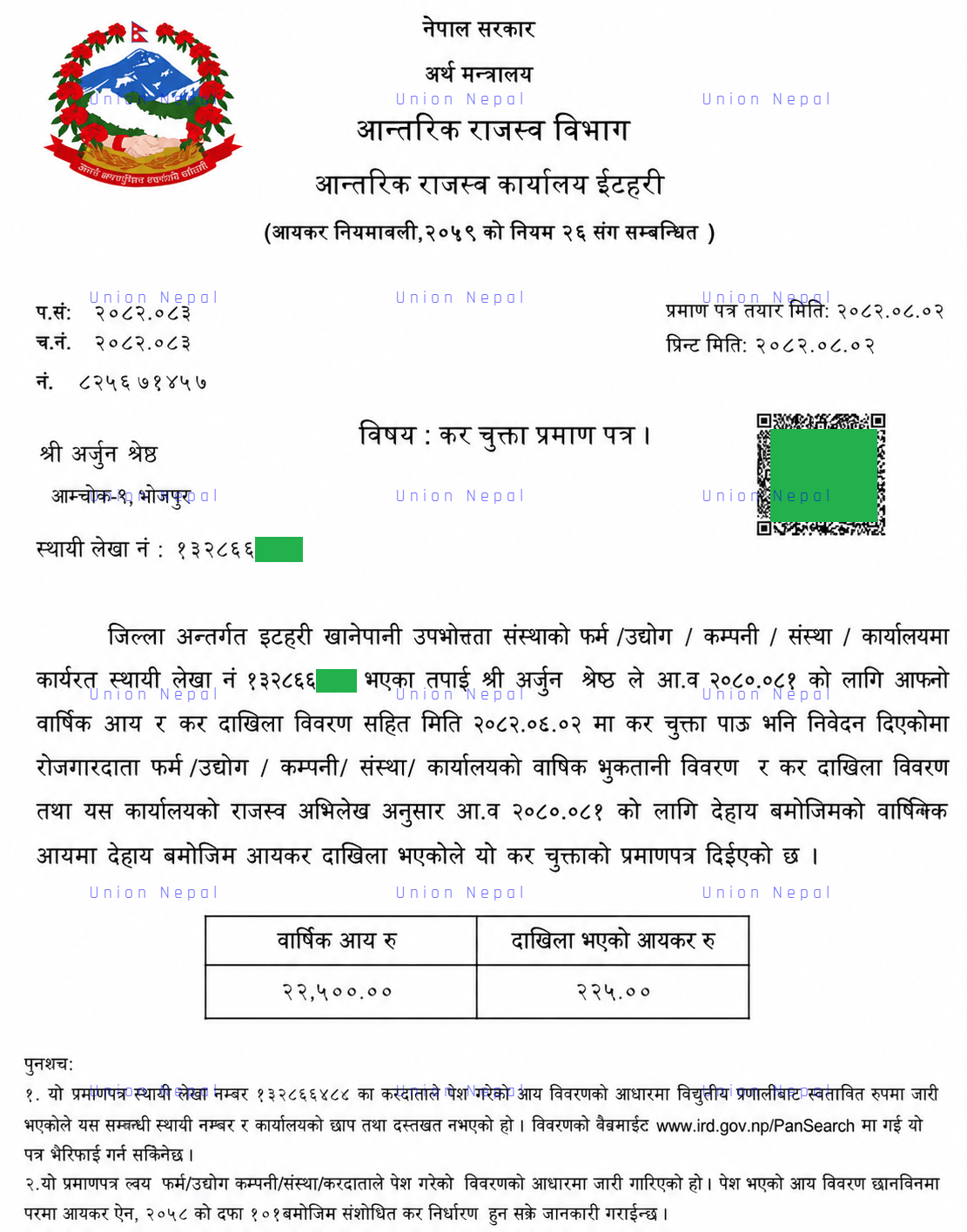
The certificate itself states your name, PAN, fiscal year and a confirmation that income tax has been deposited, along with a QR code that banks, embassies or government offices can use to verify authenticity.
Who Needs A Personal Tax Clearance Certificate In Nepal?
- Individuals applying for a student, work or immigration visa to countries such as Australia, the United States, Canada, the United Kingdom or other country based on individual foreign country policy.
- Salaried employees or self-employed professionals applying for a bank loan or credit facility.
- Individuals buying or selling property, where the certificate proves the legitimacy of the funds involved.
- People submitting income proof for scholarship, embassy or sponsorship purposes.
- Investors or shareholders who need to prove that dividend income has been properly declared.
- Anyone who wants to keep an official annual record of personal tax compliance.
Eligible For Online Tax Clearance Certificate Self-Service
Not every individual taxpayer can generate the Personal Tax Clearance Certificate independently online.
The IRD’s self-service tool is designed for a specific and very common category of taxpayer. Before you begin, check that you meet all of the following conditions.
- You have single employment (Ekal Rojgar) – meaning you received salary income from only one employer during the fiscal year.
- Your employer has correctly completed and reconciled Electronic Tax Deducted At Source (eTDS) on your PAN.
- Your annual income does not exceed Nrs. 40 lakh.
- You are not claiming deductions other than standard items such as employer-linked retirement contributions or medical and health insurance.
- You do not have business income, rental income or income from more than one source in the same fiscal year.
If You Fall Outside These Conditions – For Example – if you changed jobs mid-year, worked for 2 employers at the same time, run a business alongside your job or earn rental or investment income – the online self-generation Personal Tax Clearance Certificate option will not work for you. In this case, you will need to visit your Local Inland Revenue Office in person with your documents (See the section below).
Documents Required For Personal Tax Clearance Certificate Nepal
Even for the fully online route, keep the following ready. The portal auto-fills much of this information from your PAN record, but you should verify accuracy before submitting.
- Your PAN number, along with your Taxpayer Portal username and password.
- Salary certificate or income statement from your employer, showing gross salary, allowances, bonuses and deductions for the fiscal year.
- Proof of eTDS deposited under your PAN, visible under Withheld Information or Transactions in the portal.
- Bank statement, if your monthly income exceeds Nrs. 25,000 as supporting proof of income received.
- PAN number of spouse, if you are assessed as a couple.
- Proof of Retirement Fund (Social Security Fund or Provident Fund), life insurance and medical insurance contributions, if claiming these deductions.
- Authorization Letter, if someone else will collect a printed copy on your behalf from the tax office.
If your case requires an offline visit to the Inland Revenue Office, you will additionally need a written application (Nibedan) on your own letterhead or plain paper, a Power of Attorney if applying through a representative, an audit report where applicable and the previous fiscal year’s tax clearance certificate for reference.
Online Steps To Get A Personal Tax Clearance Certificate In Nepal
Once you have confirmed eligibility and gathered your documents, follow these steps on the IRD Taxpayer Portal.
The process works on both desktop and mobile browsers and typically takes under 20 minutes if your KYC and eTDS records are already in order.
Step 1 – Check Your Eligibility
- Confirm you meet all 5 eligibility conditions listed above – single employer, reconciled eTDS, Income within Nrs. 40 lakh, standard-only deductions and no additional income sources – before starting the online process.
Step 2 – Visit The IRD Website And Open The Taxpayer Portal
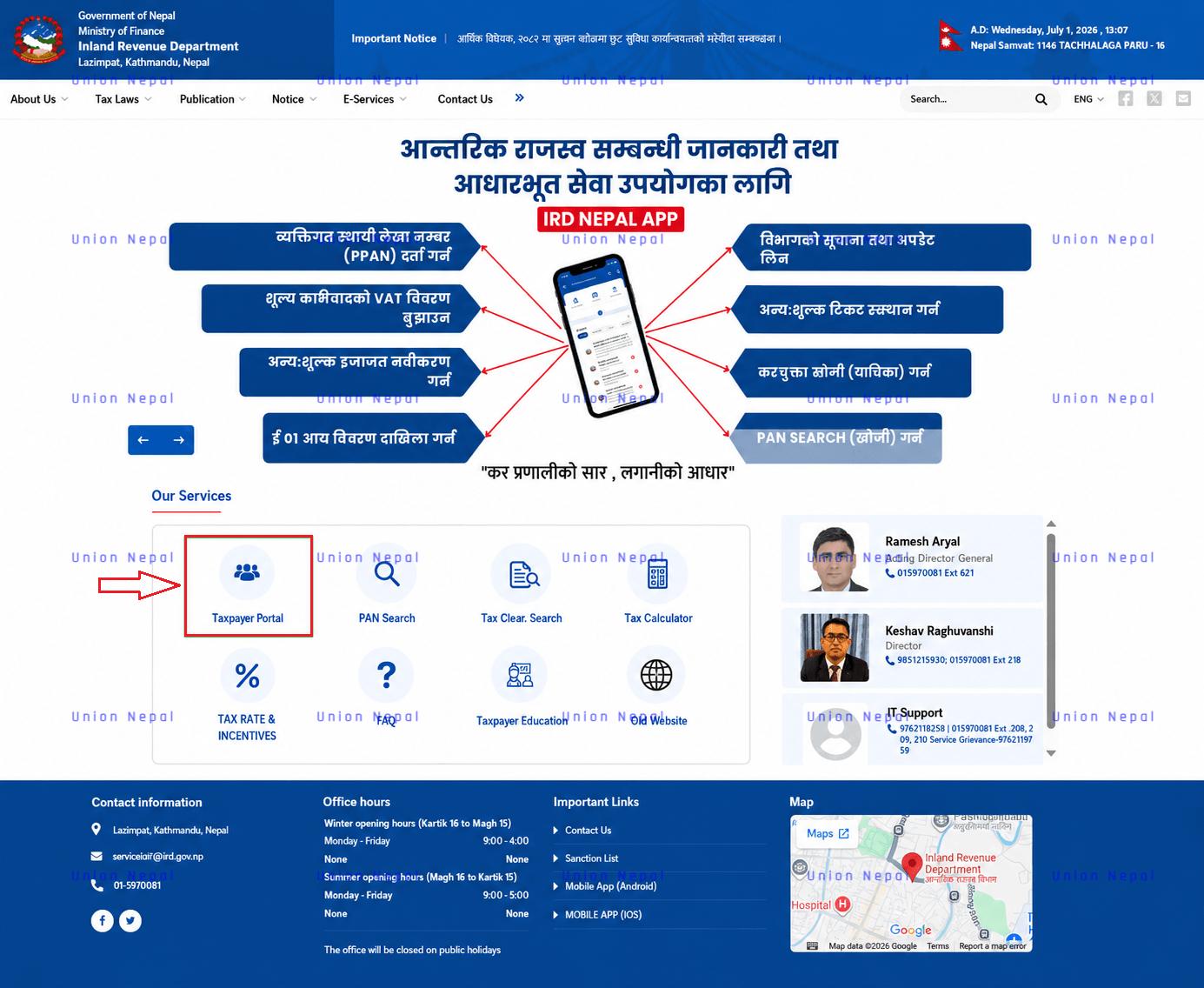
- Open a web browser – Google Chrome or Mozilla Firefox both work well and go to the Official Inland Revenue Department website at www.ird.gov.np On the homepage, click on Taxpayer Portal – This opens the taxpayer (taxpayerportal.ird.gov.np/taxpayer/app.html) login system.
Step 3 – Create Your Taxpayer Login (First-Time Users)
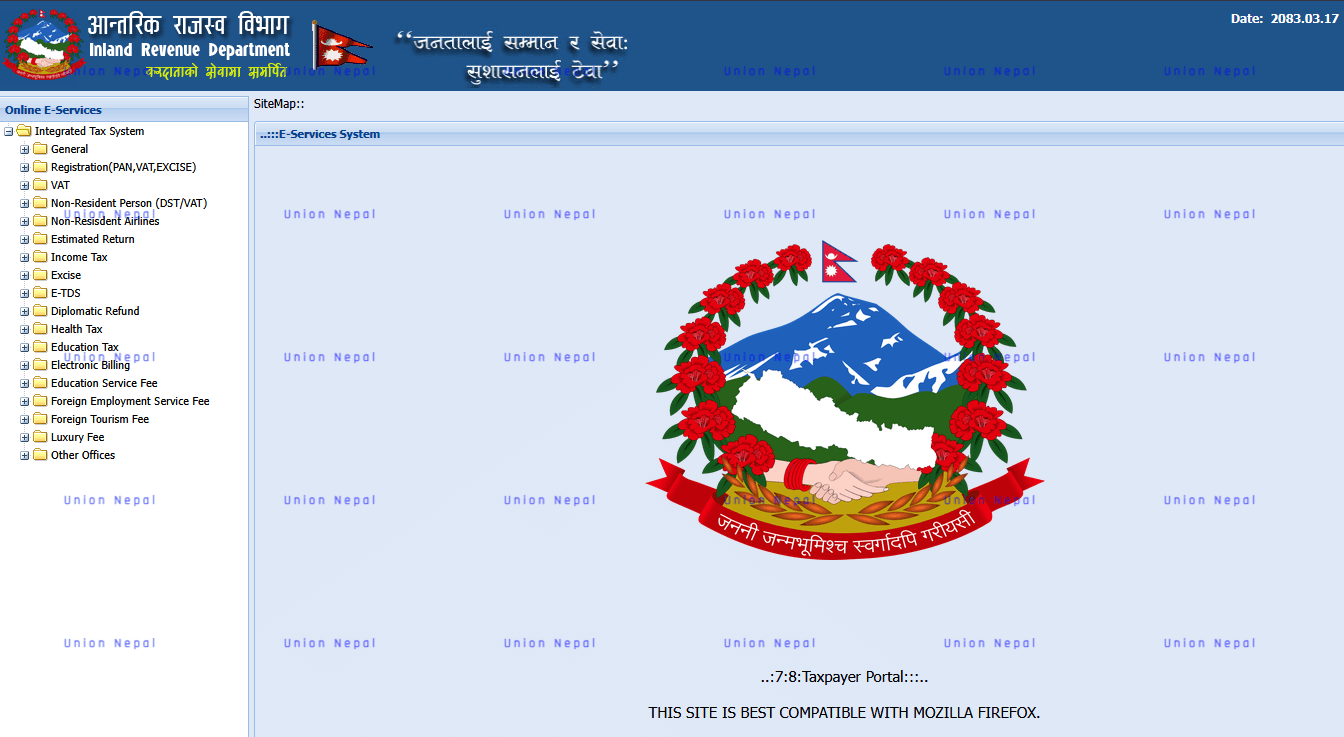
- If you have never logged in before, click the General menu on the left, then select Create Taxpayer Login.
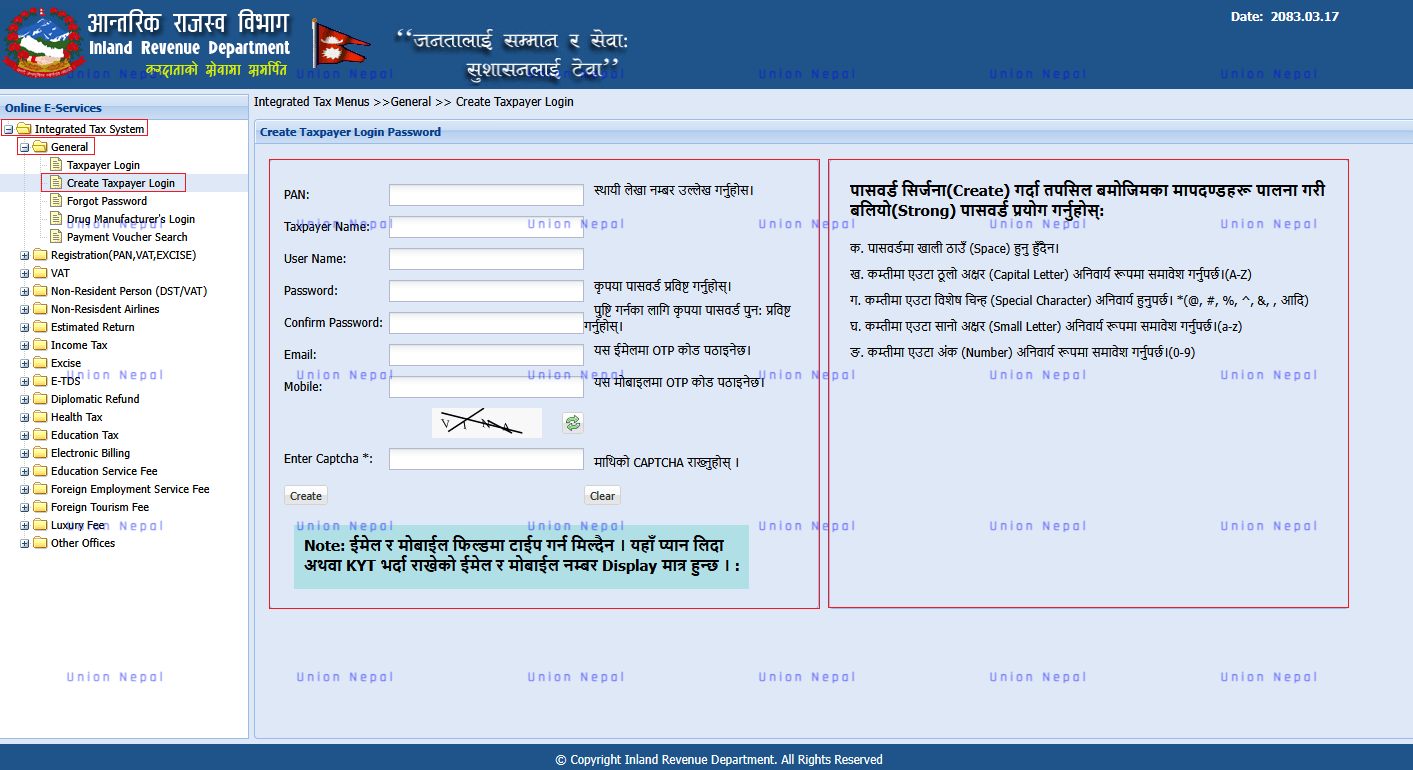
- Enter your PAN number and the system automatically displays your registered Taxpayer Name and address from IRD records.
- Set a Password of your choice, Confirm Password, and enter your Email and Mobile Number. Submit the form and a One-Time Password (OTP) will be sent to your registered mobile number. Enter the OTP to verify and complete account creation.
If you already have login credentials but have forgotten your password, use the Forgot Password option on the login screen. Enter your PAN, complete the Captcha and an OTP will be sent to your registered mobile number or email so you can reset your password.
Step 4 – Log In To The Taxpayer Portal
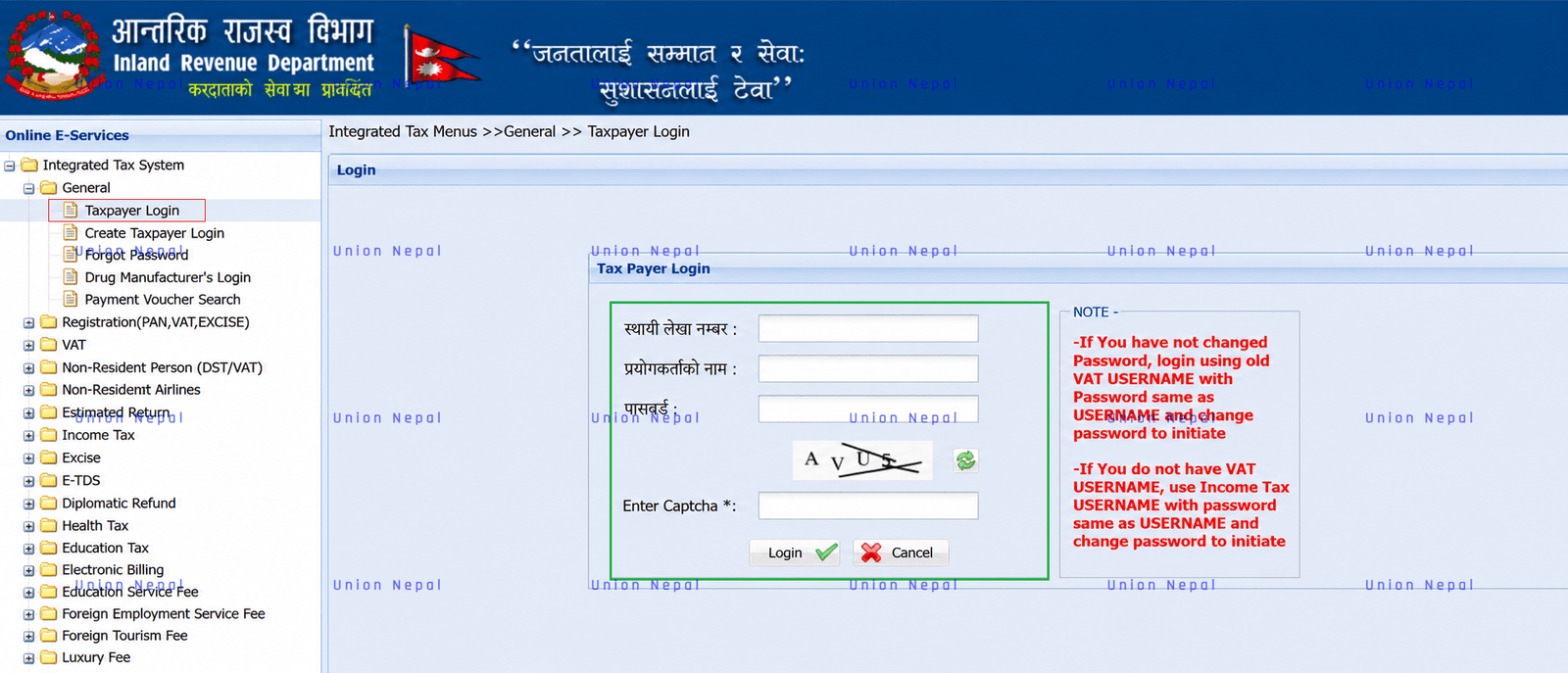
- From the General menu, click Taxpayer Login Enter your PAN number in the Permanent Account Number field, enter the same PAN (or your registered username) in the Username field, type your Password, complete the Captcha exactly as shown and click Login.
Step 5 – Update Your KYT/KYC – Do Not Skip This Step
- This is the step where most guides overlook and it is the single most common reason a tax clearance certificate fails to appear even after tax has been paid in full. Every fiscal year, the IRD requires taxpayers to reconfirm their Know Your Customer (KYC) details.
- After logging in, check your dashboard for a notice such as Please Update KYC/KYT. If your local level, ward number, tole and contact details have not changed, select the No Change option and save – no OTP is required for this.
- If any detail is blank or has changed, select Change fill in your district, local level (Metropolitan, Sub-metropolitan, Municipality or Rural Municipality), ward number, address, official contact person, email and mobile number, then click Save – An OTP will be sent to your mobile number; enter it to complete KYT/KYC verification.
Skipping this step is the main reason taxpayers see a blank certificate or a Please Update KYC message on screen even though their taxes are fully paid.
Step 6 – Go To The Tax Clearance Section
- Return to the dashboard and click on Tax Clearance For added security, the system may show a secondary login screen asking you to re-enter your password – enter it and proceed.
Step 7 – Fill The Self-Declaration Form
A form will open showing your name, PAN and address auto-filled. Complete the remaining fields.
- Select the fiscal year for which you need the certificate.
- Enter your employer’s PAN number and the district where you work.
- Confirm I have completed eTDS where applicable.
- Confirm Single Employment and No other income besides employment.
- Indicate whether you are affiliated with the Social Security Fund (SSF).
- Tick the self-declaration checkbox confirming the information is true and accurate.
- Enter your mobile number and email address, then click Next.
Step 8 – Enter Annual Income and Deductions
- On the next screen, select your taxpayer category – single individual or couple and your gender. Indicate if you have a disability or work in a government-classified remote area, as both qualify for additional tax rebates.
- Then enter your annual income details – basic salary with grade, allowances, festival bonus and any other taxable benefits received during the fiscal year. On the deduction side, enter contributions to your retirement fund (Social Security Fund Or Employees Provident Fund), life insurance premium and medical or health insurance premium, where applicable.
Step 9 – Calculate And Review Your Tax
- Click the Calculate Tax button. The system instantly displays your total income, taxable income and computed tax liability based on the current fiscal year’s tax slabs.
- Compare these figures carefully against your salary slip or eTDS record before proceeding – this is the single most important accuracy check in the whole process, since any mismatch with what your employer has reported can cause reconciliation to fail later.
Step 10 – Submit Your Application
Once you are satisfied the figures are correct, click Submit – The portal confirms successful submission of your income and tax details for the selected fiscal year.
Step 11 – Download Or Print Your Certificate
- Go back to the Tax Clearance option and select the same fiscal year again. Click Print.
- Your certificate opens in a new window, formatted on the letterhead of the Government of Nepal, Ministry of Finance, Inland Revenue Department, and the concerned Inland Revenue Office, referencing Rule 26 of the Income Tax Regulations 2059, along with your name, PAN and a QR code.
- From here you can either send it directly to a connected printer or choose Save as PDF from your browser’s print dialog to store a digital copy on your.
Tax Deductions And Exemptions For Individual Taxpayers
Understanding what you can legally deduct helps you enter accurate figures during Step 8 and can reduce your tax liability.
The figures below apply for Fiscal Year 2082/83 (2025/26) and are provided for reference only – tax slabs and limits are commonly revised through the national budget each year, so always cross-check the current figures on the IRD Taxpayer Portal or with a qualified tax professional before filing.
- Basic Exemption Limit – Nrs. 500,000 per year for an individual assesse and Nrs. 600,000 per year for a couple.
- Retirement Contribution (Social Security Fund or Approved Retirement Fund) – deductible up to one-third of assessable income or Nrs. 5,00,000, whichever is lower.
- Life Insurance Premium – deductible up to Nrs. 40,000 per year.
- Medical or Health Insurance Premium – deductible up to Nrs. 20,000 per year, for self, spouse or dependent family members.
- Remote Area Allowance – taxpayers working in government-classified remote districts receive a rebate of roughly 10% to 35% of taxable income, depending on the area classification.
- Disability Rebate – individuals with disabilities receive an additional 50% exemption on top of the basic exemption limit.
- Senior Citizen Rebate – taxpayers aged 60 and above are entitled to an additional exemption on top of the basic limit.
Fees And Processing Time
Online Self-Service – Generating a Personal Tax Clearance Certificate through the Taxpayer Portal’s self-service option carries no separate government fee. The only requirement is that you have already paid the applicable income tax for the fiscal year.
Once your tax payment is reconciled through eTDS and your KYC is updated, the certificate is generated immediately and is available to download or print the same day.
Office-Based Processing – If your case must be handled directly at the Inland Revenue Office – for instance, due to multiple income sources – processing times vary.
For straightforward individual cases, this typically ranges from the same day to a few working days. Processing may take longer during peak periods, such as the weeks around Poush-End (the mid-year tax filing deadline) or the fiscal year-end.
Common Reasons Your Tax Clearance Certificate Does Not Appear
If you have paid your taxes but the certificate still will not generate or shows blank, check the following before assuming there is a system error.
- KYC not updated for the relevant fiscal year – the most frequent cause, and it applies even if every previous year’s KYC was completed correctly.
- eTDS not yet deposited or reconciled by your employer – the employer must submit and reconcile the eTDS return correctly under your PAN before your figures will match.
- eTDS submitted on the very same day the tax was paid – reconciliation typically only completes from the next working day onward.
- Voucher number, payment date or bank name entered incorrectly during eTDS reconciliation, causing an unreconciled status.
- Outstanding tax liability from a previous fiscal year still showing against your PAN.
- Attempting to self-generate a certificate while having more than one employer or additional income sources in the same fiscal year.
Check And Verify A Personal Tax Clearance Certificate Online
Every certificate generated through the Taxpayer Portal carries a QR code and a unique reference tied to your PAN and the fiscal year.
For Third Parties – Banks, employers or immigration authorities can use this reference, together with the name of the concerned Inland Revenue Office, to confirm that the certificate was genuinely issued and matches IRD records.
For Taxpayers – You can independently verify your own filing and payment history at any time. Simply log into the Taxpayer Portal and check the Withheld Information and Transactions sections, which display your eTDS records, payment vouchers and previously issued tax certificates for each fiscal year.
Condition Like Multiple Employers Or Other Income Sources
The online self-service option only works for the single-employment, eTDS-only scenario described earlier.
When You Need In-Person Filing – If any of the following apply to you, you will need to file a full income statement using the relevant schedule or annex forms (depending on your income level) and apply for tax clearance in person at your local Inland Revenue Office.
- You changed employers during the fiscal year.
- You held 2 jobs at once.
- You earned business, rental, dividend or capital gains income in addition to your salary.
Documents To Prepare – For in-person filing, be ready with the following.
- Written application.
- Income and expenditure statement.
- Audit report (if applicable).
- eTDS details from each employer.
- Payment vouchers for any tax paid directly.
Consequences Of Not Obtaining A Tax Clearance Certificate
Skipping this certificate does not remove your obligation to pay tax – the government still collects what is due through eTDS or direct payment. What you lose is the paper trail proving it.
Without a valid certificate, you may face.
- Rejected visa applications.
- Delayed or declined bank loan approvals.
- Difficulty proving the legitimate source of funds in a property transaction.
- Complications if the IRD or another authority later asks you to demonstrate your tax compliance history for a specific year.
Personal Vs. Business Tax Clearance Certificate
Personal Tax Clearance Certificate – Issued to a natural person based on personal PAN records, salary income and personal deductions.
Business Tax Clearance Certificate – Issued to a registered company, partnership firm or sole proprietorship based on audited financial statements, VAT and excise returns and business-related tax filings. This generally requires an in-person visit to the concerned Inland Revenue Office with a fuller set of documents, such as audit reports and reconciliation statements.
If you run a registered business in addition to earning a salary, you may need both certificates for different purposes.
Inland Revenue Department (IRD), Nepal – Contact Info
• Address : Lazimpat, Kathmandu, Nepal
• Phone : 01-5970081
• Email : serviceird@ird.gov.np
• Website : ird.gov.np
[Office Hours]
• Winter (Mid-Nov To End-Jan / Kartik 16 – Magh 15) : Sunday-Friday, 9:00 AM – 4:00 PM
• Summer (Rest Of The Year / Magh 16 – Kartik 15) : Sunday–Friday, 9:00 AM – 5:00 PM
• Closed on public holidays.
[Additional Contacts (Site-Listed)]
• Information Officer : Keshav Raghuvanshi – 9851215939 / 01-5970081 Ext. 218
• IT Support : 9762118258 / 01-5970081 Ext. 208, 209, 210 – Service Grievance: 9762119759