
Free Online CV Maker – Create A Professional CV In Minutes
If you are looking for a Free CV Maker to make a Professional CV? Then you are in right place – our CV Maker helps you to build a Professional CV in a minutes without any skills.
This Free Online CV Maker is designed for everyone, from fresher as school level, college level, graduates to senior professional’s job applicants. So, make your Professional CV now.
Make Your Professional CV
Career Objective
Academic Qualification
Other Qualification
Work Experience
Personal Information
📄 Your Professional Resume/CV Preview
Why Your CV Format Matters More Than You Think
Recruiters in Nepal spend an average of 6-10 seconds scanning a CV before deciding whether to read further. That means your formatting – the layout, spacing, font and section order – directly determines whether your qualifications ever get read at all.
A Clean, Modern CV Template Does 3 Things Simultaneously – It signals professionalism, makes key information instantly findable and demonstrates that you take your career seriously.
Conversely, a cluttered or poorly formatted CV – regardless of your actual experience – creates doubt in the employer’s mind before they have read a single word.
This is why using a well-designed free CV maker online is not just convenient – it is a genuine career advantage.
Why Choose Our Free Online CV Maker?
Creating a professional CV should not be complicated or expensive. So our CV Maker offers.
- Instant Download – Get your CV in PDF format immediately.
- Mobile-Friendly – Build your CV on any device and anywhere.
- 100% Free – No hidden charges – no credit card required.
- Save Time And Effort – You can make you CV with in a (5-10) minutes.
- Professional Formatting Without Designers – Clean, modern layouts that recruiters love.
- No Registration Or Sign Required – Start creating your CV right away.
Steps To Build Your CV With Our CV Maker
Creating your professional CV is simple with our Free Online CV Maker. Follow these steps to create a beautiful and professional CV that gets you noticed by high profile companies.
Step 1: Enter Your Basic Information
Start by providing your contact details and professional identity.
- Full Name – Your complete legal name as it appears on official documents.
- Contact Details – District, area/locality and state/city- based on your location.
- Phone Number – Active mobile number where company/employers can contact you.
- Email Address – Professional email ID.
- Professional Role – Your current job title or desired position (E.g. Accountant, Receptionist, Security Guard, Marketing Manager, Cashier, Driver Etc.).
- Photo – Passport size photo with clear, white or light or colored background with formal attire and a neutral facial expression.
Step 2: Craft Your Career Objective
Select your experience level and our Maker automatically suggests tailored career objectives.
- Entry Level – Perfect for fresh graduates without any working experience.
- Mid-Level – Ideal for professionals with 1-3 years of experience.
- Senior Level – Designed for managers and leaders with 4-7 years of experience.
- Professional Level – It suites for executives and industry experts with 8+ years of experiences.
Your career objective is the first thing that company reads. Make it as clear and professional – which shows your goals, relevant skills and what value you bring to potential employers. Studies show that CVs with strong career objectives receive 40% more interview callbacks.
Step 3: Add Your Academic Qualification
List your educational background in chronological order or reverse chronological order – as you want.
- Degree/Qualification name (Bachelor’s, Master’s, PhD, Diploma and High School).
- University/Board or institution name.
- Graduation year.
- GPA or percentage (%).
Step 4: Include Other Qualifications
Showcase certifications, training programs and additional qualifications that make you stand out.
- Technical training programs (Basic Computer Courses).
- Online course completions (Online Language Learning).
- Industry-specific licenses.
- Workshops and seminars attended.
- Technical training programs.
- Professional certifications.
In 2026 – 87% of employers value continuous learning. Highlighting additional qualifications demonstrates your commitment to professional development on your job field and can increase your chances of landing interviews by 35%.
Step 5: Add Your Work Experience
This is the most important section of your CV. Include your job – some example as below.
- Accountant – Worked as an Accountant at XYZ Pvt. Ltd. for 4 years. Responsible for managing daily financial transactions, preparing balance sheets, processing payroll, filing tax returns and maintaining accurate ledger records. Applied strong numerical accuracy, attention to detail and knowledge of accounting software such as Tally and MS Excel on a daily basis.
- Receptionist – Worked as a Receptionist at XYZ Pvt. Ltd. for 3 years. Responsible for managing front-desk operations, handling incoming calls, greeting visitors, scheduling appointments and maintaining records. Utilized strong communication, customer service and organizational skills on a daily basis.
- Security Guard – Worked as a Security Guard at ABC Security Services for 5 years. Duties included monitoring premises, controlling access points, conducting regular patrols and ensuring the safety of staff and property. Applied vigilance, physical fitness and incident-reporting skills consistently.
- Marketing Manager – Worked as a Marketing Manager at DEF Pvt. Ltd. for 6 years. Led marketing campaigns, developed strategies, managed teams, analyzed market trends and coordinated with sales departments. Utilized leadership, strategic planning, and communication data analysis skills.
- Cashier – Worked as a Cashier at GHI Supermarket for 4 years. Handled cash transactions, processed payments, issued receipts, assisted customers and maintained accurate billing records. Used numerical accuracy, customer service and time-management skills daily.
- Driver – Worked as a Driver at JKL Transport Company for 7 years. Responsible for safe transportation of goods/passengers, vehicle maintenance checks, route planning and timely deliveries. Applied safe driving practices, route knowledge and reliability.
Step 6: Complete Personal Information
Provide an additional details that give employers/company-a complete picture:
- Gender – Include based on an individual.
- Father Name – Required for certain industries and regions.
- Date Of Birth – Format consistently (MM/DD/YYYY).
- Languages Known – List all known languages.
- Nationality– Important for international applications and work permits.
- Marital Status – Optional in many countries, include if culturally relevant.
Step 7: Preview And Download Your CV
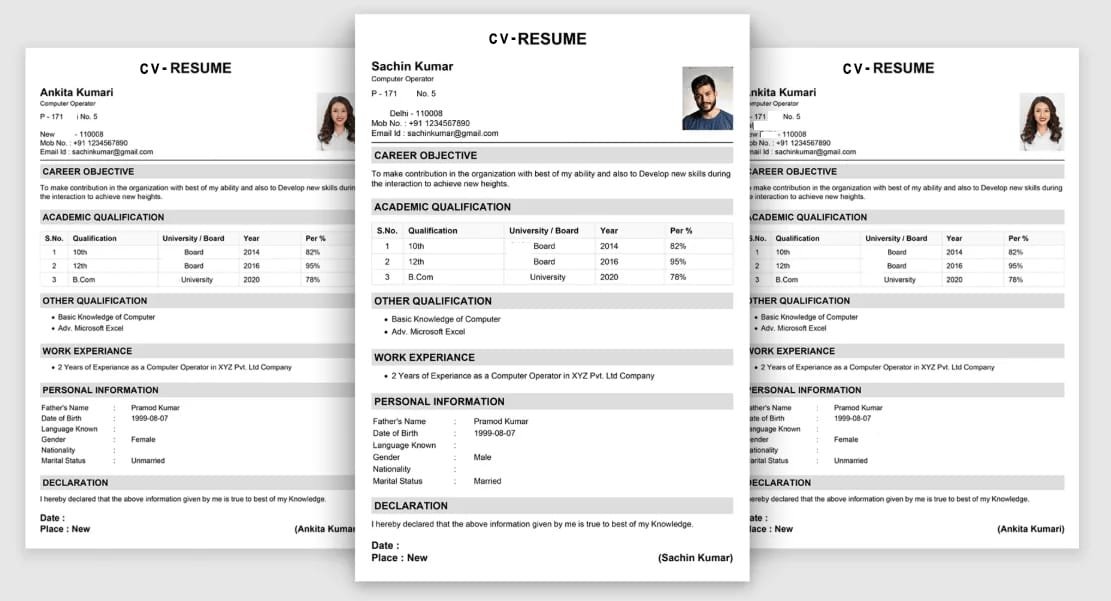
After completely filled all this necessary information then click the Create CV Button. You get your professional CV Preview with.
- Basic Information-With your detail information’s and Passport Size photo.
- Career Objective– As mentioned your goal, interest and vision.
- Academic Qualification – Properly mentioned all your academic qualifications in tabular forms.
- Other Qualification – Which shows your self-development and learning skilled in bulleted point.
- Work Experience – Your past works experiences in different fields.
- Personal Information – Presented professionally.
- Declaration – Your standard statement which affirming information accuracy of CV information.
Date/Place And Your Signature – Our CV Maker automatically mention the updated CV creation date And your permanent address – At right bottom corner you can also make a physical signature (after you download and print your CV) before submitting copy of CV to the company/employer.
Quick Review Before Download
Review your resume carefully, check for spelling errors and ensure consistency in formatting. Our preview feature shows exactly how your CV will appear to the employers.
Then Download and Print your professional CV-It looks beautiful if you print your Resume in color print format.