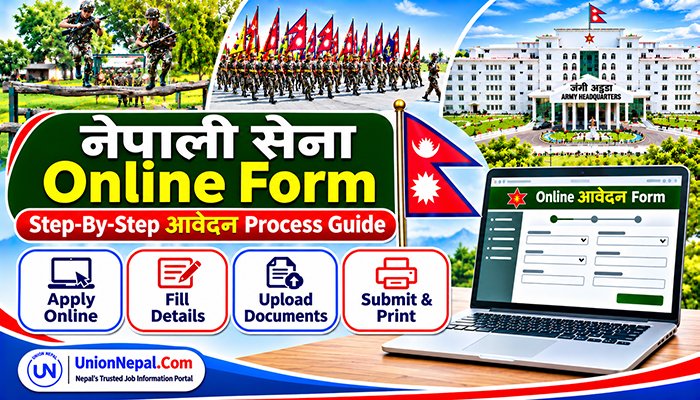
Nepal Army Online Form : Step-By-Step Application Process Guide
The Nepal Army (Nepali Sena) accepts applications through its online recruitment portal at vacancy.nepalarmy.mil.np. Eligible candidates can use the portal to apply for advertised vacancies, including Sainik Prad, Technical, Air Force, and various Officer Posts.
This guide explains How to Apply for Nepal Army Online and complete the Nepal Army Online Form Application Process screen by screen. It follows the sequence shown for Nepal Army Vacancy 2083/084, as applicants would see exactly as it on a Mobile Phone or Computer.
Myth About Online Form Submission For Nepal Army Vacancy
• First, complete the Nepal Army online application form through the official recruitment portal. The steps below explain how to fill out the form for the relevant advertised post.
• Online submission alone is NOT sufficient for the process described here. You must also submit the printed form and supporting documents in person at the relevant/nearest Nepal Army Selection Centre/Department within the published deadline. Check the current vacancy notice for the designated location and any post-specific instructions.
• This guide also explains how to download and print the completed Nepal Army application form and prepare it for physical submission.
Documents Required For The Nepal Army Online Form
Prepare the following documents and details before beginning the Nepal Army online application. The application instructions state that the form cannot be saved and resumed, so have everything ready before starting. Check the current vacancy notice for the exact requirements, accepted formats and applicable fee.
- Revenue deposit bank voucher (the earlier 2083/084 instructions listed NRs. 400, confirm the applicable fee for your advertised post in the current vacancy notice).
- Scanned copy of Nepali Citizenship Certificate (Both Sides, Digital Copy)
- Scanned copies of Educational Certificates (Mark sheet, Character Certificate, Original Certificate) for SLC/SEE, Intermediate (+2) and Bachelor level.
- Digital Passport-Size Photograph (Recent, Clear Background)
- Family Member details (Grandfather, Father, Mother, Guardian names, education, occupation)
- National ID number (if available).
Complete Step-By-Step Nepal Army Online Form Application Process
Step 1: Visit The Official Nepal Army Recruitment Portal And Select Apply
- Go to vacancy.nepalarmy.mil.np, find the relevant advertised vacancy (e.g. Sainik Prad, Technical, Air Force or Padik Ra Billadar etc.), and click the green APPLY button beside it.
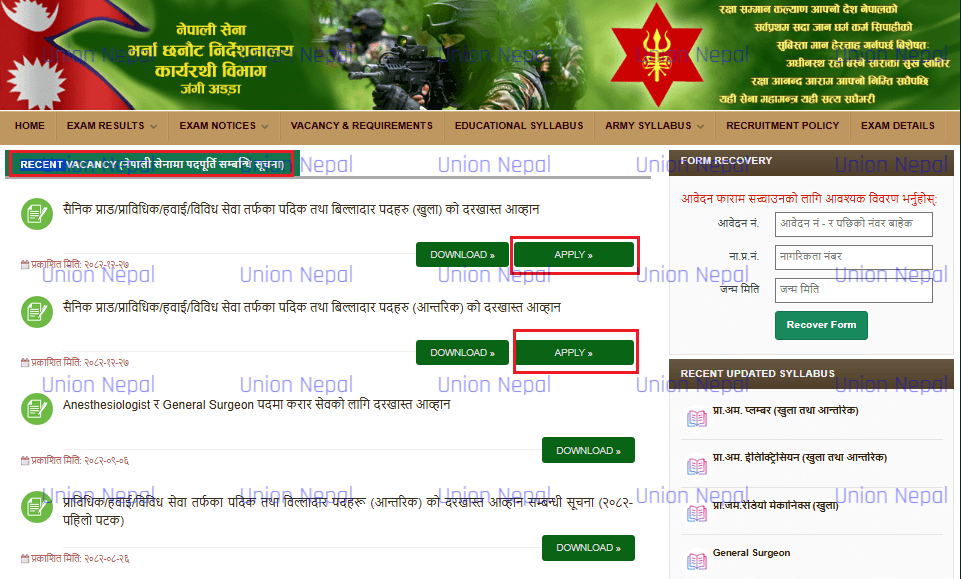
Portal Availability: The recruitment portal may occasionally load slowly or be temporarily inaccessible during maintenance or periods of high traffic. If the page does not open, wait briefly and try again.
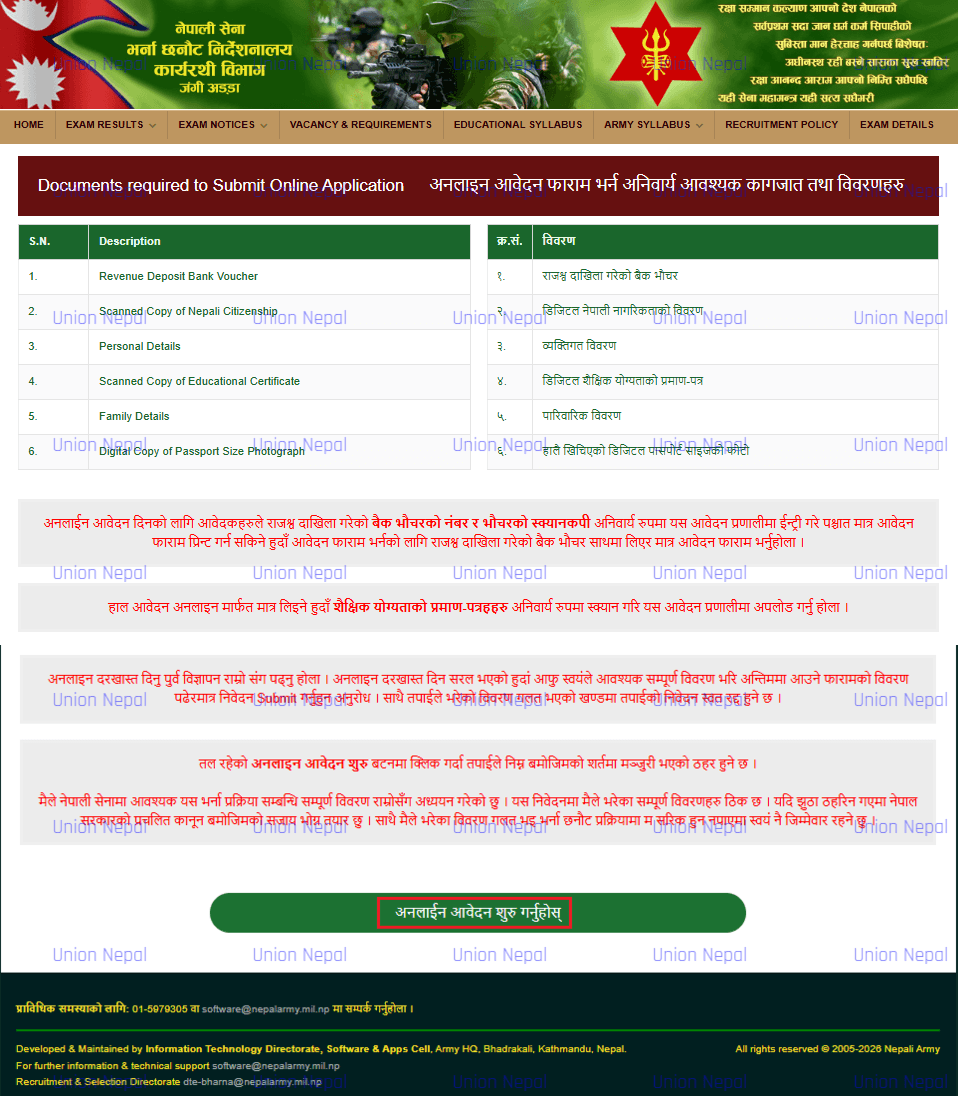
Step 2: Review The Required Documents And Start The Online Application
- Read all 6 required documents listed in the table – confirm you have every item ready.
- Read all red-highlighted instructions on the page carefully.
- Click the green button Online Aavedan Suru Garhuhos (Start Online Application) at the bottom to proceed.
Step 3: Complete The Initial Eligibility Check Form
- Fields To Fill One By One – Post, Applicant Type, Gender, Qualification, Date of Birth, Citizenship No., Citizenship District, Citizenship Date of Issue, Citizenship Type, Citizenship Digital Copy, National ID and Security Code.
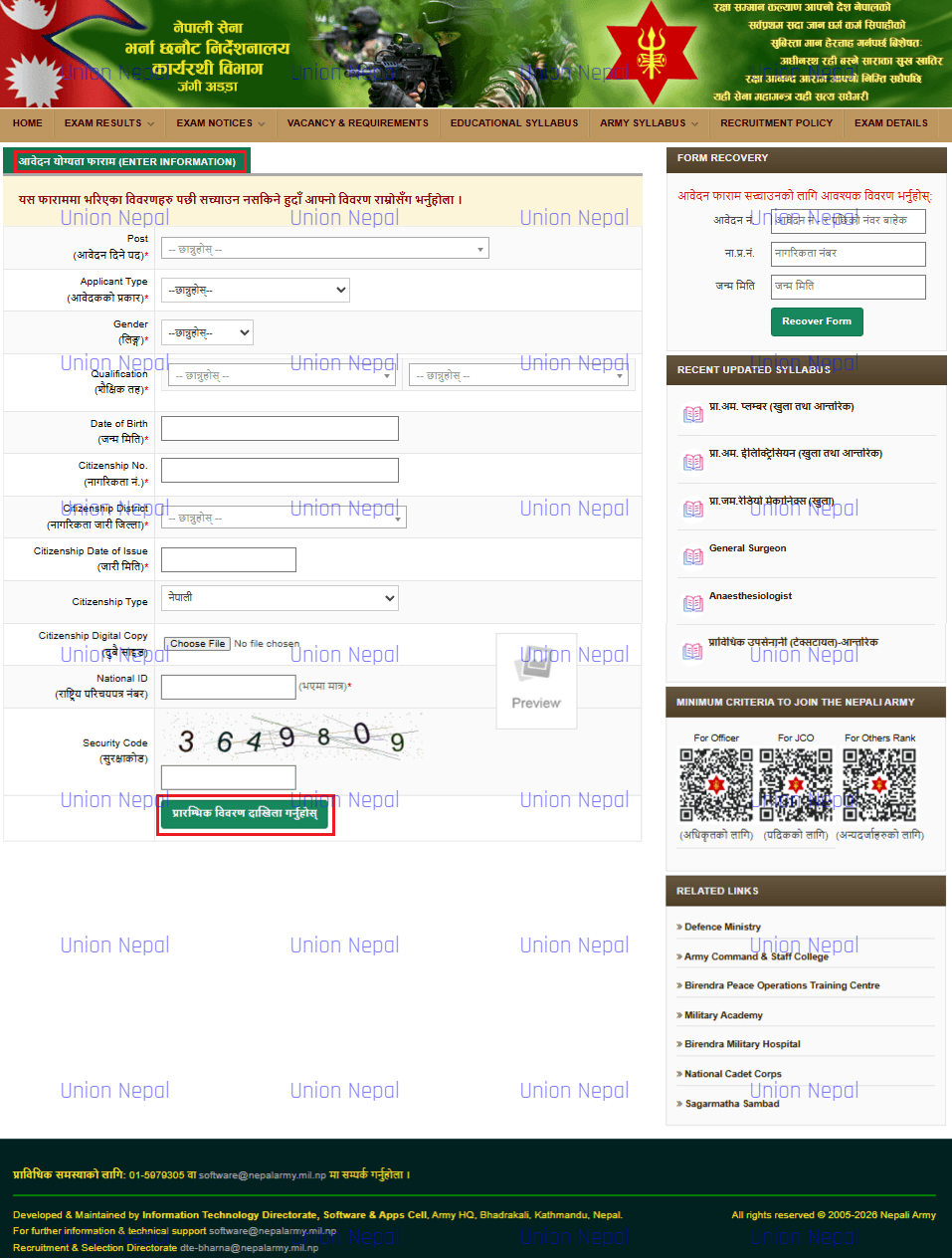
- Double check all the fields as they CANNOT be edited later.
- Click the green button Prarambhik Vivaran Dakhila Garnuhos (Submit Your Initial Information) at the bottom.
- The system checks your eligibility automatically. If eligible, you proceed to get your Temporary Application Number (Step 4).
Note: If your age, education or citizenship does not meet the minimum criteria, the system will NOT allow you to proceed.
Step 4: Note Your Temporary Application Number
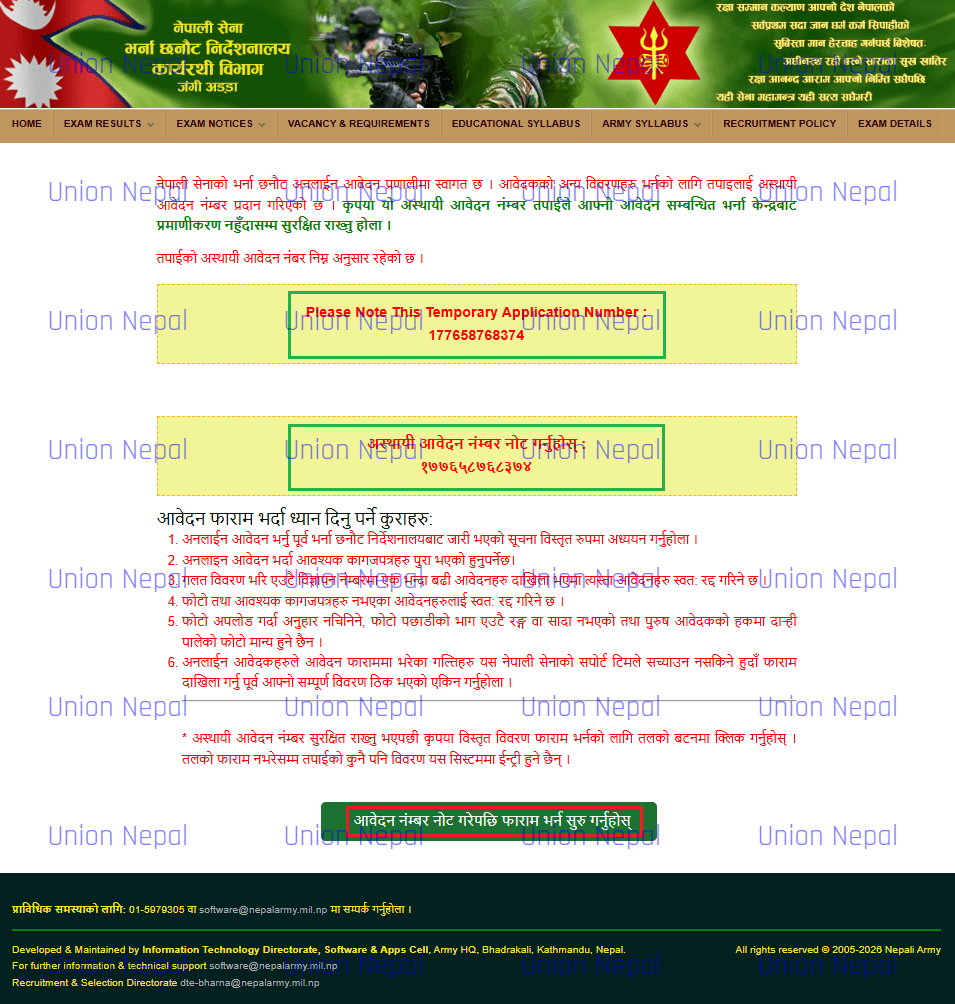
After you pass the eligibility check, the portal displays a Temporary Application Number in a highlighted yellow box in both English and Nepali Devanagari numerals. The example shown in this guide is 177658768374.
Below the number there are 6 important instructions listed in Nepali.
- Read the vacancy notice from the Recruitment Directorate thoroughly before filling the online form.
- All required documents must be ready before filling the form.
- Applications with wrong information submitted under the same vacancy advertisement will be automatically cancelled.
- Applications without a photo or required documents will also be automatically cancelled.
- When uploading a photo – do not upload a cropped or Plain-Colour Photo. Male applicants must upload a right-side facing photo only.
- Nepal Army support cannot correct errors in a submitted form – verify all information before clicking Submit.
What To Do
- Write down your Temporary Application Number immediately – E.g. 177658768374.
- Keep this Number Safe until you receive final confirmation from the Recruitment Centre.
- Click the green button Aavedan Number Note Garepachi Faram Bharna Suru Garnuhos (After Noting Your Application Number, Proceed To Fill The Form) to proceed to Step 5.
Note: If you lose this number and something goes wrong, you will NOT be able to recover your form. Note it on paper immediately.
Step 5: Confirm Your Temporary Application Number And Start The Main Application Form
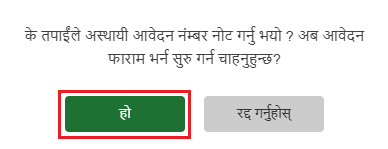
A confirmation dialog asks whether you have noted your temporary application number and want to begin filling in the main form. The two buttons shown are ‘Ho’ (Yes – Green Button) and ‘Radha Garnuhos’ (Cancel – Grey Button).
What To Do
- Make Sure you have noted your Temporary Application Number from Step 4.
- Click the green ‘Ho’ (Yes) Button to proceed to the main application form.
- Click ‘Radha Garnuhos’ only if you need to go back and Note The Number First.
Step 6: Enter Your Personal Information
All fields marked with an asterisk (*) are mandatory. Red instructions indicate fields that must be entered in Nepali Unicode. The personal information section includes the following details.
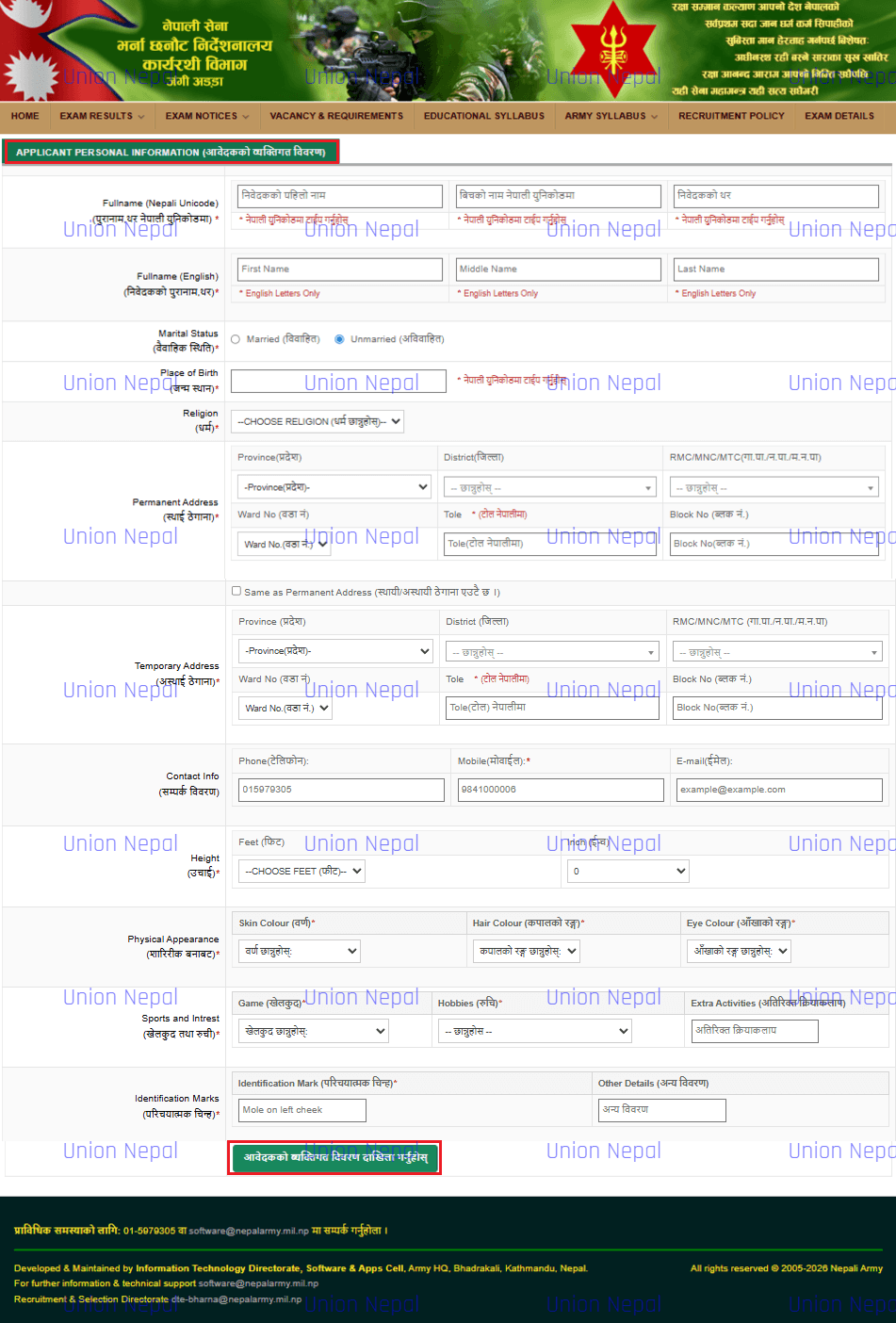
Section 1 – Full Name
- Full Name (Nepali Unicode)
- Full Name (English)
Section 2 – Personal Details
- Marital Status
- Place of Birth
- Religion
Section 3 – Permanent Address
- Province
- District
- RMC/MNC/MTC
- Ward No.
- Tole
- Block No.
Section 4 – Temporary Address
- Same as Permanent Address
- Province / District / RMC / Ward / Tole / Block
Section 5 – Contact Information
- Phone
- Mobile
Section 6 – Physical Details
- Height
- Skin Colour
- Hair Colour
- Eye Colour
Section 7 – Sports & Interests
- Game
- Hobbies
- Extra Activities
Section 8 – Identification Marks
- Identification Mark
- Other Details
After completing the required fields, click the green button Aavedhakko Vyaktigat Vivaran Dakhila Garnuhos (Submit the Applicant’s Personal Details) to save your information and continue to the education section.
Note: Enter all fields labelled in Nepali using Nepali Unicode. The application instructions warn that entering English text in Nepali-labelled fields may cause rejection. If needed, prepare a Romanized Nepali Unicode input tool (E.g. Google Input Tools) before starting.
Step 7: Enter Your Educational Information
The education section of the Nepal Army application form contains 3 sections, one for each education level, with corresponding fields and document-upload controls.
Section 1 – Secondary Education – SLC / SEE
- Education
- Name of Institute
- Address – Place
- Address – District
- Passed Year
- Grading
- Percent
- Remarks
- Upload Mark Sheet
- Upload Character Certificate
- Upload Original Certificate
Section 2 – Intermediate Education – 10+2 / +2 Level
- Fill the same fields as Section 1 Above for your Intermediate / 10+2 / Certificate Level Education.
Section 3 – Bachelor Education
- Fill the same fields as Section 1 Above for your Bachelor’s Degree If Applicable.
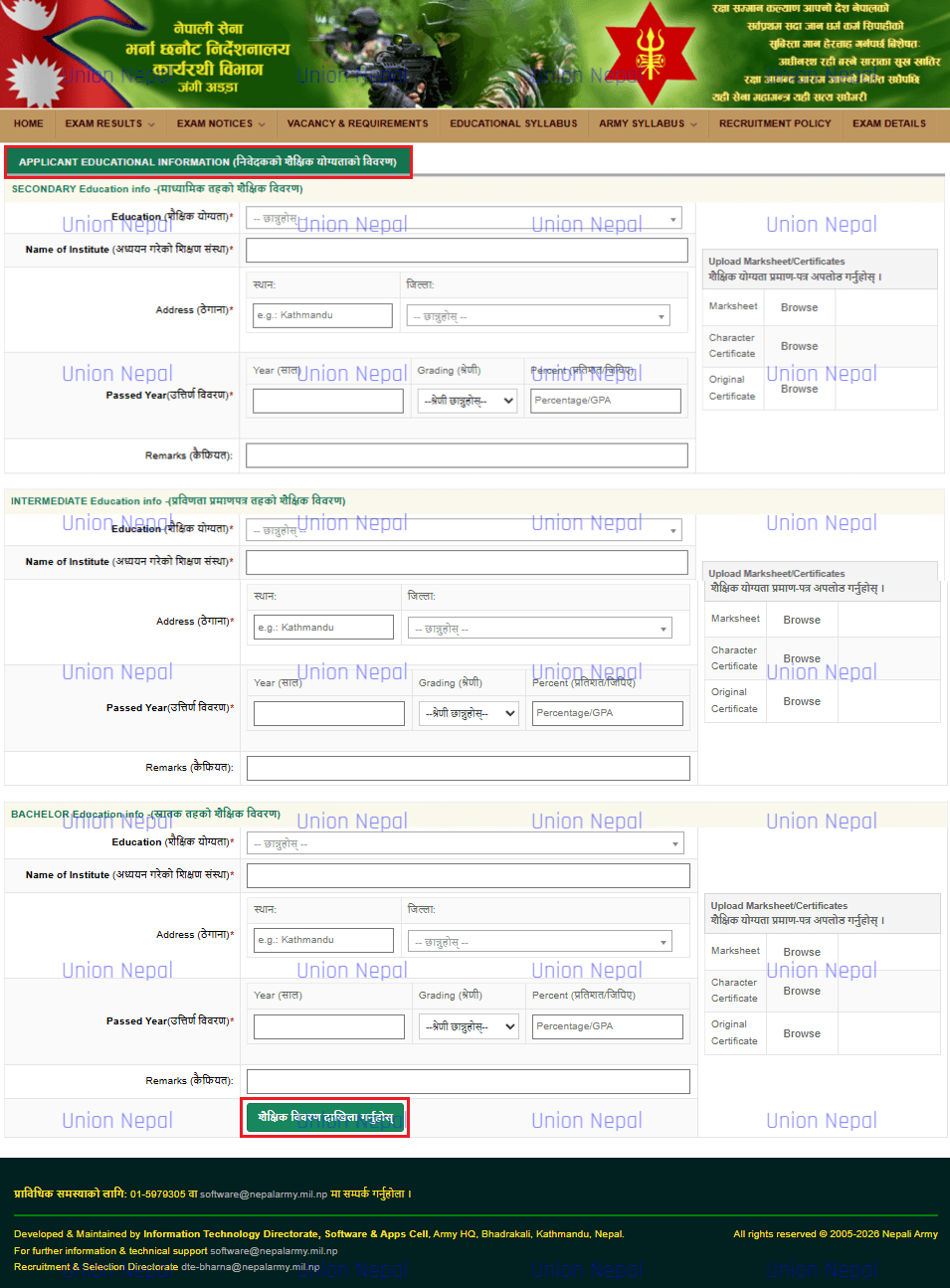
After filling all applicable education sections with necessary documents uploads, click the green button Shaikshik Vivaran Dakhila Garnuhos (Enter Educational Details) to save and proceed to Family Information.
Note: You must upload certificates for every education level you fill. Leaving upload fields empty will result in rejection. If you do not have a Bachelor’s degree, leave Section 3 empty and only fill Sections 1 and 2.
Step 8: Fill In Your Family Information
The family information section asks for details about the applicant’s grandfather, father, mother and, where applicable, guardian. Each row has the same set of fields.
- Full Name in English
- Namthar Nepalima (Full Name In Nepali)
- Education
- Occupation
- Address
- Age
- Guardian / Contact
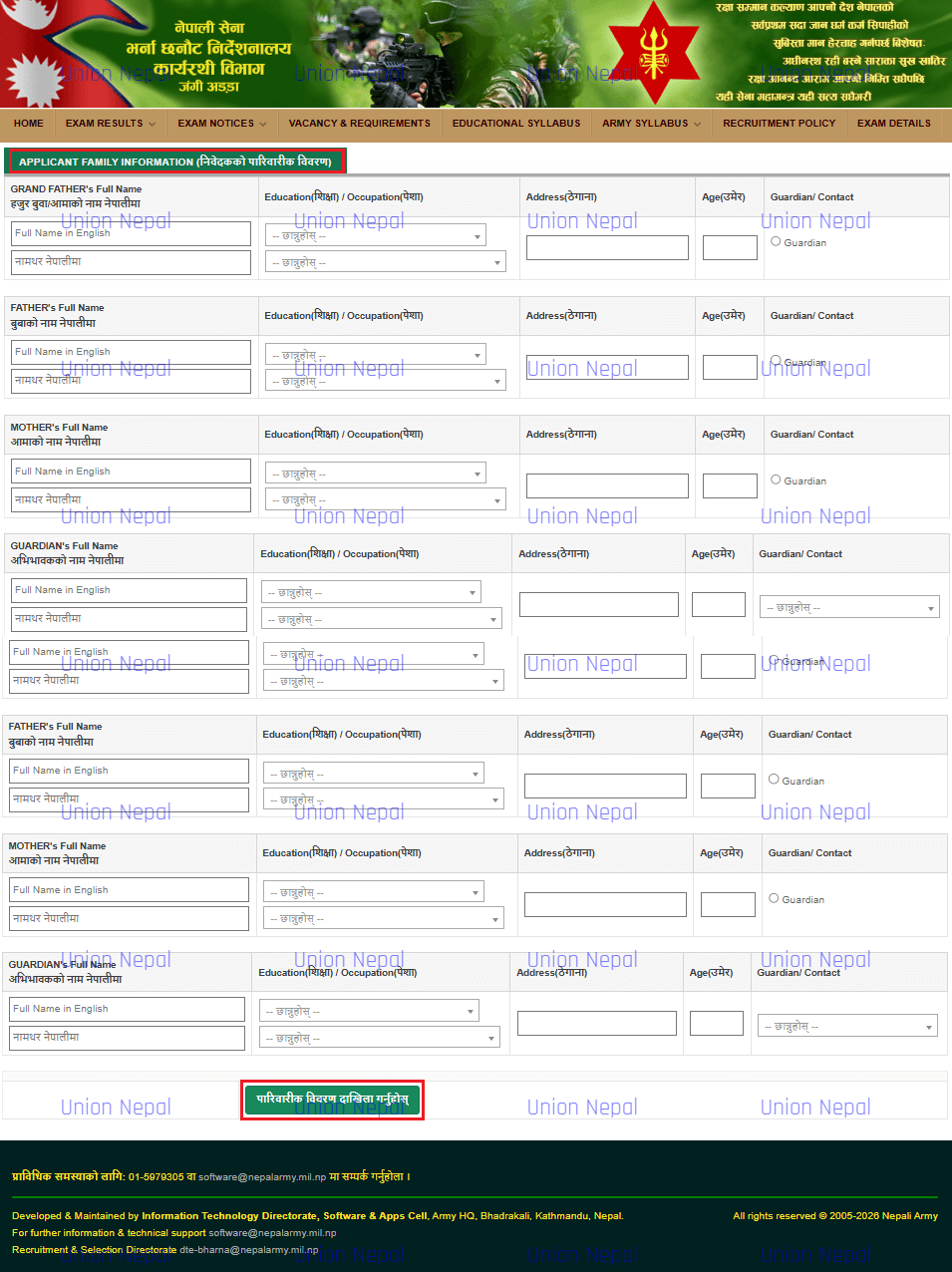
After filling all family member rows, click the green button Pariwarik Vivaran Dakhila Garnuhos (Enter Family Details) to save and proceed to Application Info.
Note: You must fill Grandfather, Father and Mother Rows. Guardian row is required if your legal guardian is different from your parents.
Step 9: Complete Application Centre And Other Application Details
The Application Info section collects your vacancy centre, reservation group/category, any additional required documents, a recent digital photograph and details about previous applications.
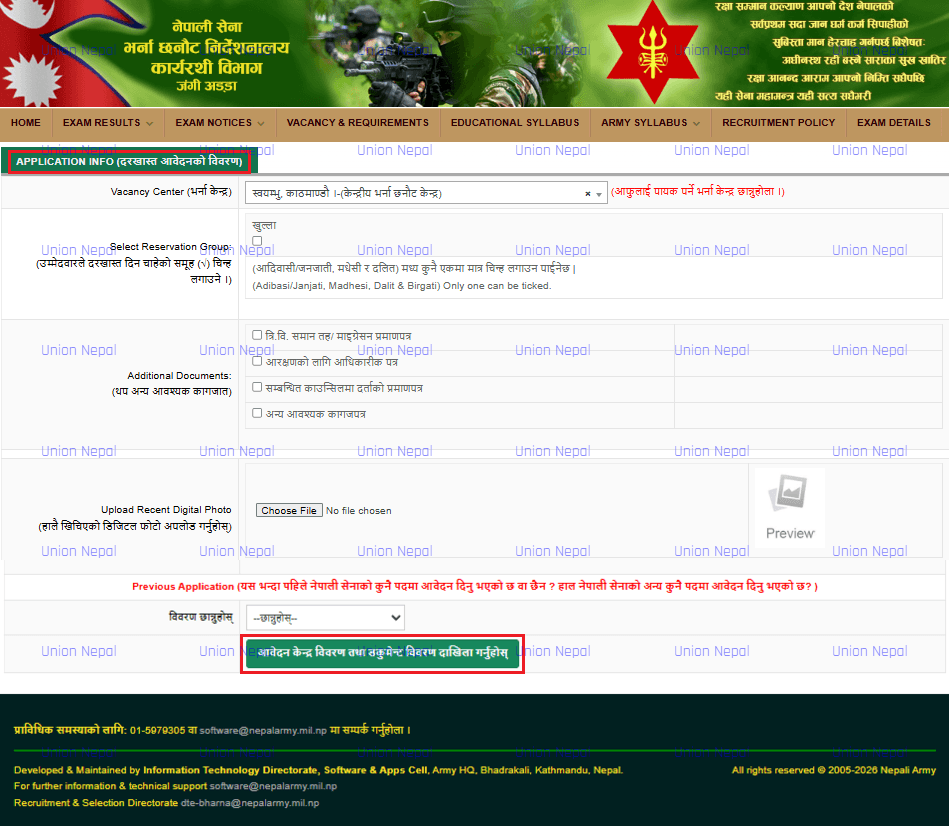
Click the green button Aavedan Kendra Vivaran Tatha Document Vivaran Dakhila Garnuhos (Enter Application Center Details And Documents Details) to save and proceed to Revenue Voucher entry.
Special Note: For the Previous Application section, select the relevant option from the dropdown if you have previously applied for a Nepal Army post. Otherwise, Here if you need further help message us or Inbox Us through our Contact Us page of this website.
Step 10: Enter The Revenue Deposit Voucher Information
The Revenue Deposit Voucher Info section collects your bank payment details. The instructions specify that the voucher file must be 100 KB-500 KB in PNG or JPG format and warn that false voucher details may lead to cancellation and legal action. Confirm the current upload limits and instructions in the active vacancy notice.
Here The Fields To Fill Are.
- Revenue to Deposit
- Revenue Amount
- Bank Voucher No./Transaction No.
- Bank Voucher File/Transaction Screenshot
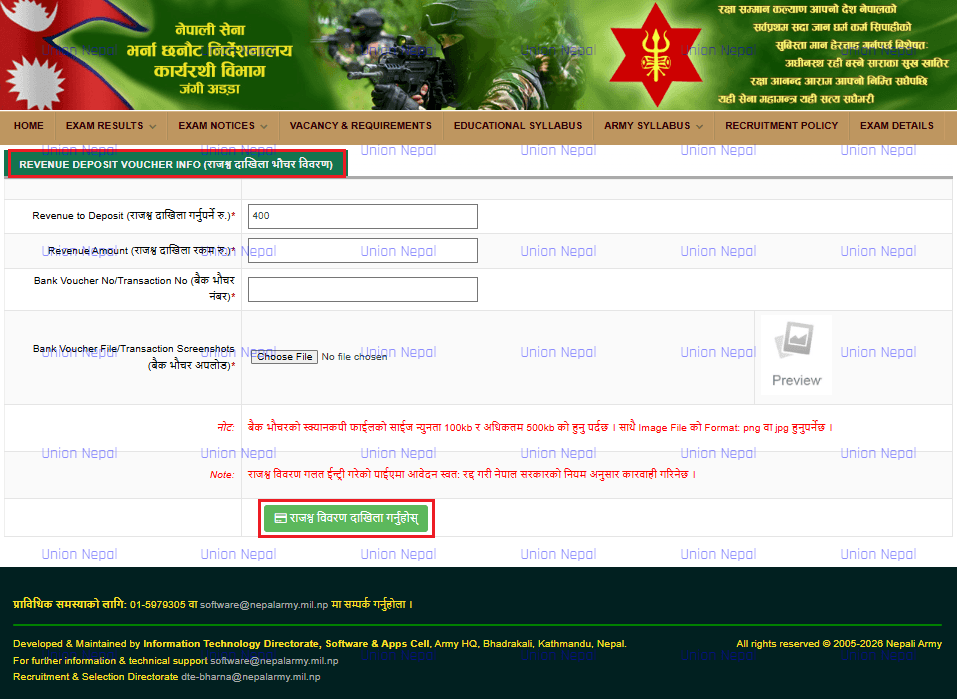
Click the green button Rajashow Vivaran Dakhila Garnuhos (Enter Revenue Details) to save the voucher information and proceed to the Application Preview.
Note: The bank voucher number must match the actual voucher you submit physically. Any mismatch will lead to rejection. Keep your original physical bank voucher safe – you must bring it when submitting the printed form in person.
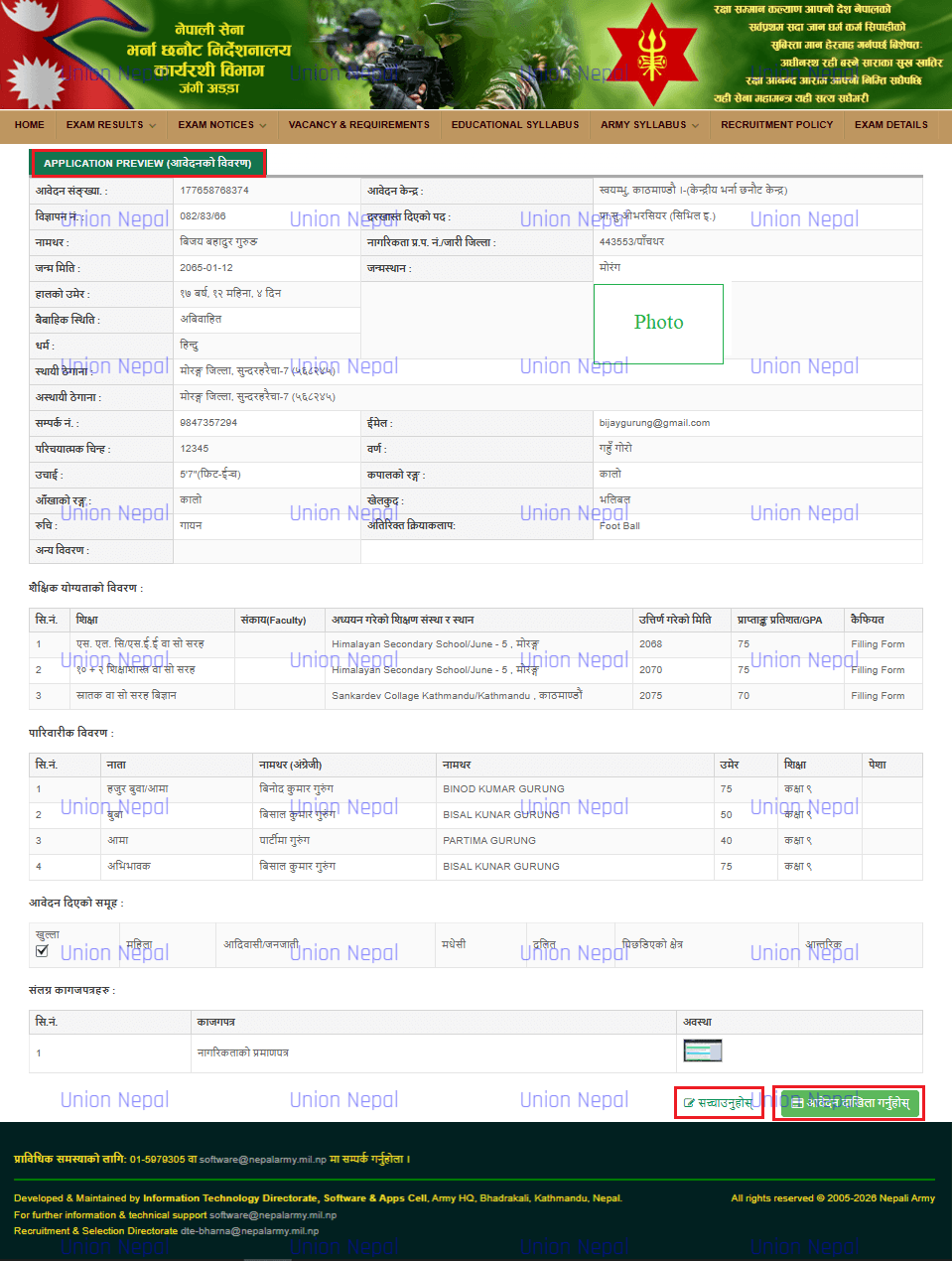
Step 11: Review Your Application Preview And Submit The Final Application
The Application Preview page displays a read-only summary of the details entered in the Nepal Army online application form, including the following sections:
- Header: Application Number, Application Centre, Advertisement Number, Post Applied.
- Personal Details: Name, Citizenship, DOB, Birthplace, Current Age, Marital Status, Religion, Permanent/Temporary Address, Contact, Identification Mark, Skin/Hair/Eye Colour, Height, Sport, Hobby, Extra Activity.
- Educational Qualifications Table: All levels, faculty, institution, passed year, GPA/percentage, remarks.
- Family Information Table: All family members with relation, name, age, education, occupation
- Reservation Group ticked.
- Supporting Documents list with status.
What To Do
- Read every section of the preview carefully. Compare with your original documents.
- If you find any error, click Sachyaunuhos (Edit/Correct) button at the bottom right to go back and fix it.
- If everything is correct, click the green Aavedan Dakhila Garnuhos (Submit Application) button.
- After submission, download and save/print the Application Form PDF, Admit Card and Fee Voucher immediately.
Note: Once you click Submit, you CANNOT make any changes. Verify everything before submitting. Take a screenshot or photo of the preview page before submitting as your personal record.
Step 12: Download And Print Your Application Form, Admit Card And Fee Voucher – Then Submit Physically
What The PDF Contains (6 Pages)
- Page 1–2: Application Letter – Full application with personal details, education, family info and thumb impression box and signature line.
- Page 3: Office Use only section – For the recruitment office to fill.
- Page 4–5: Admit Card – Contains your photo, personal details, exam sections and physical test score table.
- Page 6: Revenue Deposit Voucher copy – Nepal Bank Limited Deposit voucher copy attached.
Physical Submission Instructions (Check the Current Vacancy Notice)
- Print the Downloaded PDF (All 6 Pages). Print 2 Copies as instructed in the notice.
- Affix your Passport-Size Photograph on the printed form at the designated photo box.
- Affix a Postage Stamp (Hulak Tikat) as required by the vacancy notice.
- Sign the form at the signature line.
- Attach Thumb impressions on the designated boxes – Right and Left.
- Attach Photocopies of all required certificates as listed as above in the printed form.
- Bring the Original Bank Revenue Voucher.
- Submit in person at the relevant/nearest Nepal Army Selection Centre/Department specified in the applicable vacancy notice, within the published deadline.
Important: Online submission alone is NOT valid for the process described here. Physical submission of the printed form and required documents is mandatory within the published deadline. Confirm the designated centre and any additional requirements in the current vacancy notice.
Nepal Army Online Form – Frequently Asked Questions
Contact/Helpline Information
• Website: nepalarmy.mil.np / vacancy.nepalarmy.mil.np
• Address: Nepal Army Central Recruitment Centre, Sano Bharyang, Swoyambhu
• Helpline Phone: 01-5979478 (General) And 01-5979305 (Technical/Online Form)
• Email: For Further Support – dte-bharna@nepalarmy.mil.np / dte-bharna@nepalarmy.mil.np and For Technical Support – software@nepalarmy.mil.np
• Online Application Portal: vacancy.nepalarmy.mil.np
Important NOTE For You
Before submitting the Nepal Army online form, read the current recruitment notice and prepare the documents requested for the advertised post.
Check every entry carefully, keep your temporary application number safe, download the completed application form, admit card and fee voucher, and complete any required physical submission within the deadline.
Application requirements and submission arrangements may vary by vacancy, so use the applicable official notice as your final reference.